Key takeaways
- ✓The right ecommerce web developer Johor sellers hire settles the platform, redirects, mobile speed and payment methods before anyone designs a page. Most lost sales start with those decisions. How the store looks matters far less.
- ✓Pick the platform to fit your catalogue. Shopify suits small catalogues with a standard checkout. WooCommerce on WordPress suits heavy customisation, English, Bahasa Malaysia and Chinese content, or blog-led SEO.
- ✓Never approve a rebuild without a 301 redirect map. My Lovely Baby’s traffic dropped overnight after a site upgrade broke its URLs, and recovering it took a full migration audit.
- ✓Most developers ignore a market that sits right next to Johor stores: Singapore shoppers. Showing prices in SGD and setting clear shipping zones costs little at build stage.
- ✓Send every developer the copyable brief near the end of this guide so their quotes cover the same work.
What a Good Ecommerce Web Developer Johor Sellers Hire Gets Right Before Design Starts
Most Johor online stores that disappoint after launch look fine. The damage sits underneath: a platform that can’t handle the catalogue, old URLs that now return errors, a checkout that fights the thumb on a phone, and no option for the Singapore buyer 30 minutes away. Below are the seven mistakes we see most often when auditing new or rebuilt stores, and the fix for each one.
This guide is for sellers in Johor Bahru, Iskandar Puteri, Batu Pahat or Muar who are moving off Shopee, Lazada or WhatsApp orders, or rebuilding an ageing site. By the end, you will be able to brief a developer and check their work before you pay the final invoice.
When you compare quotes for ecommerce website development, the cheapest and most expensive proposals rarely differ much in design. What separates them is what each one leaves out: redirect maps, payment testing, speed targets and handover. Read every quote for those four things.
Owning a store that Google can index is worth the effort. DataReportal’s Digital 2026: Malaysia report puts the country at over 35 million internet users, about 98% of the population. Statcounter data shows Google handles roughly 93 to 96% of Malaysian searches. Your marketplace listings can rank too, but that traffic belongs to the marketplace, not to you.
Mistake 1: Choosing the Platform Before Counting Your SKUs
Developers tend to recommend what they already know. A WordPress studio pitches WooCommerce for everything, and a Shopify partner pitches Shopify. The Shopify vs WooCommerce Malaysia decision should come from your catalogue and your plans, not from the developer’s habits.
✗ Picking the platform on looks or on the developer’s preference
A store that outgrows its platform needs a second migration within two or three years. That means a second round of redirects, a second dip in rankings and a second invoice.
✓ The fix
Before you ask for quotes, write down your SKU count, how many variants each product has, which languages you need, whether you sell wholesale and retail, and where else your stock is sold. Then pick the platform using the rules below.
If you’re weighing a bespoke quote against a theme-based one, our comparison of custom builds versus standard templates sets out where each makes financial sense.
Mistake 2: Rebuilding the Store Without a 301 Redirect Map
Every product and category URL that ranks today is an address Google has already filed. Change the platform and those addresses usually change too. Shopify, for example, puts products under /products/ and categories under /collections/. If there are no 301 redirects, the old URLs return 404 errors and the rankings attached to them fade away.
✗ Treating ecommerce website migration as a design job
Redirects are often missing from the quote and handled by no one. The new store launches, organic orders fall within days, and the developer says SEO wasn’t part of their scope.
✓ The fix
Name the person responsible for the redirect map in the contract. Crawl every old URL, map each product, category and blog URL to its closest new equivalent (not the homepage), and test in Google Search Console after launch.
Client example
My Lovely Baby: 100% of lost traffic recovered after a broken upgrade
Problem: A site upgrade broke the baby shop’s URLs and its traffic dropped overnight.
What we did: We ran a migration audit and a recovery programme that mapped and fixed the broken URLs.
Result: 100% of the lost traffic came back, and 85% of target keywords reached page 1 within 9 months, including “baby shop”, “baby stroller” and “baby car seat”.
A redirect map is only one part of planning a website revamp properly. You also need to plan content, tracking and launch timing. Avoid launching just before Hari Raya or the 11.11 sales.
The Pre-Launch Redirect Check You Can Run Yourself
Export every current URL
Collect URLs from your current sitemap, the Pages report in Search Console and a crawler such as Screaming Frog. Its free version crawls up to 500 URLs.
Build the map in a spreadsheet
Use three columns: old URL, new URL and status. Every row needs a real destination. Discontinued products go to their parent category.
Spot-check your top 20 URLs
Paste each high-traffic old URL into a browser. Confirm it lands on the right page with a single 301, not a 302 and not a chain of several redirects.
Submit the new sitemap and watch for 404s
Submit the new sitemap on launch day and check the Pages report weekly for a month. If you haven’t verified the property yet, follow our guide to setting up Google Search Console before launch, not after.
Mistake 3: Approving a Storefront That Only Looks Fast on Desktop
Most store demos run on the developer’s office monitor over fibre. Your customers mostly browse on phones, often on mobile data in a Grab or in the CIQ queue. Website speed has to be judged on mobile, because that’s where Malaysians shop.
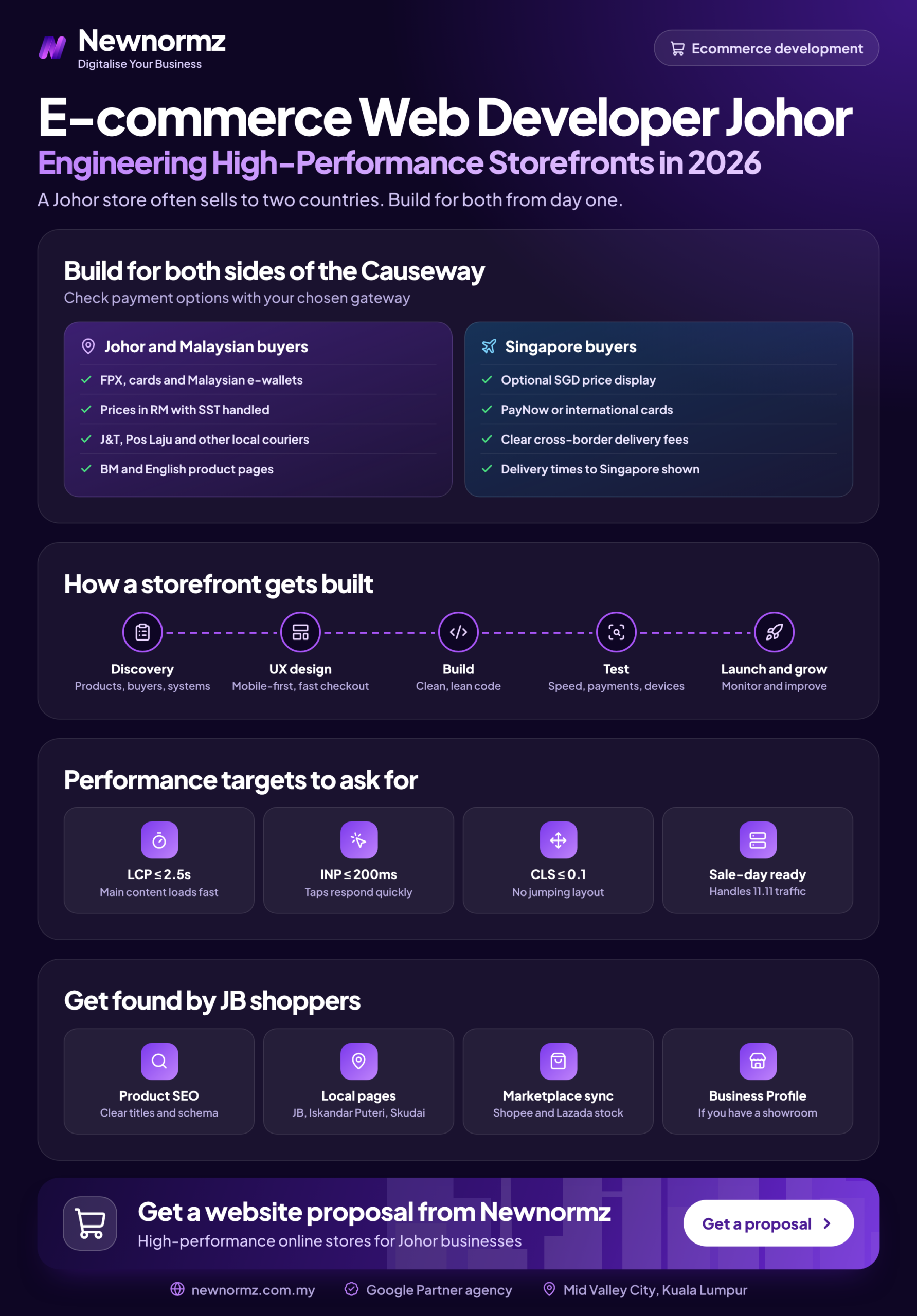
Google sets the “good” thresholds for Core Web Vitals. LCP (loading) should be 2.5 seconds or less, INP (responsiveness) 200 milliseconds or less, and CLS (layout shift) 0.1 or less. Run your product and category pages through PageSpeed Insights and read the mobile tab. Our guide explains what the Core Web Vitals scores mean in plain terms.
✗ Signing off on a desktop demo
The usual causes of weak Core Web Vitals ecommerce scores are uncompressed hero banners, a dozen apps or plugins that each load their own scripts, and chat widgets or tracking tags that load before the product images.
✓ The fix
Write mobile Core Web Vitals targets into the contract and make the final payment depend on them. Ask for compressed WebP images, a limit on apps, and chat widgets that load only after the page is usable.
Here is why this matters in ringgit. The figures below are an illustration, not a benchmark. Swap in your own numbers from GA4.
| Illustration | Fast mobile store | Slow mobile store |
|---|---|---|
| Monthly sessions | 8,000 | 8,000 |
| Conversion rate | 1.5% | 1.2% |
| Orders | 120 | 96 |
| Revenue at RM120 average order | RM14,400 | RM11,520 |
| Lost revenue | None | RM2,880 a month (RM34,560 a year) |
A conversion rate that is 0.3 points lower looks harmless on a dashboard. Over a year, it can cost more than the whole build.
Mistake 4: A Checkout Built Around Credit Cards
Many Malaysian shoppers never reach for a card. They pay by FPX online banking, DuitNow QR, Touch ‘n Go eWallet or GrabPay, and many marketplace buyers expect cash on delivery. If your payment gateway Malaysia setup only handles cards well, you’re turning away buyers who have already decided to purchase.
✗ A desktop-style checkout with forced account creation
Long forms, compulsory sign-up and a card-first payment page are where mobile checkout breaks down. You’ll see customers add to cart and then leave.
✓ The fix
Show FPX, DuitNow and e-wallets on the first payment screen. Allow guest checkout, cut the form to essential fields and autofill city and state from the postcode. Add a WhatsApp Business button so hesitant buyers can order through chat. Ask your gateway for its per-transaction fees for each method before you sign.
Mistake 5: Ignoring the Singapore Shopper on Your Doorstep
Any ecommerce website Johor Bahru businesses launch has an advantage most Malaysian stores don’t: a wealthier market across the Causeway. Singapore shoppers already cross over for groceries, baby products and home goods. Many developers still build stores that show prices in ringgit only and ship within Malaysia only.
✗ A Malaysia-only store, or a second Singapore site built too early
If you ignore Singapore, you give up easy cross-border orders. A separate SG site built before demand exists doubles your content, maintenance and SEO work.
✓ The fix
Start inside one store. Show prices in SGD (Shopify Markets does this natively, and WooCommerce needs a multi-currency plugin). Set a separate Singapore shipping zone with clear rates, and state delivery cut-off times on product pages. Consider hreflang tags or a dedicated SG store only once Singapore orders are a steady, meaningful share of revenue.
One honest caveat: Singapore charges GST on imported low-value goods, and larger overseas sellers must register for it. Check with your accountant before cross-border volume grows. Ranking in Singapore search is an international SEO project, so treat it as a later phase rather than a launch requirement.
Mistake 6: Treating Shopee and Lazada as the Competition Instead of the Benchmark
A common question is whether an online store website Malaysia shoppers can find on Google is still worth building if you already sell on Shopee and Lazada. Usually it is, for different jobs. Marketplaces win on traffic. Your own store wins on margin, customer data and repeat orders, because you pay no commission on those sales and the customer relationship stays with you. Store and use that data in line with PDPA requirements.
✗ Copying the marketplace catalogue and competing on price
Identical products at identical prices give shoppers no reason to leave the platform they already trust.
✓ The fix
Keep marketplaces for discovery. Use your own store for repeat buyers, bundles and higher-margin lines. Add Product and Offer schema, and connect a Google Merchant Center feed so your products show in Google Shopping and its free listings.
Getting Google to show your own product pages is a discipline in its own right. Our guide to SEO for online stores covers category structure, product pages and feeds in more depth.
Mistake 7: Launching an SEO-Friendly Ecommerce Website With No One to Feed It
An SEO-friendly ecommerce website has clean category architecture, unique product descriptions instead of supplier copy, Product, Offer and Review schema, and GA4 tracking WhatsApp clicks as well as purchases. A good developer builds that foundation. But a foundation that no one looks after stops gaining ground.
✗ Treating launch day as the finish line
Plugins go out of date, new products go live with pasted supplier copy, and links break. Nobody checks Search Console, so problems pile up for months before anyone notices.
✓ The fix
Agree ecommerce website maintenance terms before you sign. That means monthly updates, security patches and uptime checks. Assign someone to write category content and product copy, and someone to review rankings and tracking every month.
That is a real monthly workload: content, technical fixes, schema updates and reporting. If you don’t have someone in-house to own it, an SEO agency in Malaysia can take it on. Expect a realistic timeline: technical fixes in weeks 2 to 6, first ranking movement around day 60 to 90, and traffic growth in months 4 to 8.
Client example
Oriental Kopi: +350% ranked keywords
Problem: A national F&B and retail brand needed its online store to rank for the coffee terms its customers actually search.
What we did: Ecommerce technical fixes, full schema, and content built around “kopi”, “white coffee” and “3 in 1 coffee”.
Result: Ranked keywords grew by 350%, and the brand has been a client for 4 years.
From our audits
All seven mistakes share one pattern: the person making the decision was not going to be around after launch. A developer paid only for delivery will reasonably optimise for delivery. Give them a written brief and acceptance criteria that cover what happens after go-live.
The Ecommerce Website Development Brief to Send Every Johor Developer
Ecommerce website development Johor quotes vary widely because each studio assumes a different scope. Copy the list below into an email and send it to every studio on your shortlist, whether it’s a web developer Johor Bahru side or an agency in KL. Any quote that skips an item has left that work for you to handle.
Ecommerce website development brief
- ✓Catalogue: number of SKUs, variants per product, and expected growth over two years.
- ✓Platform: the recommended choice and the reason it fits this catalogue, plus marketplace stock sync if needed.
- ✓Payments: FPX, DuitNow QR, Touch ‘n Go eWallet, GrabPay and cards, with gateway fees listed.
- ✓Shipping zones: Peninsular, East Malaysia and Singapore, with SGD price display.
- ✓Languages: English, Bahasa Malaysia, Chinese, or a subset.
- ✓Redirect map: who builds it, who tests it, and by when.
- ✓Mobile Core Web Vitals targets: LCP 2.5s or less, INP 200ms or less, CLS 0.1 or less on key templates.
- ✓Ownership: domain, hosting, platform admin, GA4, Search Console and Merchant Center all registered in your company’s name.
- ✓Handover: documentation of themes, apps or plugins, logins, and a training session for your team.
- ✓Maintenance: monthly scope, response times and cost after launch.
For a fuller picture of what a performance-first build involves, see how we approach ecommerce builds in KL. The same standards apply to stores we build for Johor businesses.
Questions Johor Business Owners Ask Before Hiring an Ecommerce Developer
How much does an ecommerce website cost in Johor?
It depends on the platform, the catalogue size and the integrations, so no honest developer can quote before seeing your brief. Any realistic ecommerce website cost Malaysia-wide also includes running costs: platform subscriptions or hosting, paid apps, gateway fees and maintenance. Send the same brief to three developers and compare itemised quotes.
Should a Johor business use Shopify or WooCommerce?
Choose Shopify for a small catalogue with a standard checkout. Choose WooCommerce if you need heavy customisation, multilingual content or blog-led SEO. If you also sell on Shopee and Lazada, pick your stock sync tool before you choose either.
Do I still need my own website if I already sell on Shopee and Lazada?
Yes, if you want better margins, your own customer data and repeat orders you don’t pay commission on. Keep the marketplaces for discovery and use your own store for loyal buyers and higher-margin lines.
How do I stop losing Google traffic when I move my store to a new platform?
Map every old URL to its new equivalent with 301 redirects before launch, then monitor Search Console for 404 errors for at least a month. My Lovely Baby recovered 100% of its lost traffic only after a full migration audit fixed the broken URLs.
What should an ecommerce developer hand over at the end of a project?
You should receive full admin access to everything, with the domain, hosting, GA4, Search Console and Merchant Center registered in your company’s name. You should also get the redirect map, documentation of every app or plugin and a training session.
How fast should an ecommerce website load on mobile?
Under Google’s thresholds, the main content should load within 2.5 seconds (LCP), with INP at 200 milliseconds or less and CLS at 0.1 or less. Test product and category pages in PageSpeed Insights on the mobile tab, not just the homepage.
Can a Johor online store sell to Singapore customers in SGD?
Yes. Both Shopify and WooCommerce can show prices in SGD and use a separate Singapore shipping zone. Ask your gateway how it settles foreign-currency payments and what conversion fee it charges.
Before you sign a developer
Send us the proposal or your current store and we’ll show you what it’s missing
Newnormz builds websites for brands like CHAGEE and My Lovely Baby, designed to rank and convert from day one.
Get Your Free Website Review →
No obligation. Our strategists work in English, Bahasa Malaysia and Chinese.

Bryan Tan is an SEO Specialist and CEO at Newnormz, helping hundreds of businesses achieve first-page rankings on Google. With a passion for driving organic growth, Bryan blends innovative strategies with hands-on experience to optimize websites for maximum visibility. Always at the forefront of the latest SEO insights and trends, he consistently adapts to the evolving digital landscape.