Google Search Console is Google’s free tool for showing you how your website performs in its search results. It shows which searches your pages appear for, how often people click, which pages Google has indexed and which it has left out. Setting it up takes about 15 minutes: add your site, verify that you own it, and submit your sitemap. The setup is the easy part. What matters is reading three reports every month and acting on them. Search Console won’t improve your rankings by itself. It shows you what to fix, and in Malaysia, where Google handles roughly 93% of searches, that information is worth having.
A Simple Way to Think About It
The Shop Window Nobody Is Watching
🚪 Counting only who walks in
You know how many customers came through the door today. You have no idea how many people looked at your window and kept walking.
👀 Watching the window too
You can see everyone who stopped to look, what caught their eye, and which of them came inside. Now you know what to change in the window.
Most Malaysian business owners are in the first shop. The setup steps below move you into the second.
What Search Console Shows You That Analytics Doesn’t
Most SMEs we audit already have Google Analytics 4 installed. Far fewer have Search Console set up correctly, and the two tools answer different questions.
GA4 tells you what happens after someone lands on your site. Search Console tells you what happens before that: the searches that showed your pages, how many times they appeared (impressions), how many people clicked, and your average position. It also reports problems only Google can see from its side, such as pages it has chosen not to index, broken redirects, security issues and manual penalties.
Malaysia had 35.4 million internet users at the end of 2025, about 98% of the population, and nearly all of their searches go through Google. Search Console is the only first-party record of how your site performs in those searches. Guessing is the alternative.
One thing to know for 2026: Google has said that appearances in AI Overviews and AI Mode are counted in the standard Performance report. They aren’t reported separately. So if impressions rise while clicks stay flat, AI answers are a likely reason, and you can only spot that pattern if Search Console is running.
How to Set Up Google Search Console, Step by Step
You don’t need a developer. You need your Google account, access to your WordPress dashboard or your domain’s DNS settings, and about 15 minutes.
Step 1: Choose your property type
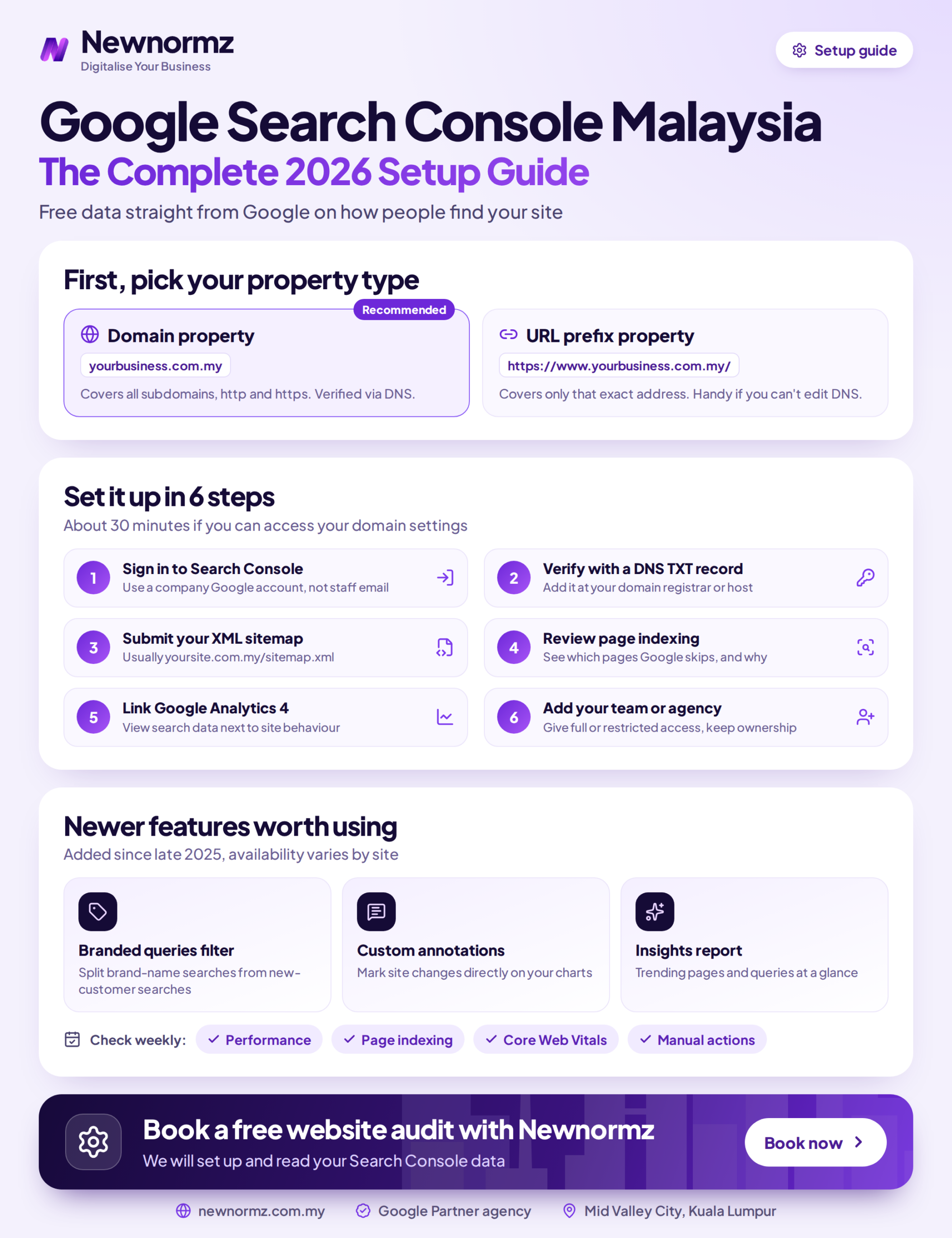
Go to search.google.com/search-console, sign in and click Add property. You’ll be asked to choose one of two types, and the choice matters more than most guides admit.
- Domain property covers everything on your domain: http and https, www and non-www, and every subdomain. It’s the more complete view, but DNS verification is the only way to verify it.
- URL prefix property covers only the exact address you enter, such as https://www.yourcompany.com.my/. It’s easier to verify, but it misses traffic on other versions of your site.
My advice: if you (or whoever manages your domain) can log in to your registrar, set up a Domain property. If you can’t, start with a URL prefix property for the version of your site that visitors actually land on, and add the Domain property later.
Step 2: Verify ownership
Google has to confirm the site is yours before it shows you any data. These are the available methods:
| Method | Works for | When to use it |
|---|---|---|
| DNS TXT record | Domain and URL prefix | You can log in to your domain registrar. This is the only option for a Domain property. |
| HTML meta tag | URL prefix | WordPress sites using Rank Math or Yoast. Paste the code into the plugin’s webmaster or site connection settings. |
| Google Analytics | URL prefix | GA4 is already on the site and you have edit access to it. No code changes needed. |
| Google Tag Manager | URL prefix | Your site runs GTM and you have publish access to the container. |
| HTML file upload | URL prefix | You have FTP or cPanel file manager access to the site’s root folder. |
For DNS verification, Google gives you a TXT record. Add it in your registrar or hosting panel (for most Malaysian .my and .com.my domains, that’s the account you bought the domain through), then click Verify. DNS changes can take a while to take effect. If verification fails right away, wait an hour and try again before you assume something is wrong.
Leave the verification tag or TXT record in place permanently. If it’s removed, for example during a theme change or a DNS migration, you lose access.
Step 3: Submit the correct sitemap URL
Many guides go wrong here. They tell you to type “sitemap.xml”, but that isn’t the address on most WordPress sites.
- Rank Math or Yoast: usually /sitemap_index.xml
- WordPress with no SEO plugin: usually /wp-sitemap.xml
- Shopify, Wix and other platforms: usually /sitemap.xml
Before you submit, open the URL in your browser. If you see a page of XML links, it’s correct. Then, in Search Console, go to Sitemaps, paste the path and click Submit. After a day or two, check that the status reads “Success” and that the number of discovered pages looks roughly right. If you have 40 service pages and Google has discovered 6, something is wrong.
Step 4: Request indexing only where it matters
Paste any URL into the inspection bar at the top of Search Console to see whether Google has indexed it. For a new or recently updated page, click Request Indexing.
A request doesn’t guarantee the page will be indexed, and Google limits how many you can make each day. Use them on your homepage, your main service pages and new content. Don’t submit your whole site one URL at a time. The sitemap handles that.
Step 5: Give access properly
Under Settings, Users and permissions, you can add your agency, developer or marketing staff as Full or Restricted users. Don’t share your Google password, and always keep Owner access with someone inside the business. We regularly see companies lose their Search Console history because a former freelancer set it up on a personal Gmail account.
The Three Reports Worth Checking Every Month
Search Console has a lot of menus. You can ignore most of them day to day. These three are the ones that lead to action.
1. Performance: find the easy wins
This report shows clicks, impressions, click-through rate and average position for every query and page. It keeps 16 months of data, which is enough to compare this year with last year. Three things to filter for:
- High impressions, low CTR. People see your result and don’t click. Rewriting the title and meta description is often the quickest fix.
- Average position 8 to 15. These pages are close to page one or at the bottom of it. Better content, stronger internal links and clearer headings tend to have the most effect here.
- Pages losing impressions month on month. The content is going out of date, or a competitor has overtaken it.
Specific to Malaysia: set the Country filter to Malaysia. If you serve Singapore or elsewhere as well, compare markets separately. Also look for Bahasa Malaysia and Chinese-language queries. Clients are often surprised to find they get impressions for BM searches they have no dedicated page for. That’s a content gap you can close.
These are also the numbers we use to report results to clients. For example, Times Parking reached 528,000 impressions and 31.5K clicks across a six-month campaign. Impressions and clicks are what show whether visibility is actually growing, rather than whether a single ranking went up.
2. Page indexing: find out what Google is ignoring
This report used to be called Coverage. It lists every page Google knows about and whether it’s indexed. A page that isn’t indexed can’t rank. These statuses cause the most trouble on Malaysian SME sites:
| Status | What it usually means | What to do |
|---|---|---|
| Crawled, currently not indexed | Google visited the page and decided it wasn’t worth including. The content is often thin or very similar to another page. | Improve the content or merge it with a stronger page. |
| Discovered, currently not indexed | Google knows the page exists but hasn’t crawled it yet. | Add internal links to it from important pages and check it’s in your sitemap. |
| Not found (404) | The page was deleted or its URL changed, often after a redesign. | 301 redirect it to the closest relevant live page. |
| Redirect error | A redirect loop or a chain too long for Google to follow. | Point each old URL directly at its final destination. |
| Excluded by noindex tag | The page is telling Google not to index it. This is often left over from a staging site. | Fine for thank-you and login pages. On a service page, remove it immediately. |
You don’t need every URL indexed. Tag archives and filter pages are often better left out. What matters is whether the pages that bring in revenue are indexed.
3. Core Web Vitals: check the real-user experience
This report groups your URLs as Good, Needs improvement or Poor on three measures, based on data from real Chrome users. Largest Contentful Paint (LCP) measures how quickly the main content appears. Interaction to Next Paint (INP) measures how quickly the page responds to taps and clicks. Cumulative Layout Shift (CLS) measures how much the layout jumps around while loading.
Keep this in proportion. Page experience is one ranking signal, and Google has said good content still wins over a slightly faster page. But if your mobile pages are marked Poor, that’s worth fixing, because most of your Malaysian visitors are on phones. The usual causes are oversized images, slow shared hosting and too many plugins loading scripts.
Low-traffic sites may see “Not enough usage data” in this report. That’s normal, not an error.
Common Setup Mistakes We Keep Finding
- Verifying the wrong version of the site. Someone verified http://yourcompany.com.my, but the live site runs on https://www. The data looks empty, so everyone assumes Search Console doesn’t work.
- A sitemap submitted once and never checked. A plugin change moved the sitemap, and Search Console has shown “Couldn’t fetch” for a year.
- Owner access held by someone who has left. Nobody in the company can add users or recover the account.
- Not linked to GA4. Linking the two in GA4’s admin settings lets you see search queries next to on-site behaviour in one place.
- Setting up Search Console but not Google Business Profile. If you serve customers in a specific area, map pack results depend on your Business Profile, not Search Console. That’s the local SEO side of your visibility, and it needs its own attention.
When to Hand the Data to Someone Else
Most hosting provider guides stop at verification. That’s the part you can do yourself in an afternoon.
The harder part is deciding what to do with the data. Search Console might show you 120 queries in positions 8 to 15, 40 pages Google crawled but didn’t index, and a sudden drop in impressions after a site redesign. It won’t tell you which to fix first, whether to rewrite or merge the thin pages, or whether the drop is a technical problem or a Google algorithm update.
If you have the time and an in-house marketer, the monthly routine above will get you a long way. If you don’t, that’s where an SEO agency in Malaysia is useful: someone who reads the reports every month, ranks the fixes by likely impact, and makes the content and technical changes. Be wary of anyone who promises a specific ranking position in return. Google has said publicly that nobody can guarantee one.
Frequently Asked Questions
Is Google Search Console free?
Yes. There’s no paid version, no limit on how many sites you add, and no charge for any report. The only cost is the time it takes to act on what it shows you.
How long before data shows up after setup?
Performance data usually starts appearing within a few days of verification. Search Console doesn’t fill in history from before your property was added, so set it up as early as you can, ideally before launching a new site.
Why don’t my Search Console clicks match GA4 sessions?
They measure different things. Search Console counts clicks from Google Search results. GA4 counts sessions on your site, and it misses visitors who block tracking or leave before the page loads. A gap between the two is normal. What you should watch is whether both are moving in the same direction.
Does Search Console show Bahasa Malaysia and Chinese searches?
Yes. Queries appear in whatever language people typed them in. Filter by country to Malaysia and scroll through the query list. If you see steady impressions for BM or Chinese searches with few clicks, that usually means you need a page written for those searchers.
My site isn’t showing up in Search Console at all. What’s wrong?
Check three things in this order. First, that you verified the version of the URL your site actually uses. Second, that no noindex tag or robots.txt rule is blocking the site, which is common after a developer moves a site from staging to live. Third, that your sitemap was submitted and fetched successfully. Those three cover most cases we see.
How often should I check it?
Go through the three reports above once a month. Also check whenever you launch, redesign or migrate the site, and whenever enquiries drop suddenly. Search Console also emails account owners about serious issues, so make sure those emails go to an inbox someone actually reads.
Search Console Set Up, but Not Sure What It’s Telling You?
Let Us Read Your Search Console Data and Show You What to Fix First
Newnormz has run SEO campaigns across F&B, healthcare, ecommerce, and local services in Malaysia, backed by a performance guarantee of 70 percent of targeted keywords on Google’s first page.
30 minutes, no obligation, and you leave with a prioritised list of indexing and keyword fixes.

Bryan Tan is an SEO Specialist and CEO at Newnormz, helping hundreds of businesses achieve first-page rankings on Google. With a passion for driving organic growth, Bryan blends innovative strategies with hands-on experience to optimize websites for maximum visibility. Always at the forefront of the latest SEO insights and trends, he consistently adapts to the evolving digital landscape.