Short verdict
Most Malaysian online stores don’t need a custom build yet. On the custom ecommerce platform Malaysia question, a well-configured Shopify or WooCommerce template is the better choice for most shops with a few hundred SKUs or fewer and a standard checkout. A custom build starts to pay off when your catalogue logic, your integrations (ERP, POS, multi-warehouse stock) or the organic revenue you could lose justify the extra cost and risk. This guide is for owners and marketing managers deciding what to build for the next two to three years.
Here’s the part most build quotes leave out. The real cost of either option shows up later, in page speed, SEO architecture and migration risk, not on the day you sign. So this comparison covers all three, then gives you a three-year cost example and a set of rules for making the call.
Custom Ecommerce Platform Malaysia vs Template Store: The Side-by-Side
The table compares the two options on the criteria that matter once the store is live. The ranges are deliberately broad, because quotes for a custom ecommerce website Malaysia developers send out can mean anything from a modified WooCommerce install to a fully headless build.
| Criterion | Template or SaaS store | Custom ecommerce website |
|---|---|---|
| Upfront cost | Low. A theme plus setup, usually a few thousand ringgit to the low five figures. | High. Usually five to six figures, depending on scope and integrations. |
| Monthly running cost | A platform plan plus app subscriptions, which tend to grow as you add features. | Hosting, a CDN and a maintenance retainer, with fewer per-feature fees. |
| Time to launch | Weeks | Usually several months, including testing |
| Speed ceiling | Good if the theme is lean and you keep apps under control. Capped by the theme’s code and third-party scripts. | The highest possible, but only if the developer plans caching and keeps JavaScript light. |
| SEO control | Partial. Shopify forces the /products/ and /collections/ prefixes, filter URLs can create duplicates, and schema depends on the theme. | Full control of URLs, faceted navigation rules, canonical tags and Product, Offer and BreadcrumbList schema. |
| Payment gateway flexibility | FPX, DuitNow, cards and BNPL usually come through plugins or gateway apps. Check the fees and whether checkout redirects off-site. | Any gateway with an API, with the checkout flow designed around how Malaysians pay. |
| Integrations | Ready-made connectors for common tools. ERP, POS, warehouse and Shopee/Lazada stock sync often need paid middleware. | Built around your systems, but every integration is code someone has to maintain. |
| Ownership and lock-in | On SaaS you rent the platform and can only export part of it. On WooCommerce you own the code and data. | You own the code if the contract says so. The lock-in moves to the developer who knows the codebase. |
| Maintenance burden | SaaS handles core updates. On WooCommerce you update WordPress and the plugins yourself. | Security patches, dependency updates and bug fixes fall to you or your retainer. |
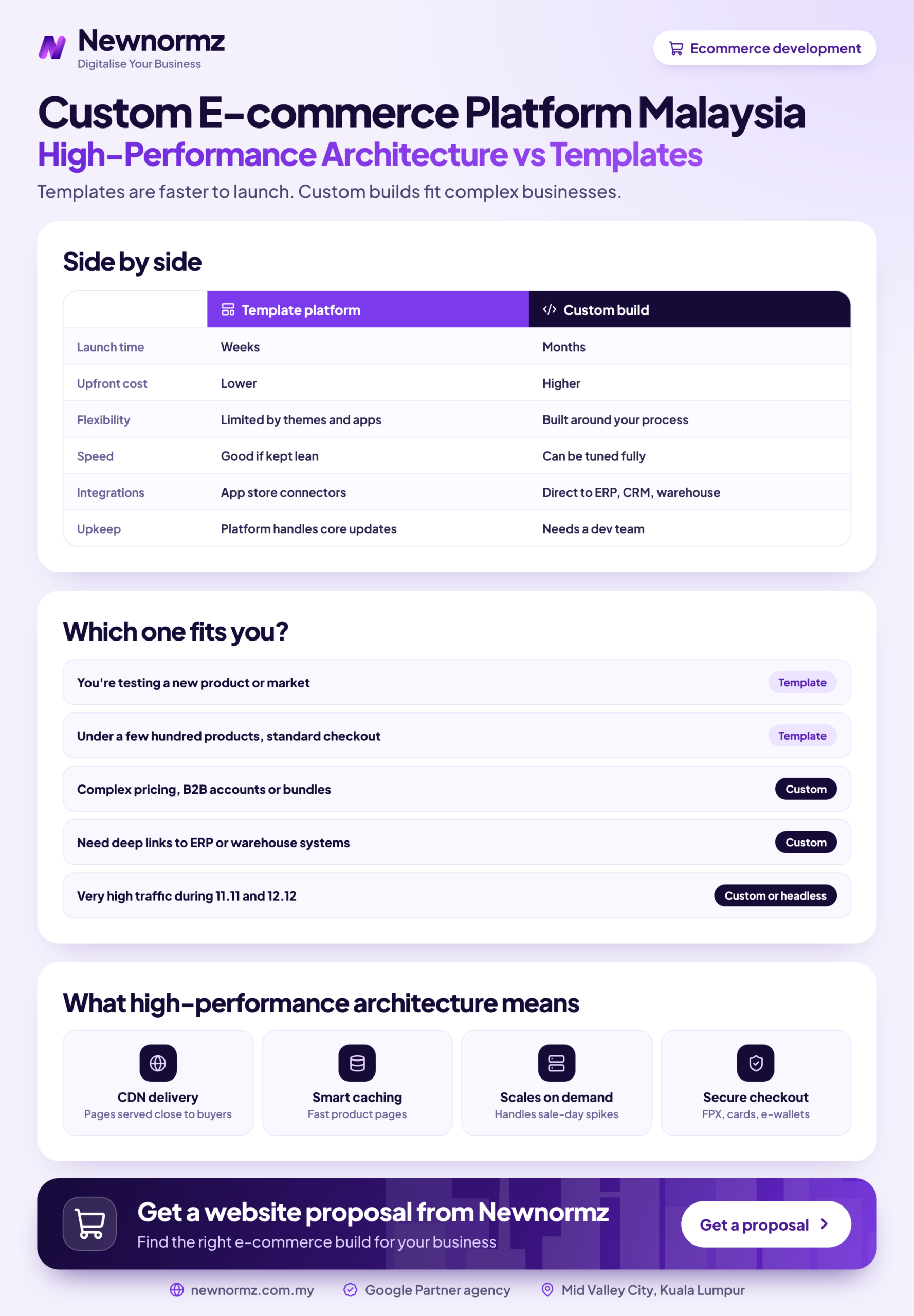
What “High Performance Architecture” Actually Means for an Online Store
Behind the jargon, ecommerce website speed comes from five unglamorous things done well. The server responds quickly. Images are resized and served in modern formats such as WebP or AVIF. Pages are cached and delivered from a CDN node close to Malaysian shoppers. Templates send only the code each page needs. And on larger builds, the frontend may be separated from the commerce engine.
That last option is headless ecommerce: the storefront is a separate API-first frontend that pulls products, prices and stock from the commerce backend. It can be very fast and gives designers full freedom. It also means two systems to host, two to maintain, and a bigger bill. For a store with 150 products, it’s usually overkill.
The scorecard Google uses is Core Web Vitals. Google’s documentation rates a page as “good” when Largest Contentful Paint is 2.5 seconds or less, Interaction to Next Paint is 200 milliseconds or less and Cumulative Layout Shift is 0.1 or less, measured at the 75th percentile of real visits. Google also uses mobile-first indexing, which means the mobile version of your store is the one that gets ranked. With DataReportal’s Digital 2026: Malaysia report putting internet penetration at about 98%, your typical buyer is on a mid-range Android phone over mobile data, not a desktop on office fibre.
Check your own numbers in PageSpeed Insights (look at the field data, not just the lab score) and in the Core Web Vitals report in Google Search Console. For a deeper look at the engineering side, our guide to high performance web development covers server and caching choices in more detail.
Why Templates Get Slow (and It’s Usually Not the Platform’s Fault)
From our audits
When a template store fails Core Web Vitals, Shopify or WooCommerce is rarely the cause. The usual culprits are a multipurpose theme loaded with features the store never uses, 15 or more apps or plugins each adding its own scripts, hero banners uploaded straight from the designer at several megabytes, and live chat, pixels and review widgets that load before the product image. On the ecommerce template vs custom website question, a slow template is usually a reason to clean up, not to rebuild.
Fix a slow template before you replace it
- ✓Audit every app or plugin and remove anything that hasn’t earned a sale in 90 days.
- ✓Compress hero and product images, and lazy-load everything below the first screen.
- ✓Delay chat widgets and tracking scripts until after the main content has loaded.
- ✓Swap a bloated multipurpose theme for a lean one built for ecommerce.
- ✓On WooCommerce, add page caching and a CDN, and move off the cheapest shared hosting.
Where Custom Builds Fail on Speed Too
Custom doesn’t automatically mean fast. It’s one of the most common gaps we see in ecommerce website development Malaysia proposals: some agencies ship heavy JavaScript frontends that build the whole page in the browser, with no caching plan and no performance budget. The result looks impressive on the developer’s MacBook and loads slowly on a RM900 phone in Seremban. Before you sign, ask the developer these questions:
- What LCP and INP will product and category pages hit on a mid-range Android phone over 4G?
- Is product and category HTML rendered on the server, or assembled in the browser?
- Where does the caching layer sit, and how is it cleared when a price or stock level changes?
- Who owns the code repository and hosting account from day one?
Vague answers to the first two questions mean the speed advantage you’re paying for isn’t guaranteed.
The SEO Difference: URL Control, Faceted Navigation and Product Schema
On Shopify vs custom ecommerce, SEO is where the gap is real but often overstated. Template platforms can rank very well. What they limit is control over URLs, over how filter pages get indexed and over structured data. Whether those limits hurt you depends on how big and how complex your catalogue is.
Template or SaaS is enough when
- Your catalogue has a few hundred products and a handful of filters.
- A good theme already outputs Product and Offer schema, and an app can fill the gaps.
- Fixed URL prefixes like /products/ don’t conflict with how you want to structure categories.
- You sell in one language, or a translation app handles BM and Chinese properly.
Custom earns its cost when
- Faceted filters generate thousands of near-duplicate URLs that you need to control.
- You need clean category paths, plus BreadcrumbList schema that matches them.
- Separate EN, BM and Chinese versions need their own URLs and hreflang tags.
- B2B pricing or product bundles need Offer schema the theme can’t produce.
Whichever platform you choose, an SEO-friendly ecommerce website starts with the category structure, not the theme. If you’re planning a new build, map out organising categories into silos before the developer touches the navigation, because changing it later means redirects.
Architecture and schema are measurable ranking levers, not cosmetic ones. Our work with Oriental Kopi shows how much they matter.
Client example
Oriental Kopi: +350% ranked keywords from ecommerce architecture and schema
Problem: A national F&B and retail brand needed its online store to rank for competitive product searches such as “kopi”, “white coffee” and “3 in 1 coffee”.
What we did: Optimised content around those product terms, implemented full schema markup and fixed the store’s ecommerce technical issues.
Result: +350% ranked keywords. Over a 2-year SEO campaign: 468,000 clicks, 6.31M impressions and 24,500 more ranking keywords. Oriental Kopi has been a client for 4 years.
Budget Maths: What Each Option Really Costs Over Three Years
Most comparisons of ecommerce website cost Malaysia stores face stop at the build quote. That’s the wrong number to compare. The figures below are illustrative assumptions for a mid-sized store, not Newnormz pricing. Replace them with your own quotes. Payment gateway fees are left out because they’re roughly the same on both options.
| Cost line (example assumptions) | Template store | Custom build |
|---|---|---|
| Build or setup (one-off) | RM8,000 | RM60,000 |
| Platform plan or hosting and CDN | RM200/month = RM7,200 | RM400/month = RM14,400 |
| App subscriptions (filters, reviews, translation, marketplace sync) | RM400/month = RM14,400 | Built in |
| Freelancer fixes or maintenance retainer | RM500/month = RM18,000 | RM1,500/month = RM54,000 |
| Three-year total | RM47,600 | RM128,400 |
For a standard store, the template wins by about RM80,000. Now change the scenario. Say you sell wholesale and retail, so you need tiered pricing, ERP sync and stock across two warehouses. App costs rise to RM800/month and workaround labour to RM2,500/month, which puts the template’s running cost at RM3,500/month. Over three years that’s RM134,000, against the custom build’s RM128,400. Custom is now the cheaper option.
The break-even rule: divide the extra build cost by the monthly saving. In the second scenario, that’s RM52,000 extra divided by RM1,600 saved per month, which comes to about 33 months. If payback falls inside the three years or so before you’d redesign anyway, custom makes financial sense. If it doesn’t, keep the template and put the money into content and ads. Ecommerce website maintenance is the line people forget to budget, so get a written retainer quote before comparing. Our guide to building a store that performs covers what that retainer should include.
Malaysian Requirements Templates Don’t Always Handle Well
Generic “Shopify vs custom” comparisons are written for US and UK stores. Malaysian buyers expect things those articles never mention, and this is where template stores most often need paid workarounds.
Malaysia checklist for any ecommerce build
- ✓FPX and DuitNow online banking at checkout, alongside cards and BNPL. Local shoppers drop off when these are missing.
- ✓Choose a payment gateway Malaysia shoppers recognise (such as iPay88, Billplz or Stripe’s FPX support) that connects without a clumsy off-site redirect. On Shopify, check whether your plan adds a fee for third-party gateways.
- ✓SST shown consistently, either included in or added to the price, on product pages, cart and invoices.
- ✓WhatsApp order and enquiry buttons that pass along the product name, since many Malaysians would rather ask before they pay.
- ✓English, Bahasa Malaysia and Chinese storefronts with their own indexable URLs, not just a translation widget.
- ✓Customer data handled in line with the Personal Data Protection Act 2010 (PDPA): consent, a privacy notice and secure storage.
- ✓Stock sync with Shopee and Lazada, so a sale on one channel doesn’t oversell on another.
- ✓Mobile-first ecommerce design: thumb-friendly buttons, a short checkout and autofill for Malaysian address formats.
Switching Platforms Without Losing Your Rankings
Ecommerce platform migration is where stores lose the most money, and it happens on both kinds of rebuild. Statcounter puts Google’s share of Malaysian search at roughly 93 to 96%, so if your URLs break, the traffic you lose is Google traffic, and there isn’t another search engine to make it up.
Client example
My Lovely Baby: 100% of lost traffic recovered after a site upgrade
Problem: A site upgrade broke the store’s URLs and traffic dropped overnight.
What we did: Ran a full migration audit and recovery: mapped the broken URLs, restored redirects and repaired the technical damage.
Result: 100% of lost traffic recovered, with 85% of target keywords on page 1 within 9 months, including “baby shop”, “baby stroller” and “baby car seat”.
The recovery worked, but it took months. Doing the following steps before launch is far cheaper than repairing the damage afterwards.
Build a full URL inventory
Export every URL with clicks or impressions from the Google Search Console Performance report for the last 16 months, then add your sitemap and a full crawl. Pages that rarely get visits can still have backlinks.
Write a one-to-one 301 redirect map
Point each old product and category URL to its closest new equivalent. Never send everything to the homepage, because Google treats mass homepage redirects as soft 404s.
Carry over titles, content and schema
Keep the title tags, meta descriptions, product copy and Product, Offer and BreadcrumbList schema that already rank. A redesign isn’t the time to rewrite everything at once.
Crawl the staging site before launch
Test every redirect, check canonical tags and look for a leftover noindex tag. Run the key templates through PageSpeed Insights so you don’t launch slower than the old site.
Monitor 404s daily for the first month
Submit the new sitemap and check the Pages report in Search Console every day. Our guide to fixing 404 errors in Search Console shows how to sort real problems from harmless ones.
Even a clean migration needs time to settle. The timeline we give clients after a rebuild is technical fixes in weeks 2 to 6 and first ranking movement around day 60 to 90. If your store already earns real organic revenue, that’s a strong reason to bring in an SEO agency in Malaysia before the developer starts, not after traffic drops.
Planning a replatform? We’ll review your URL inventory and redirect plan before anything goes live.
Decision Rules: Which Ecommerce Platform Fits Your Store
If the rules point to a new build, treat it as a business project with its own success metrics, not a design refresh. Our framework for planning a website revamp sets out what to measure before and after launch.
For stores that do need a bespoke build, our ecommerce website development team scopes speed, SEO architecture and Malaysian checkout requirements from the start, so they don’t get bolted on after launch.
FAQ
Is a custom ecommerce website better for SEO than Shopify?
Not automatically. A custom build gives you more control over URLs, faceted navigation and schema, which matters for large or multilingual catalogues. A small, well-optimised Shopify store can outrank a poorly built custom site.
How much does a custom ecommerce platform cost in Malaysia compared with a template store?
A custom build usually costs several times more upfront, often five to six figures in ringgit against a few thousand for a template setup. Compare the three-year total, including apps, workaround labour and maintenance, because the gap can narrow or reverse for complex stores.
When should a Malaysian business move from Shopify or WooCommerce to a custom build?
Move when app subscriptions and workaround labour cost more each month than a custom maintenance retainer would, or when you need integrations the platform can’t support. Catalogue complexity, ERP/POS sync and the organic revenue at stake are the three signals to measure.
Can a template ecommerce site pass Core Web Vitals?
Yes, if the theme is lean, apps are kept to a minimum and images are compressed. Most template stores that fail do so because of third-party scripts and oversized images, not the platform itself.
Will migrating my online store to a new platform hurt my Google rankings?
It can, if URLs change without proper 301 redirects. With a full URL inventory, a one-to-one redirect map and daily 404 monitoring after launch, most stores keep their rankings, though some short-term movement is normal.
Should I build my own store or keep selling on Shopee and Lazada?
Do both. Marketplaces bring volume, while your own store lets you keep customer data, build repeat sales and rank on Google. Start lean and sync stock across all channels.
Custom build or template?
Get an honest review of your store’s speed, SEO architecture and migration risk
Newnormz builds websites for brands like CHAGEE and My Lovely Baby, designed to rank and convert from day one.
Get Your Free Website Review →
No obligation. We’ll tell you if your current store is good enough.

Bryan Tan is an SEO Specialist and CEO at Newnormz, helping hundreds of businesses achieve first-page rankings on Google. With a passion for driving organic growth, Bryan blends innovative strategies with hands-on experience to optimize websites for maximum visibility. Always at the forefront of the latest SEO insights and trends, he consistently adapts to the evolving digital landscape.