Key takeaways
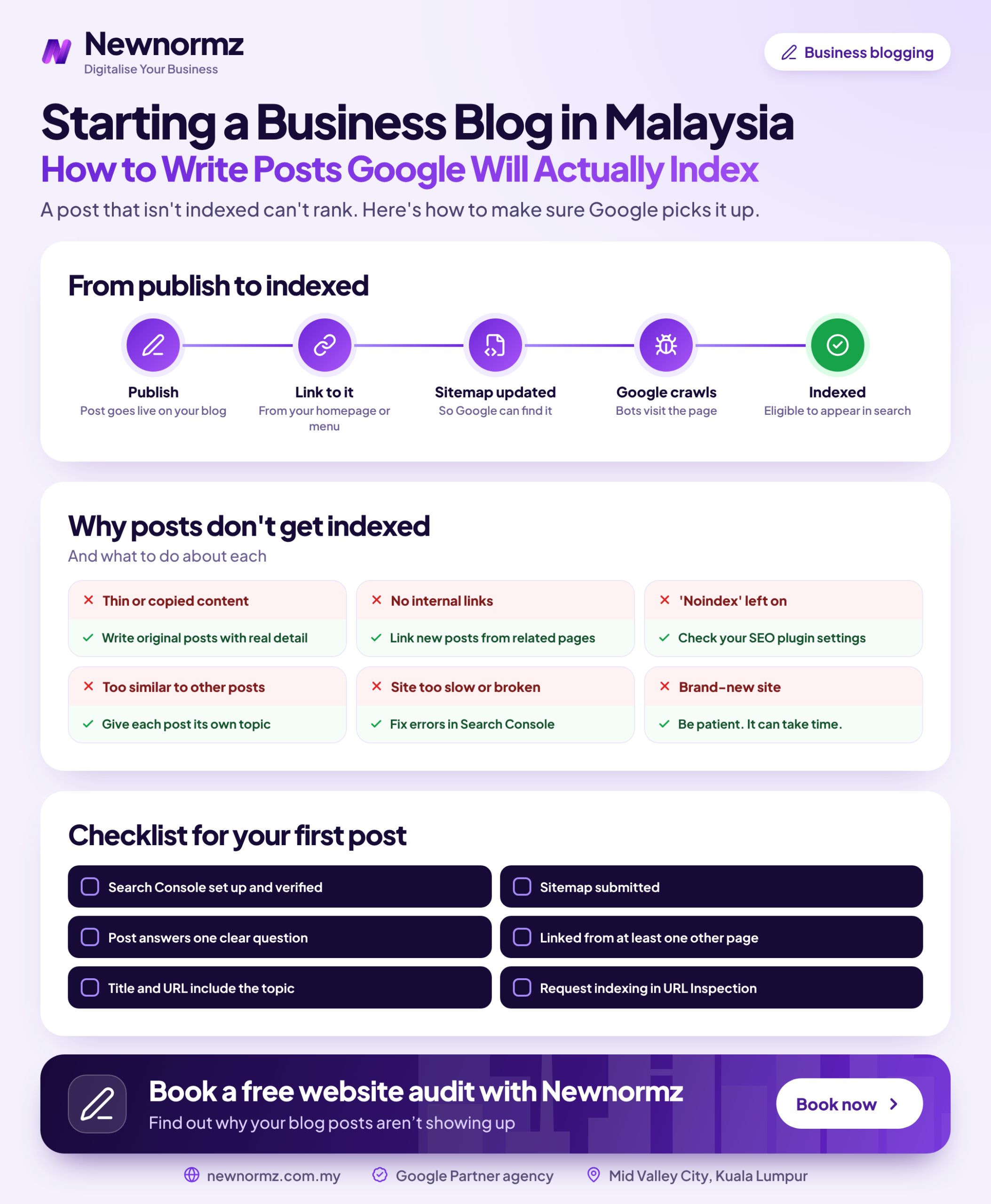
- ✓Most business blog SEO Malaysia problems start at indexing, not at writing. If Google never adds a post to its index, nobody finds it, however good the writing is.
- ✓Run this checklist before you publish a new post, and again on any existing post that still has no Google impressions after 8 weeks.
- ✓“Discovered, currently not indexed” usually points to a linking or crawl-priority problem. “Crawled, currently not indexed” usually points to a quality or duplication problem.
- ✓Sending the same unchanged post to Google again rarely helps. Fix the cause first, then request indexing.
Business Blog SEO Malaysia Starts With One Question: Is Google Indexing Your Posts?
Most company blogs that get no readers aren’t badly written. Google simply never put the posts in its index. Before you rewrite anything or pay for more content, check which of those two problems you have.
Here’s an example to show what’s at stake (these are made-up numbers, not client data). Say you pay a freelancer RM300 a post and publish 4 posts a month. That’s RM1,200 a month. If half those posts never get indexed, RM600 of it buys nothing at all, every month, and nobody notices because the posts look fine on your website.
This checklist shows you how to spot that, fix it, and stop it happening again. If you’re about to start a business blog Malaysia customers can find on Google, run it before the first post goes live. If your blog already exists, run it on every post that has no impressions yet.
The 2-Minute Test: Check Whether Your Blog Is Indexed Before You Write Another Post
You need Google Search Console set up for your domain. It’s free and takes about ten minutes to verify. Then follow these steps:
Do a quick site: search
Type site:yourdomain.com.my/blog into Google. If the posts you expect aren’t in the results, you’ve probably found a problem. Don’t rely on this check alone, though: the site: operator is a rough sample, not a complete list, and Google itself says not to treat it as one.
Open the Page indexing report
In Search Console, go to Indexing > Pages. Scroll to “Why pages aren’t indexed” and filter the list for your blog URLs. Each reason listed there is a separate fix, and the table further down explains each one.
Inspect individual posts
Paste a post URL into the URL Inspection bar at the top. “URL is on Google” means it’s indexed. Anything else shows the reason it isn’t, plus the canonical URL Google picked, which often tells you more than the status does.
Request indexing, but only after a fix
Click “Test live URL” to check the current version, then click “Request indexing”. Google’s documentation says this does not guarantee the page will be indexed, and every Request indexing Google Search Console accepts counts toward a daily limit. Use them on posts you’ve actually changed.
Pre-Publish Checklist: 12 Things Every Post Needs Before You Hit Publish
This is the SEO checklist for blog posts we use on client sites, and it doubles as blog SEO for WordPress, since every setting named here lives in WordPress or its SEO plugins. It covers indexing only, not how to write the post. For the writing side, use our framework for writing SEO posts. The 12 items fall into three groups, and you only need to check the first group once.
Settings That Silently Block Google (Check Once, Then Never Again)
Site-level blockers (items 1 to 4)
- ✓WordPress Settings > Reading: “Discourage search engines from indexing this site” is unticked.
- ✓In Rank Math or Yoast SEO, posts are set to show in search results, and the individual post’s advanced tab isn’t set to noindex.
- ✓robots.txt (at yourdomain.com.my/robots.txt) has no Disallow rule covering /blog/ or your post URLs.
- ✓Nothing from the staging site is left behind: no password protection, no staging domain in the canonical tags, no leftover noindex header.
Most people miss item 2. Some SEO plugin setup wizards, and some theme demo imports, change the default robots meta for whole content types. If you have thin tag archives, setting them to noindex is often a sensible choice. Setting the Posts content type to noindex is a disaster.
Malaysia note
We often see this when a local web vendor hands over a site. The vendor builds it on a staging subdomain with “Discourage search engines” ticked, which is the right thing to do on staging. Then they move it to the live domain and nobody unticks the box. The site looks perfect, and Google is told to ignore all of it. When you take over a site from a vendor, check this before anything else.
Signals That Tell Google the Post Is Worth Keeping
Quality signals (items 5 to 8)
- ✓The post matches what people searching the query actually want: a guide, a price list or a comparison.
- ✓It adds something the current top results don’t have, such as your prices, your process or a mistake you see customers make.
- ✓A real author byline names someone with relevant experience and links to a short bio.
- ✓No other post on your site already covers the same question in a near-identical way.
Google’s guidance on helpful content and E-E-A-T is about content written for people, by people who know the subject. A clinic owner writing up what patients actually ask at the counter has more of that than a generic 800-word overview. Our breakdown of the signals Google uses to judge expertise shows how to make that experience visible on the page.
Links That Get the Post Found
Discovery signals (items 9 to 12)
- ✓At least 2 to 3 existing, relevant pages link to the new post, so it isn’t an orphan.
- ✓The post links out to your related service page and one or two related posts.
- ✓Your XML sitemap includes the post (Rank Math and Yoast both build one at /sitemap_index.xml), and you’ve submitted that sitemap in Search Console.
- ✓The canonical tag points to the post’s own URL, not to the blog homepage or a staging copy.
Item 9 is where internal links for blog posts usually go wrong. Most sites link from the new post to older ones and forget the reverse. A post that only appears on page 4 of your blog archive looks unimportant to Google, so go back and add links to it from your strongest related pages on the day you publish.
Reading the Search Console Statuses: “Discovered” vs “Crawled, Currently Not Indexed”
If you’re asking “why is my blog not indexed by Google?”, the answer is usually one of these statuses in the Page indexing report. The two that confuse people most are discovered currently not indexed and crawled currently not indexed (Search Console writes each with a dash after the first word).
| Status | What it means | Usual cause | The fix |
|---|---|---|---|
| Discovered, currently not indexed | Google knows the URL exists but hasn’t crawled it yet | Low crawl priority: few or no internal links, a new domain, or too many low-value URLs | Link to the post from strong pages, trim archive bloat, then request indexing |
| Crawled, currently not indexed | Google read the post and chose not to index it for now | Thin or generic content, or too close to another page | Rewrite with original detail, or merge it into a stronger post and redirect |
| Excluded by ‘noindex’ tag | The page tells Google not to index it | Plugin default, a per-post setting, or a staging leftover | Remove the noindex in Rank Math or Yoast, then request indexing |
| Blocked by robots.txt | Google isn’t allowed to crawl the URL | A Disallow rule that is too broad | Edit robots.txt, then test the URL live |
| Duplicate, Google chose different canonical than user | Google is treating another URL as the main version | Near-identical posts, or EN and BM versions that read as copies | Make each page clearly different, or consolidate them into one |
| Not found (404) | The URL no longer loads | Changed slugs or permalinks without redirects | Add 301 redirects from old URLs to new ones |
If Google found the post but won’t crawl it, fix your links. If Google read it and said no, fix the post.
That’s the decision rule. With “Crawled, currently not indexed”, resubmitting the same post does very little, because Google has already read it and decided. Rewriting it does. Usually that means making clear which question the post answers and what makes your answer different, which our guide to content Google’s systems understand covers in detail.
Don’t ignore the 404 row. My Lovely Baby, a baby shop, lost traffic overnight when a site upgrade broke its URLs. A migration audit recovered 100% of the lost traffic, but changing your blog’s permalink structure without redirects can drop indexed posts in exactly the same way.
Blog SEO in Malaysia: The Language and Topic Traps Local Sites Fall Into
Most blog SEO Malaysia advice is adapted from guides written for US or UK sites, so it skips the three traps below.
English and BM copies of the same post. Publishing one post in both languages with no hreflang tags, and nothing different in the BM version, often ends with Google keeping one and dropping the other as a duplicate. If you publish both, add hreflang (en-MY and ms-MY) and write the BM version for the way BM speakers actually search, which often uses different words, not just translated ones.
Machine-translated BM posts. Google’s spam policies have long named automatically translated text published without human review as a problem. Bahasa Malaysia blog SEO works when a fluent writer adapts the post. Running it through a translator and publishing the result doesn’t. Our strategists work in English, Bahasa Malaysia and Chinese for this reason.
National topics you can’t win. A post about Budget 2027 or the latest EPF news is up against national news sites with far more authority than yours. Customers type queries that mix a service and a place, like “waterproofing cost Shah Alam” or “TCM for back pain PJ”, and a small business can actually rank for those. Our guide to how small Malaysian businesses compete explains how to find them.
Finally, most Malaysian enquiries end up on WhatsApp. A post that gets indexed and ranks but has no WhatsApp button or clear next step still wastes the traffic it earns.
Mistakes We See in Audits of Malaysian Business Blogs
✗ Publishing 30 thin posts in one month, then stopping
A sudden batch of shallow posts on a small site tends to land in “Discovered” or “Crawled, currently not indexed”, and it makes the whole blog look low value.
✓ The fix
Publish fewer posts that are better, on a schedule you can keep up for a year. Merge the weakest existing posts into stronger ones.
✗ Company news posts nobody searches for
Annual dinners and award photos have their place on social media. As blog posts they rarely attract a single search.
✓ The fix
Keep news on a separate section set to noindex, or on social media. Point your blog budget at questions customers ask before they buy.
✗ AI drafts published without editing
Unedited drafts repeat what’s already ranking, so Google has no reason to index another copy.
✓ The fix
Use AI for the outline, then add your own prices, cases and opinions. Here’s what Google says about AI content.
✗ Tag and category archive bloat
Fifty tags on twenty posts creates hundreds of near-empty archive pages that compete with your real posts for Google’s attention.
✓ The fix
Cut tags down to a handful, set thin archives to noindex, and keep only categories that group posts in a useful way.
Client example
Sunway TCM Centre: indexing fixes first, rankings after
Problem: Crawl and indexing issues were holding back the site’s content.
What we did: A technical rebuild with crawl and indexing fixes, then AEO structuring of the content.
Result: +150% keywords and 80% of target keywords on page 1 within 4 months, including “TCM Malaysia” and “Acupuncture KL”.
How Blogging for SEO Pays Off: A Realistic Timeline
Google has said publicly that no one can guarantee a ranking position, so be wary of anyone who promises one. What we can give you is the timeline we tell our own clients:
| Phase | What usually happens |
|---|---|
| Weeks 2 to 6 | Technical and indexing fixes go in |
| Day 60 to 90 | First ranking movement |
| Months 4 to 8 | Traffic and lead growth |
| Months 8 to 12+ | Authority compounds across the topic |
The compounding part only happens when posts stay on one topic. Oriental Kopi’s content was built around “kopi”, “white coffee” and “3 in 1 coffee”, and ranked keywords grew 350%. Over a 2-year campaign the site gained 24,500 more ranking keywords and 468,000 clicks. Every new post had a set of existing posts to link to and from.
Google AI Overviews haven’t changed this order of work. Industry studies put about 76% of AI Overview citations on pages already in the traditional top 10, so getting indexed and ranked is still how you get cited. If running the checklist on your blog is more work than you can take on, an SEO agency in Malaysia can handle the technical side while you supply the expertise.
Keep It In-House or Hand It Over? A Simple Decision Rule
For a sense of cost, Newnormz publishes these market ranges for SEO in Malaysia: freelancers RM800 to RM2,500 a month, SME-focused agencies RM1,500 to RM8,000, and enterprise agencies RM10,000 to RM30,000+. If writing is the bottleneck rather than the technical side, look at SEO content writing services that include indexing checks as part of the work.
FAQ
How long does it take Google to index a new blog post in Malaysia?
On a site Google already crawls regularly, it’s usually a few days to a few weeks, but Google doesn’t commit to any timeframe. If you want to know how to get blog posts indexed faster, link to them from strong existing pages, keep them in your sitemap, and request indexing once. If a post still isn’t indexed after 8 weeks, look for the cause instead of waiting longer.
Why does Search Console say “Crawled, currently not indexed” for my blog post?
It means Google read the post and decided it wasn’t worth indexing for now, usually because it’s thin, generic or too close to another page. Rewrite it with original detail, or merge it into a stronger post. Resubmitting the same version rarely changes anything.
Does requesting indexing in Google Search Console actually help?
It can get a single URL crawled sooner, but Google says it doesn’t guarantee indexing. There’s also a daily limit on requests, so save them for posts you’ve fixed or just published.
Should I write my business blog in English, Bahasa Malaysia or both?
Write in the language your customers search in. If that’s both, publish separate versions adapted by a fluent writer, with hreflang tags linking them. Two direct copies of one post often get treated as duplicates.
How many blog posts a month does a small Malaysian business need?
In our view, 2 to 4 well-researched posts a month that you can keep up do more than a burst of 30 followed by silence. Most people who search “how to blog for Google Malaysia” are really asking this question, and the answer is the same: answer real customer questions consistently, and check each post gets indexed.
Can AI-written blog posts get indexed by Google?
Yes. Google’s guidance says it judges content on how helpful it is, not on how it was produced. The catch is that unedited AI drafts are usually generic, which is exactly what ends up as “Crawled, currently not indexed”.
Is blogging still worth it for SEO now that Google shows AI Overviews?
Yes, as long as your posts get indexed and rank. Industry studies find about 76% of AI Overview citations come from pages already in the traditional top 10, so a well-ranked post is still the most likely way into an AI answer.
Find out which of your blog posts Google is ignoring, and why
Newnormz runs SEO for 200+ Malaysian businesses on month-to-month terms, with a written page 1 guarantee and a 5.0 rating from 214+ Google reviews.
No obligation. Prefer WhatsApp? +60 17-588 2291

Bryan Tan is an SEO Specialist and CEO at Newnormz, helping hundreds of businesses achieve first-page rankings on Google. With a passion for driving organic growth, Bryan blends innovative strategies with hands-on experience to optimize websites for maximum visibility. Always at the forefront of the latest SEO insights and trends, he consistently adapts to the evolving digital landscape.