A Klang Valley aircond company launches a new website, and its main service page sits at /?p=482. A year later, someone “tidies up” the URLs, and the page that brought in most of the WhatsApp enquiries drops out of Google. Both problems can be avoided. The SEO URL structure Malaysia businesses should follow is simple: short, lowercase, hyphenated and written in the language your customer searches in. Most of it is a one-time setup: fix the settings for new pages, then leave any URL that already earns clicks alone unless you give it a one-to-one 301 redirect.
This guide is for SME owners, marketers and site managers on WordPress, WooCommerce or Shopify. In about an hour, you will have a clean URL format set for every new page and a strict rule for which existing URLs to leave alone.
What a Clean URL Looks Like to Google (and to a Customer on WhatsApp)
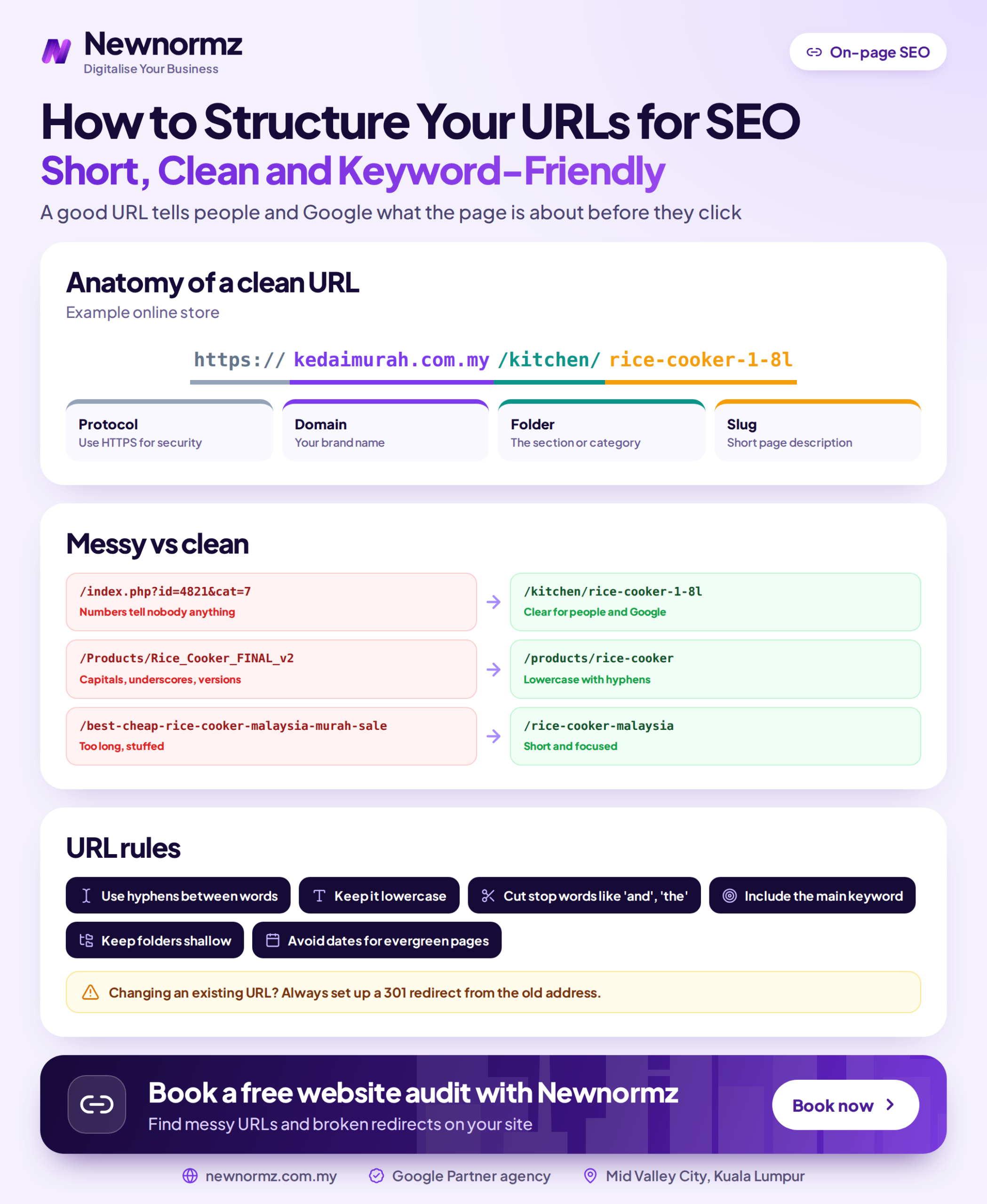
Google Search Central’s URL structure guidance is short and practical. Use simple, descriptive words. Separate words with hyphens instead of underscores. Write in the language your audience uses. Avoid long strings of IDs and parameters. That advice is a good summary of URL structure best practices, and there isn’t much to add.
Keep one thing in proportion. A keyword in the URL is a light ranking signal. The clean URL Google describes helps mostly because people can read it in search results, in a WhatsApp chat or on a printed flyer, and because it stays the same for years. Readability and stability count for more than squeezing in another keyword.
| Bad URL | Clean URL | What changed |
|---|---|---|
| /?p=482 | /services/aircond-servicing/ | A database ID is replaced with words that describe the page |
| /2024/03/15/uncategorized/our-new-service-launch-promo-final-2/ | /blog/aircond-servicing-promo/ | The date, the unused category, filler words and the “-final-2” draft leftover are gone |
| /zh/%E5%86%B7%E6%B0%94%E7%BB%B4%E4%BF%AE/ | /zh/lengqi-weixiu/ | A pinyin slug replaces 冷气维修, which turns into this string when the link is pasted |
| /Services/Aircond_Servicing | /services/aircond-servicing/ | Lowercase letters and hyphens, so there is one consistent version of the URL |
Before You Start: Five Things to Check
Have these ready before you change any setting
- ✓Admin access to your CMS (WordPress, WooCommerce or Shopify), not just editor access.
- ✓A crawl export of every current URL. The free version of Screaming Frog SEO Spider handles up to 500 URLs, which covers most SME sites.
- ✓A Google Search Console Performance export for the last 12 months, filtered by page, so you can see which URLs already earn clicks.
- ✓A redirect tool installed and tested: Rank Math’s redirection module, Yoast SEO Premium’s redirect manager, or the free Redirection plugin.
- ✓A full backup of files and database from the last 24 hours.
If you are planning a bigger restructure, sketch the content groups first. Your URL folders should mirror how you are building pillar and cluster pages, so the address of each page shows where it belongs.
How to Set Up Your SEO URL Structure in Malaysia, Step by Step
The first three steps are site-wide settings you make once. Steps 4 to 6 apply to every new page. Step 7 is the one that protects your existing rankings, so don’t skip it.
Steps 1 to 3: Set the Rules Once
Fix your WordPress permalink settings
On a new WordPress site, go to Settings > Permalinks and choose “Post name”. For most sites, those are the only permalink SEO settings you need to touch. The default ?p=123 format tells nobody anything. Date-based formats (/2024/03/post-name/) make useful guides look out of date, and you can’t refresh the date without changing the URL. If your site is already live on a date format, read Step 7 before you touch this setting.
Choose folders that match your site sections
Group service pages under one folder, such as /services/aircond-servicing/ and /services/aircond-installation/. That way the URL tells Google and your visitors how your site fits together. Keep it to one or two levels; /services/residential/aircond/servicing/shah-alam/ is too deep. To plan the groups properly, organise your site into silos before you create the folders.
Put language versions in subfolders
If you publish in BM or Chinese, use /ms/ and /zh/ subfolders rather than ms.yoursite.com.my subdomains. On subfolder vs subdomain SEO, Google says both setups can work. In practice, subfolders keep all your authority on one host, sit in one Search Console property and need less technical upkeep. Subdomains make sense when a section runs on a separate platform or is managed by a separate team. Pair the subfolders with hreflang tags, and see our guide to multilingual SEO for the full setup.
Steps 4 to 6: Write Each Slug
Use the URL slug SEO formula
Build the slug from the main keyword phrase, in 3 to 5 words, with no stop words (“the”, “and”, “for”) and no years. “Aircond Servicing in Shah Alam: The Complete 2026 Guide” becomes /aircond-servicing-shah-alam/. WordPress builds the slug from your title by default, so edit it by hand before you hit publish. Changing it afterwards is the expensive part.
Match the slug language to the search query
Malaysians search in English, BM and Chinese, often for the same service. A Bahasa Malaysia URL slug belongs on a page written for a BM query. Chinese is the exception. Google can read hanzi in a URL, but when someone copies the link into WhatsApp or an email, 冷气维修 becomes %E5%86%B7%E6%B0%94%E7%BB%B4%E4%BF%AE. That’s UTF-8 percent-encoding, and to a customer it looks like spam. Since WhatsApp is where most Malaysian enquiries happen, the link needs to look trustworthy there.
Handle the ecommerce prefixes and filter parameters
WooCommerce adds /product/ and /product-category/ to its URLs by default. You can change both bases under Settings > Permalinks > Product permalinks, but do it before launch and then leave them alone. For WooCommerce product URL SEO, the slug matters far more than the base. The Shopify URL structure is fixed: products always sit under /products/ and collections under /collections/. You can’t remove those prefixes, and you don’t need to, because every Shopify store has them and they don’t hold rankings back. Shopify also canonicalises /collections/x/products/y back to /products/y for you.
Parameters are where the real damage happens, and this is the part of URL parameters SEO most store owners miss. Filters and sorting such as ?colour=red&sort=price-asc can turn one category into hundreds of near-identical URLs. Point each filtered version at the clean category URL with a canonical tag, and keep those URLs out of your XML sitemap. These duplicate pages created by filters are one of the most common URL problems on Malaysian stores.
If your store also competes with Shopee and Lazada listings for product searches, URL hygiene is only the first layer. Product schema, category content and internal links do the heavier work in SEO for online stores.
Step 7: Decide Which Old URLs to Leave Alone
Apply the keep-or-change rule
“Should I change my URLs for SEO?” is the question we hear most before a redesign. If a URL earned clicks in the last 12 months (check your Search Console export) or has backlinks, keep it, even if it’s ugly. Change it only for a strong reason, such as merging duplicate pages or moving to a new platform. When you do change it, set up every 301 redirect after URL change as a one-to-one match, from each old URL to its closest new equivalent. Never send everything to the homepage. Google tends to treat a mass redirect to the homepage as a soft 404, so the old page’s value is lost anyway.
Here’s why the rule is strict. Take an illustrative example: a service page gets 300 clicks a month from Google, and 3% of those visitors send a WhatsApp enquiry. That’s 9 enquiries a month. With an average job of RM1,500, about RM13,500 a month of pipeline depends on that one URL. Break it without a redirect, and that pipeline shrinks while Google slowly works out what happened.
From our audits
We keep seeing the same “SEO clean-up”: someone switches the permalink setting from a date format to Post name, and every blog URL on the site changes at once. On a site with 200 posts, that’s 200 old addresses that backlinks, bookmarks and Google’s index still point to. WordPress sometimes guesses its way to the new address, but don’t rely on that. Export the old URL list first and map every one in your redirect tool.
The URL Mistake That Wipes Out Traffic Overnight
A site migration is Step 7 at full scale: every URL changes on the same day. This is what it looks like when that goes wrong, and what it takes to recover.
Client example
My Lovely Baby: 100% of lost traffic recovered after a broken migration
Problem: A site upgrade broke the baby shop’s URLs, and organic traffic dropped overnight.
What we did: A full migration audit to match old URLs to new ones, then a structured recovery of the lost pages and rankings.
Result: 100% of lost traffic recovered, and 85% of target keywords on page 1 within 9 months, including “baby shop”, “baby stroller” and “baby car seat”.
The lesson isn’t that upgrades are dangerous. It’s that the URL map has to be built before launch, not after the traffic graph falls. Any redesign or platform move needs someone to map every old URL to its new home and test the redirects before go-live. That URL-by-URL work is part of what an SEO agency in Malaysia should handle as standard, and it sits in the Architecture stage of our RANKED Framework.
Planning a redesign or a move to Shopify? We’ll check your redirect map against the URLs that already earn clicks before anything goes live.
How to Check Your New URLs Are Working
Run these checks on the day you make changes, then again a week later.
Inspect three changed URLs
Paste three new URLs into URL Inspection in Google Search Console. Run a live test, confirm the page can be indexed, and request indexing.
Recrawl the old URL list
In Screaming Frog, switch to List mode and upload your pre-change export. Every old URL should return a single 301 that lands on a page returning 200. If you see two or more hops, that’s a redirect chain, so fix it.
Clean the XML sitemap
Your sitemap should list only the new, final URLs. Old addresses left in the sitemap send Google mixed signals.
Update internal links and breadcrumbs
Menus, in-content links and breadcrumbs should point straight at the new URLs, not through redirects. Redirects are a safety net for outside links, not a substitute for fixing your own.
Watch the Page indexing report
For the next 2 to 6 weeks, check the “Not found (404)” list in the Page indexing report weekly. Any old URL that appears there needs its own redirect.
Set your expectations on timing. On our campaigns, technical fixes like these usually settle within weeks 2 to 6, and ranking movement tends to show around day 60 to 90. For Sunway TCM Centre, a technical rebuild with crawl and indexing fixes helped get 80% of target keywords onto page 1 within 4 months. Clean URLs were part of that foundation, not the whole story.
Common URL Structure Problems and How to Fix Them
✗ Underscores or capital letters in slugs
On hyphens vs underscores in URLs, Google recommends hyphens because they separate words clearly. Capital letters can create two versions of the same page (/Aircond/ and /aircond/), because servers can treat them as different URLs.
✓ The fix
Use lowercase and hyphens for every new SEO friendly URL from today. Change old pages only if they earn no clicks and have no backlinks. Otherwise, the ranking risk outweighs the small gain.
✗ Two URLs targeting the same keyword
An old /aircond-service/ page and a newer /services/aircond-servicing/ page split clicks and links, and Google keeps swapping which one it shows. Neither ranks as well as one strong page would.
✓ The fix
Merge the best content into one page, keep the URL with more clicks or backlinks, and 301 the other to it. Our guide to two pages competing for one keyword shows how to find every pair.
✗ Redirect chains after several redesigns
The 2019 URL redirects to the 2022 URL, which redirects to the 2026 URL. Every extra hop slows crawling and adds another point of failure.
✓ The fix
Export all redirects, then edit each rule so every old URL points straight at its final destination in one hop.
SEO URL Structure FAQs
Do keywords in the URL still help Google rankings?
Yes, a little, but it’s a light signal. A descriptive slug mainly helps people understand the link before they click. Google has also said publicly that no one can guarantee a specific ranking position, so treat clean URLs as groundwork, not a ranking boost.
Should I use hyphens or underscores in URLs?
Use hyphens. Google Search Central recommends them because they separate words clearly. Don’t rename existing underscore URLs that already earn clicks just to switch.
Should my URL slug be in Bahasa Malaysia or English?
Write the slug in the language of the query the page targets. That means a BM slug for a BM page targeting “servis aircond” and an English slug for English pages. For Chinese pages, use pinyin or English instead of hanzi, so the link stays readable on WhatsApp.
Is it safe to change URLs on pages that already rank?
Only if you set up a one-to-one 301 redirect and have a strong reason to change. If a URL earned clicks in the last 12 months or has backlinks, the default is to leave it as it is. Expect some ranking movement for a few weeks even with correct redirects.
How long should a URL slug be?
Aim for 3 to 5 words that capture the main keyword phrase. There’s no hard character limit, but short slugs are easier to read, share and remember. Cut stop words and years first.
Free SEO audit
Find the URL problems costing you enquiries before you change anything
- ✓A crawl of your site showing 404 errors, redirect chains and pages Google can’t index
- ✓A list of duplicate parameter URLs and missing canonicals on your product and category pages
- ✓A migration risk check: which URLs earn clicks and must be protected in any redesign
Newnormz runs SEO for 200+ Malaysian businesses on month-to-month terms, with a written page 1 guarantee and a 5.0 rating from 214+ Google reviews.

Bryan Tan is an SEO Specialist and CEO at Newnormz, helping hundreds of businesses achieve first-page rankings on Google. With a passion for driving organic growth, Bryan blends innovative strategies with hands-on experience to optimize websites for maximum visibility. Always at the forefront of the latest SEO insights and trends, he consistently adapts to the evolving digital landscape.