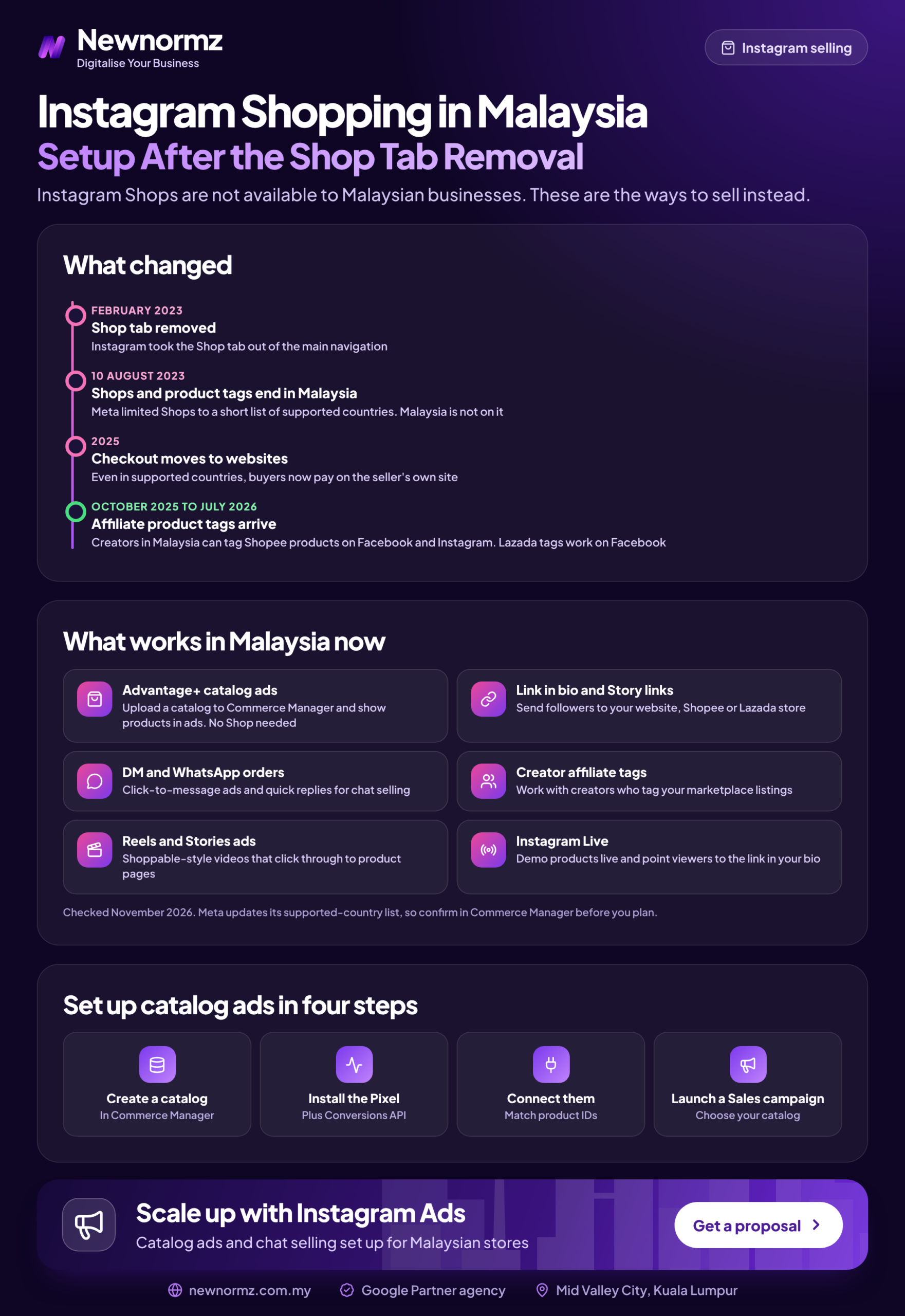
Most Instagram shopping Malaysia guides still tell you to optimise the Shop tab, and that tab left Instagram’s home navigation in early 2023. The good news is that the useful parts were never the tab. The tab was the shop window, not the shop. A Meta product catalogue still powers product tags on posts and Reels, Advantage+ catalogue ads, and checkout on your website or in WhatsApp. Don’t plan around in-app checkout in Malaysia, and check your own Commerce Manager to see which features your account has. Set it up as ad and sales infrastructure, not as a storefront you expect people to browse.
This guide is for Malaysian ecommerce owners and in-house marketers selling physical products. By the end you will have an approved catalogue, product tagging turned on, tracking connected and a way to judge whether it pays. Plan for about one working day of setup, plus Meta’s review time.
Instagram Shopping Malaysia After the Shop Tab: What Still Works
With the Instagram Shop tab removed from the main navigation to make room for Reels and other content, many sellers assumed shopping went with it. It didn’t. Product tags, catalogue ads and the catalogue behind them are still part of Meta’s commerce tools. They now work mostly through content and ads rather than a destination people visit on purpose.
What changed, and what didn’t
| Feature | Before 2023 | Now, for Malaysian accounts |
|---|---|---|
| Shop tab in home navigation | Yes, a browsable shopping feed | Removed. Don’t build a plan that depends on people browsing it. |
| Product tags on posts, carousels and Reels | Yes, for approved shops | Still the main organic shopping feature. Check in your Commerce Manager. |
| Shop on your profile | “View shop” button | Varies by account. Check in your Commerce Manager. |
| Catalogue ads | Dynamic product ads | Yes, now called Advantage+ catalogue ads. This is where most of the value is. |
| Checkout destination | Website (in-app checkout was mainly a US feature) | Your website, or messaging where offered. Check in your Commerce Manager. |
Before You Start: Instagram Shopping Eligibility Checklist for Malaysian Businesses
Most rejections come from skipping something on this list. Go through it before you open Commerce Manager. Meta changes the detail of its eligibility requirements from time to time, so check the current version in Meta’s Commerce Manager help pages too.
Instagram shopping eligibility Malaysia checklist
- ✓An Instagram professional account set to Business, not Creator
- ✓A Facebook Page linked to that Instagram account
- ✓A business portfolio in Meta Business Suite that owns the Page, the Instagram account and the ad account
- ✓A website on a domain you own, showing products with prices and a working way to buy
- ✓That domain verified in your business portfolio’s settings
- ✓Physical goods only, and every product within Meta’s commerce policies
- ✓The same business name on your website, Facebook Page and Instagram profile
Decision rule: if you sell only on Shopee or Lazada and have no website of your own, you will struggle to get an Instagram shop approved, because Meta wants the checkout on a domain you can verify. Don’t build a website just for this. Set up the catalogue in the WhatsApp Business app instead, use Click-to-WhatsApp ads, and share your marketplace links inside the chat once the buyer is ready.
How to Set Up Instagram Shopping in Commerce Manager (Step by Step)
The Instagram shop setup has five steps. Step 2 is the one most businesses rush, and it causes most of the problems later.
Step 1: Build your catalogue (manual, data feed or partner platform)
Your catalogue in Meta Commerce Manager is the product database behind tags and ads. You can build it in three ways, and the right one depends on where your products already live.
- Partner platform: best for Shopify and WooCommerce stores. Shopify’s Facebook & Instagram sales channel syncs products, prices and stock automatically. For Shopify Instagram shopping, this is the default choice. If the store itself is still half-built, start with setting up a Shopify store properly, because messy product data flows straight into Meta. WooCommerce stores can use Meta’s Facebook for WooCommerce plugin.
- Data feed: best for custom-built sites or catalogues with more than about 50 products. Upload a CSV, or connect a Google Sheet on a scheduled refresh so updates go through without anyone remembering to do them.
- Manual: fine for a handful of products that rarely change. It gets painful as soon as you run sales.
Whichever route you use, every item needs these fields for the Facebook catalogue setup to pass: id, title, description, availability, condition, price, link, image_link and brand.
Step 2: Clean the feed before you submit it
This is where expert setups and generic setups split. Check these before submitting:
- Currency format: write prices as “89.00 MYR”, not “RM89”. A wrong format can quietly drop items from the catalogue.
- Sale prices: use the sale_price field and sale_price_effective_date instead of overwriting the main price. Ads can then show the discount properly, and the price goes back to normal when the sale ends.
- IDs that match your Pixel: the id in your catalogue must be exactly the same as the content_ids your website sends to the Meta Pixel. If the catalogue says “SKU-1042” and the Pixel sends “1042”, catalogue ads cannot work out which product someone viewed.
- Variant grouping: give every size and colour of the same product a shared item_group_id, so a red dress and a blue dress show up as one product with options and not as unrelated items.
- Images: use square, clean product shots with no price text burned into the image, since a burned-in price goes stale after every promotion.
- Languages: add separate Bahasa Malaysia or Chinese titles only if you actually run ads split by language. Otherwise they are one more thing to keep in sync.
Build this feed once and reuse it. A clean feed works for Meta and as your product feed for Google Merchant Center, so Instagram and Google Shopping show the same prices.
Step 3: Create the shop and submit for review
Open Commerce Manager and start a shop
Pick the business portfolio that owns your Page and Instagram account. If you see more than one portfolio, stop and fix ownership first.
Choose the checkout method
Pick checkout on your website. If a messaging option shows up, it’s worth considering for considered purchases, but don’t choose an in-app checkout option you can’t find in your own account.
Select sales channels and the catalogue
Tick Instagram (and Facebook if you want it), then connect the catalogue from Step 1.
Submit and read the status
“In review” means wait. “Needs attention” usually points to a domain or policy issue. “Rejected” comes with a reason and, often, an option to request another review.
Step 4: Turn on product tagging in Instagram settings
Once your shop is approved, go to your Instagram profile and open Settings. Under the business tools section, find Shopping and connect the catalogue (the exact menu labels change between app versions). After that, a “Tag products” option appears when you post feed images, carousels and Reels. You can tag up to several products per post, so tag the products the buyer can actually see.
Instagram product tags now get the most attention on Reels, because Reels are where the reach went. A short demo with the product tagged is better than a polished grid post. These product-tagged Reels that sell follow the same idea. Where the feature is available in your account, give creators permission to tag your products in their own content too.
Step 5: Connect Pixel and Conversions API to the catalogue
In Events Manager, connect your Pixel to the catalogue. Then check that ViewContent, AddToCart and Purchase events all send content_ids that match your catalogue ids. Conversions API (CAPI) sends the same events from your server, so you lose fewer of them to browser privacy settings and ad blockers. If you haven’t done this yet, set up Pixel and Conversions API before you spend anything on catalogue ads. Without matched events, the ads can’t retarget the exact product someone viewed.
Why Your Instagram Shop Is Not Approved (and How to Fix Each Reason)
If your Instagram Shopping is not approved, Commerce Manager shows a rejection reason. Here is what each common reason usually means and how to fix it.
| Rejection reason | Likely cause | Fix |
|---|---|---|
| Domain not verified | Domain verified in a different business portfolio, or not verified at all | Verify it with a DNS TXT record in the portfolio that owns the shop |
| Website doesn’t meet requirements | No prices shown, “WhatsApp for price”, or no checkout | Show prices and a working cart on the product pages linked from the catalogue |
| Policy violation | Supplements, medical devices or other restricted products, or health claims in descriptions | Remove the flagged items from the catalogue, reword the claims, and check both Meta’s commerce policies and Malaysian advertising rules for your category |
| Business name mismatch | Page, profile and website use different brand names | Use one name across all three, then request another review |
| Account too new or inactive | Few posts, few followers, no history | Post regularly for a few weeks, then resubmit |
Approval is not the finish line. The problem we see most often in audits happens after approval.
✗ An approved catalogue that has fallen out of sync
The shop was approved two years ago, and since then the catalogue was a one-off CSV upload. During an 11.11 sale, tagged products and catalogue ads show the old full price, or products that are already sold out. Shoppers click, see a different price on the website and leave.
✓ The fix
Switch to a partner sync or a scheduled feed that refreshes at least daily. Check the catalogue’s Diagnostics tab once a week and before every sale.
Shop rejected or catalogue out of sync? We’ll check your Commerce Manager, feed and Pixel matching for you.
Where Instagram Shoppers Should Check Out: Website, Marketplace or WhatsApp
Most businesses that sell on Instagram Malaysia-wide pick one of three checkout routes. Where the buyer checks out decides two things: how much of your tracking survives, and how many buyers drop off before paying. These rules will get most businesses to the right answer.
Malaysia note
Many Malaysian buyers want to ask “ada stock?” or “boleh COD?” before they pay. When click to WhatsApp ads underperform, the ad is usually fine. The chat is the problem: nobody replies for three hours, or the reply is a price list with no help. Decide who answers, in which languages, and how fast, before you spend on the ads.
Instagram is one part of a wider picture that also includes TikTok Shop and live selling. This look at social commerce in Malaysia covers how the platforms split the buyer journey.
Turning the Catalogue Into Sales With Advantage+ Catalogue Ads
Advantage+ catalogue ads (formerly dynamic product ads) automatically show people products from your catalogue. You can use them in two ways. Retargeting shows people the exact products they viewed or added to cart but didn’t buy. Broad prospecting lets Meta pick products for new audiences based on what similar people bought. Meta renames these products often (the campaign type once called Advantage+ Shopping has already been renamed), so check the current names in your Ads Manager.
Here is a worked example. Every rate below is an example for the maths, not a Malaysian market rate.
| Step | Example input | Result |
|---|---|---|
| Monthly budget | RM3,000 | Starting spend |
| Impressions | Example CPM (cost per 1,000 views) RM15 | 200,000 |
| Clicks | Example CTR 1% | 2,000 |
| Orders | Example conversion rate 2% | 40 |
| Cost per purchase | RM3,000 divided by 40 | RM75 |
| Revenue and ROAS | Example average order RM150 | RM6,000 revenue, 2.0x ROAS |
A 2.0x ROAS looks healthy, but at a 40% gross margin those 40 orders earn RM2,400 in gross profit against RM3,000 of ad spend. You need a ROAS of 2.5x just to break even on the first order (1 divided by your margin). From there, the job is to raise the average order with bundles, raise conversion with better product pages, or count repeat purchases. Plug your own numbers into the free social media ROAS calculator before you set a budget.
Search “Instagram ads Malaysia” and most of the advice is about boosting posts. For product sellers, the catalogue is what makes ads pay back, which is why catalogue ads sit at the core of Instagram ads management for ecommerce clients.
Plan the catalogue around the Malaysian sales calendar
Ad costs and competition rise around 9.9, 10.10, 11.11, 12.12, Hari Raya and Chinese New Year. Load sale_price and sale_price_effective_date into the feed at least a week ahead, so the catalogue picks up the new prices before the sale starts. Brief festive creative, such as Raya and CNY product overlays or templates, two to four weeks earlier. Build your retargeting audiences in the quieter weeks beforehand, so you have warm buyers when costs peak.
How to Tell If Instagram Shopping Is Paying Off
Product tag taps are easy to report and easy to misread. Judge on purchases and revenue. Use this table as your monthly report:
| Metric | Where to find it | How to read it |
|---|---|---|
| Product tag taps | Instagram post insights | Shows interest only. Use it to compare content, not to judge results. |
| Outbound clicks | Ads Manager, Commerce Manager insights | Lots of clicks with few purchases means a product page or price problem. |
| Catalogue ad purchases | Ads Manager (Pixel and CAPI) | Compare against your store’s orders to check tracking. |
| Cost per purchase | Ads Manager | Must sit below gross profit per order. |
| ROAS | Ads Manager, checked against store revenue | Compare it with your break-even ROAS, not with an industry average. |
| WhatsApp chats started and closed | Ads Manager plus your chat log | Track chats that became orders, not just chats opened. |
Done properly, this means a synced feed, matched Pixel and CAPI events, catalogue ads, a WhatsApp process and a monthly report. If that’s more than your team can carry, a social media marketing agency in Malaysia that also runs Google Ads and SEO can connect the same product feed to Meta catalogue ads, Google Shopping and your WhatsApp enquiries. That’s how the Newnormz team works.
FAQ
Is Instagram Shopping still available in Malaysia?
Yes, in the form of product catalogues, product tags and catalogue ads, though the Shop tab is gone. Which shop features you see can vary by account, so check Commerce Manager after approval.
What happened to the Shop tab on Instagram?
Instagram took it out of the main navigation in early 2023 and gave that space to content. Shopping now happens through tagged posts, Reels and ads rather than a separate tab.
Can I tag products on Instagram without a website?
Usually not, because shop approval normally needs a verified domain that sells the products. Without a website, use the WhatsApp Business catalogue and Click-to-WhatsApp ads instead.
Can Malaysian customers check out inside Instagram?
Don’t plan around it. Native in-app checkout was mainly a US feature, so set your checkout to your website and check Commerce Manager for any messaging options.
Do I need Commerce Manager to tag products on Instagram?
Yes. Product tags draw on a catalogue and shop managed in Meta Commerce Manager, even if a partner like Shopify creates them for you.
How long does Instagram shop review take?
Often a few days, but Meta gives no fixed timeframe and some reviews take longer. Fix domain, pricing and naming issues before you submit, because each rejection adds another review cycle.
Free Meta ads account audit
Find out if your catalogue, tracking and catalogue ads are ready to sell
- ✓Commerce Manager and catalogue check: approval status, sync errors and stale prices
- ✓Pixel and Conversions API review, including content_id matching
- ✓Checkout route and catalogue ad recommendations for your products
Newnormz plans, creates and runs social media and paid social for Malaysian brands, and judges every campaign on enquiries, not just views. 5.0 rating from 214+ Google reviews.

Bryan Tan is an SEO Specialist and CEO at Newnormz, helping hundreds of businesses achieve first-page rankings on Google. With a passion for driving organic growth, Bryan blends innovative strategies with hands-on experience to optimize websites for maximum visibility. Always at the forefront of the latest SEO insights and trends, he consistently adapts to the evolving digital landscape.