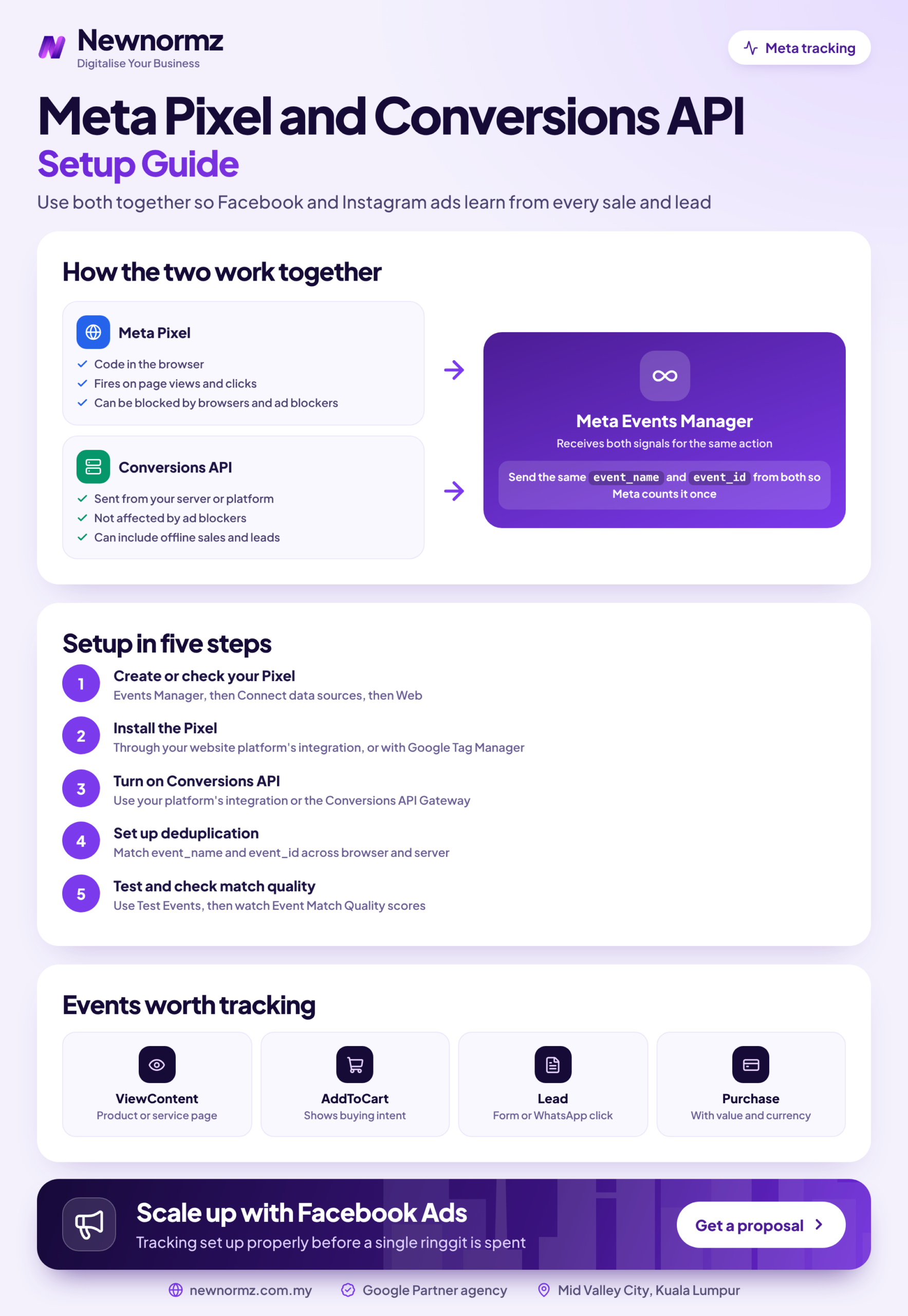
A proper meta pixel setup now means two connections, not one. The Meta Pixel sends events from the visitor’s browser, and the Conversions API (CAPI) sends the same events from your server. Deduplication then makes sure Meta counts each sale or lead only once. Browser-only tracking misses events because of ad blockers, browser privacy limits and the iOS prompt that lets people opt out of app tracking. Every missed event, and every fake one, teaches Meta’s algorithm to find the wrong people. On a typical WordPress or Shopify site, the full setup below takes about an afternoon.
This guide is for Malaysian business owners, in-house marketers and web developers running Facebook and Instagram ads. By the end you will have the Pixel and Conversions API live, deduplicated and checked with a real test lead or purchase, plus a plan for tracking WhatsApp and Instant Form enquiries.
Meta Pixel Setup in Plain Terms: What You’re Installing and Why the Pixel Alone Isn’t Enough
The Meta Pixel is a piece of JavaScript on your website. When someone views a page, adds to cart or submits a form, it tells Meta. Because it runs in the browser, anything that blocks scripts or cookies can stop it: ad blockers, Safari’s and Firefox’s tracking limits, consent banners, or a visitor who leaves before the page finishes loading.
The Conversions API sends the same events from your server, or from a platform such as Shopify, straight to Meta. It doesn’t depend on the visitor’s browser, so it catches many of the events the Pixel misses. Meta’s own Business Help Centre recommends using the Conversions API alongside the Pixel, not instead of it. Each one covers gaps in the other.
This isn’t only about cleaner reports. Meta Ads Manager uses these events to decide who sees your ads next. If your “Lead” event fires when someone simply opens a form, Meta goes looking for more people who open forms. Feed it real enquiries and it looks for people who enquire.
Meta doesn’t optimise for customers. It optimises for whatever event you tell it looks like a customer.
Before You Start: The 15-Minute Prep Most Setups Skip
Most tracking problems we fix come from skipping this prep, not from bad code. Sort these out before you open Events Manager.
Pre-setup checklist
- ✓Admin access to your Business Portfolio (formerly Meta Business Manager). It should be owned by your business, not by an agency or a former employee’s personal profile.
- ✓A rule of one pixel per business. Agencies get partner access to your pixel. They don’t create their own.
- ✓Admin access to your site (Shopify admin, WordPress admin) or a developer who has it.
- ✓A written list of the 3 to 5 actions that actually make you money: a purchase, a booked appointment, a quote request or a qualified enquiry.
- ✓A named owner for the CRM, lead sheet or WhatsApp inbox. This is the person who will mark which leads were real.
- ✓A privacy notice and form consent wording that mention advertising and analytics partners.
That last item matters in Malaysia. Sending customers’ hashed emails and phone numbers to Meta is processing personal data under the Personal Data Protection Act 2010 (PDPA). Update your privacy notice and form wording to cover advertising partners, and ask your own legal adviser to check them. This guide isn’t legal advice, and we won’t quote specific PDPA sections.
Step 1: Create the Pixel (Dataset) in Meta Events Manager
Meta has been renaming things, so you may see “pixel” in some screens and “dataset” in others. A dataset holds your website events from both the browser and the server, and it can also hold app and offline events. For this guide, treat the two words as the same thing. If you’re working from an older Facebook pixel setup tutorial, expect the screens to look different. Menu labels may differ slightly in your account.
Check what already exists
Open Meta Events Manager from the All tools menu in Meta Business Suite and look at your data sources. If there’s a pixel with months of history, keep using it. That history helps your campaigns.
Connect a new web data source only if none exists
Click Connect data sources, choose Web and follow the prompts. Meta will ask for your website URL and may detect a partner platform such as Shopify or WooCommerce.
Name it after the business
Use something like “YourBrand Website”, not “Pixel 1” or “Test”. Two years from now, someone will need to know which one is live.
Assign people, partners and the ad account
In Business settings, under Data sources, connect the dataset to your ad account, add your team and give any agency partner access. That way the agency can leave without taking your data with them.
✗ Two or three pixels left behind by past agencies and freelancers
We see this all the time in Meta account audits. Each agency set up its own pixel, so conversions are split across several, some ad sets optimise on a pixel that no longer fires, and nobody trusts the numbers.
✓ The fix
Choose the one with the cleanest, longest history. Remove the other pixel codes from the site, switch every active ad set to the chosen pixel, and remove agency access you no longer need.
Step 2: Choose Your Install Method (Decision Table)
There are three realistic ways to get both the Pixel and the Conversions API running. Choose by your site platform and by who will maintain the setup next year, not by what sounds most advanced.
| Install method | Best for | Effort | Who maintains it |
|---|---|---|---|
| Partner integration (Shopify’s Facebook & Instagram app, official WooCommerce or WordPress plugin) | Shopify and WooCommerce stores, standard WordPress lead sites | Low. Pixel and CAPI are switched on together in an hour or two | Meta and the platform. You keep the app updated |
| Conversions API Gateway | Custom sites with no in-house developer | Medium. Set up from Events Manager, runs on cloud hosting, usually with a hosting cost | You or your agency, inside your own cloud account |
| Manual or Google Tag Manager, plus a server-side CAPI build | Custom checkouts, booking systems, CRM events, multi-domain setups | High. Needs developer time and testing | Your developer. Budget for ongoing fixes |
Decision rule: if you’re on Shopify or WooCommerce, use the official integration first. Only go custom if you need events it doesn’t send, such as a booked appointment from a third-party scheduler or a CRM status change.
Shopify
A Meta Pixel Shopify install goes through Meta’s own sales channel app, not through code pasted into your theme.
- Install the Facebook & Instagram app (published by Meta) from the Shopify App Store.
- Connect your Business Portfolio, Facebook Page, ad account and the existing dataset from Step 1. Don’t let it create a new one.
- In the app’s data sharing settings, choose the highest level. At the time of writing this is labelled “Maximum”, and it turns on the Conversions API alongside the Pixel. Check the current label in your app.
- Remove any old pixel code pasted into your theme files or added by older marketing apps.
If your store is still young, our guide to setting up a new Shopify store covers the groundwork that should be in place before you pay for traffic.
WordPress and WooCommerce
The cleanest Meta Pixel WordPress setup uses one official plugin and nothing else. For WooCommerce, use the official Facebook for WooCommerce plugin. For a WordPress site without a shop, use Meta’s official pixel plugin for WordPress, and check that the plugin author is Meta before you install it. Connect it to your Business Portfolio, select your existing pixel, and turn on the Conversions API or server events option if the plugin offers one. Labels may differ slightly between versions.
✗ Stacking pixel plugins, a theme setting and hardcoded code
A typical WordPress site we audit has a pixel plugin, a “Facebook Pixel ID” box in the theme options, plus code a freelancer pasted into the header. The result is two or three PageViews per visit, inflated reports, and Meta learning from noise.
✓ The fix
Keep one source of truth (the official plugin), clear the theme field, delete the hardcoded snippet, then confirm with Meta Pixel Helper that each page fires exactly one PageView.
Every extra tracking plugin also adds weight to your pages. Here’s more on how extra scripts slow your pages and what that does to conversion rates.
Custom Sites and Landing Page Builders
Paste the Pixel base code into the <head> of every page, either directly or through Google Tag Manager. Fire standard events on the thank-you page, or in the form’s “submission successful” callback, never on a button click that might fail validation. Most landing page builders have a field for the pixel ID and a separate place for thank-you page scripts.
For the server side, the Conversions API Gateway is worth it when you have no developer but run meaningful spend. A developer-built CAPI is worth it when your money event happens somewhere the browser never sees: a payment gateway callback, a booking system or a CRM.
Step 3: Set Up Standard Events Around the Action That Makes Money
Meta’s standard events (Purchase, Lead, Contact, Schedule, AddToCart and others) are the vocabulary the algorithm understands. Choose one primary event that equals money or a real chance of it, and use the rest as supporting signals. Most guides on how to install Meta Pixel code stop at the base code, but this choice is what decides who Meta finds for you.
| Business type | Primary event | Supporting events |
|---|---|---|
| Ecommerce | Purchase, with the order value and currency set to MYR | ViewContent, AddToCart, InitiateCheckout |
| Service or lead generation | Lead, fired on the real thank-you page after a successful submission | Contact (call or email clicks), Schedule (confirmed booking) |
| WhatsApp-led business | Contact on the WhatsApp button click, as a stopgap only | Lead for any form, plus qualified outcomes fed back later (see the WhatsApp section) |
✗ Firing Lead when the form page loads or the button is clicked
It’s the easiest setup, so it’s everywhere. It counts curious visitors and failed submissions as leads, makes your cost per lead look great, and trains Meta to find people who click and don’t finish.
✓ The fix
Fire Lead only on a confirmed submission: the thank-you page, or the form plugin’s success event. Fewer leads will show up in Ads Manager. That’s the honest number.
Step 4: Connect the Conversions API and Deduplicate Events
This is the part most DIY meta conversions api setup attempts get wrong. Turning on CAPI is easy. Making sure Meta doesn’t count every purchase twice is where the care goes.
Switch on server events
Use the partner integration toggle, finish the Conversions API Gateway setup, or have your developer generate an access token in the dataset’s settings in Events Manager.
Send a matching event name and event ID from both sides
For each conversion, the browser and the server must send the same event_name and the same unique event_id. An order number or form submission ID works well. This pair is the only thing the event deduplication Meta runs can match on.
Pass fbp and fbc with server events
fbp is the browser ID stored in the first-party _fbp cookie. fbc is the click ID, built from the fbclid parameter Meta adds to ad click URLs. Sending both helps Meta tie a server event back to the ad click.
Hash and send customer information
Normalise and SHA-256 hash email and phone before sending them. Emails are trimmed and lowercased. Phones use international format with the 60 country code and no leading zero, so 012-345 6789 becomes 60123456789 before hashing. Meta’s developer documentation lists the exact rules. Partner integrations do this for you.
Include the basics on every server event
Send the event time, the page URL (event_source_url), action_source set to website, and the visitor’s IP address and user agent. Without these, Meta matches fewer events.
How event deduplication works on Meta
Browser: fbq('track', 'Purchase', {value: 189.00, currency: 'MYR'}, {eventID: 'ORDER-10452'});
Server: event_name: "Purchase", event_id: "ORDER-10452", action_source: "website"
Meta sees the same name and ID arrive from both sources and keeps one. If the IDs differ, or one side sends none, you get two Purchases and your reported ROAS doubles on paper.
Not sure your Pixel and CAPI are deduplicating? We’ll check your Events Manager as part of a free Meta ads audit.
Step 5: Verify Everything Before You Spend a Ringgit
“The pixel is firing” isn’t a test. You want proof that one real conversion produces exactly one event, with the right value, from both browser and server.
Run Meta Pixel Helper
Install the Meta Pixel Helper Chrome extension and click through your key pages. You should see one pixel ID, one PageView per page, and no errors or warnings.
Open the Test Events tab
In Meta Events Manager, select your dataset, open Test events and enter your site URL. This is the Test Events Meta Pixel check most people skip, because Pixel Helper only shows the browser side. For server events, your developer adds the test event code shown there to their requests.
Do a real test conversion in an incognito window
Buy a low-priced product (then refund it) or submit a lead with your own details. In Test Events, confirm the Purchase or Lead arrives from both Browser and Server, is marked as deduplicated, shows the right value in MYR, and that nothing fired when the form page merely loaded.
Check event details and Diagnostics a day later
In the Overview, open each key event and check that the connection method shows both browser and server, with deduplication working. Then clear every warning in the Diagnostics tab: missing parameters, duplicate events, domain issues.
Do this weeks, not days, before a big push. Tracking that breaks on the eve of Hari Raya, Chinese New Year or 11.11 costs the most, and Meta’s festive campaign tips assume your measurement is already solid.
Meta Pixel Not Working? The Usual Causes
When nothing shows up at all, the cause is usually one of four things: a caching or optimisation plugin delaying scripts, a consent banner blocking Meta before the visitor accepts, the wrong pixel ID, or a theme update that wiped header code. Turn those off or fix them one at a time and test again.
Reading Event Match Quality Without Obsessing Over It
Event Match Quality (EMQ) is a score out of 10 that Events Manager shows for server events. It estimates how well the customer information you send can be matched to Meta accounts. The parameters that raise it most are email, phone, an external ID (your own customer or lead ID), fbc and fbp, followed by IP address and user agent.
In our experience, adding hashed email and phone to Lead and Purchase events gives the biggest jump. PageView will always score lower because anonymous browsers haven’t given you any details, and that’s fine. Focus on raising EMQ on the event you optimise for, and stop once Events Manager stops suggesting parameters you could add.
Domain Verification and Event Priority
Verify your domain in Business settings, under Brand safety and Domains, using the meta-tag, DNS TXT record or HTML file method. It proves you own the site and lets you control event settings for it. Meta has changed its rules on event configuration and prioritisation several times since iOS 14, so follow whatever your Events Manager currently asks for instead of older guides that quote fixed limits.
Tracking What Pixels Can’t See: WhatsApp Enquiries and Instant Form Leads
This is the gap most Malaysian guides skip. A large share of the Facebook ads Malaysia-based businesses run never send anyone to a website. They start with a Click-to-WhatsApp ad or a Facebook lead ads form and end in a chat. The Pixel sees none of it, so Meta only knows someone started a conversation or submitted a form, not whether they became a customer.
Malaysia note
Optimising Click-to-WhatsApp ads for conversations is a fine starting point, but a conversation that says “hi, price?” counts the same as one that books. Who answers the chat and how fast often matters more than the ad. If nobody tracks which chats closed, Meta keeps buying “hi, price?”
Three ways to close the gap, from simplest to strongest:
- Weekly tagging. Have the inbox owner label each WhatsApp chat or form lead as junk, qualified or customer, so at minimum you can judge campaigns on cost per qualified lead.
- Click to WhatsApp ads tracking through the Conversions API. If your WhatsApp Business Platform provider or CRM supports it, send qualified and purchase outcomes from the chat back to Meta using the Conversions API for business messaging. Check whether it’s available in your Ads Manager and with your provider.
- Instant Form lead quality. Use a higher-intent form type, add a qualifying question, sync leads to your CRM and send stage changes (qualified, converted) back through the Conversions API for CRM. Where it’s offered, you can then optimise for conversion leads instead of raw form fills.
This feedback loop is where most of the gains in our Facebook ads management work come from, because it changes who Meta looks for, not just how you report.
Worked Example: What Bad Tracking Costs on a RM5,000 Monthly Budget
The numbers below are a hypothetical example to show the maths. They aren’t market rates for Facebook ads in Malaysia.
| Example, RM5,000 per month | Scenario A: Lead fired on button click | Scenario B: real submission, CAPI, quality feedback |
|---|---|---|
| “Leads” in Ads Manager | 250 | 120 |
| Cost per lead | RM20 | About RM41.67 |
| Genuine, qualified enquiries | 25 (10%) | 48 (40%) |
| Cost per qualified lead | RM200 | About RM104 |
Scenario A looks twice as efficient in the dashboard and is roughly twice as expensive where it counts. The business owner looking at RM20 leads usually raises the budget, which buys more of the wrong people.
To run the same maths on your own numbers, plug them into our free social media ROAS calculator.
The habit matters more than the platform. On a Google Ads (paid search, not Meta) campaign for a confinement centre in KL, our team reported 266 qualified leads in the first 30 days at RM9.58 per qualified lead. The figure that went to the client was the qualified lead cost, not clicks or form opens. Hold your Meta campaigns to the same standard.
Once tracking is clean, the next step is campaign structure and creative. Our guide to running profitable Meta ads in Malaysia picks up from here.
When a DIY Meta Pixel Setup Is Enough, and When to Hand It Over
As a social media marketing agency in Malaysia, we judge Meta campaigns on enquiries, not just views, and that starts with tracking. Our team runs Meta alongside Google Ads and SEO, so we can connect Meta events with search and WhatsApp enquiries in one view. Brands we’ve run Facebook campaigns for include Taiwan Excellence.
Meta Pixel Setup FAQs
Do I still need the Meta Pixel if I set up the Conversions API?
Yes, Meta recommends running both together. The Pixel captures browser signals such as fbp and on-page behaviour, while the Conversions API catches events the browser misses. Deduplication stops the overlap being double-counted.
How do I stop Meta counting the same purchase twice from the Pixel and Conversions API?
Send the same event name and the same unique event ID from both the browser and the server. An order number works well. Then confirm in the Test Events tab and event details that the event shows as deduplicated.
What is a good Event Match Quality score and how do I improve it?
Aim for the highest rating Events Manager gives on the event you optimise for, and don’t worry about PageView scoring lower. To improve it, send hashed email and phone, an external ID, fbc and fbp, plus IP address and user agent with each server event.
Which event should I optimise my Facebook ads for if I don’t get many purchases?
Optimise for the closest higher-volume event that still signals intent, such as InitiateCheckout or AddToCart, then move to Purchase as volume grows. Meta’s Business Help Centre describes ad sets needing around 50 optimisation events in a week to exit the learning phase, so an event you get five times a month gives the system too little to learn from.
Can I track WhatsApp enquiries from Click-to-WhatsApp ads as conversions?
Partly. Meta reports conversations started by default, and if your WhatsApp Business Platform provider or CRM supports the Conversions API for business messaging, you can send qualified and purchase outcomes back too. Check whether it’s available in your Ads Manager. Without it, tag chat outcomes manually and judge campaigns on qualified leads.
How long after installing the Meta Pixel can I start running conversion campaigns?
You can launch as soon as your test conversion shows up correctly and deduplicated, often the same day. A brand-new pixel has no history, though, so expect the first weeks to be a learning period and keep budgets modest until real conversions build up.
Is it legal under PDPA to send customer emails and phone numbers to Meta?
It can be, if your privacy notice and consent wording cover sharing data with advertising partners, but confirm your setup with your own legal adviser. The data is hashed before sending, but hashing doesn’t replace the notice and consent obligations under the Personal Data Protection Act 2010.
Why does Events Manager show fewer conversions than my website or CRM?
Usually because Meta only counts conversions it can attribute to an ad within its attribution window, and some events can’t be matched to a Meta user. Missing CAPI, low match quality and broken thank-you pages widen the gap. The same principle applies to setting up Google Ads conversion tracking: each platform only counts what it can see and attribute, so your CRM stays the source of truth.
Is Meta learning from your real customers, or from button clicks?
Newnormz plans, creates and runs social media and paid social for Malaysian brands, and judges every campaign on enquiries, not just views. 5.0 rating from 214+ Google reviews.
Includes a Pixel and Conversions API tracking check. No obligation.

Bryan Tan is an SEO Specialist and CEO at Newnormz, helping hundreds of businesses achieve first-page rankings on Google. With a passion for driving organic growth, Bryan blends innovative strategies with hands-on experience to optimize websites for maximum visibility. Always at the forefront of the latest SEO insights and trends, he consistently adapts to the evolving digital landscape.