Setting up Google Merchant Center in Malaysia takes six steps: create the account, add business information that matches your website exactly, verify and then separately claim your domain, configure shipping and tax, upload a product feed priced in MYR, and link Google Ads. Most stores that stall at this stage got the account creation right and the feed wrong, since price mismatches and invalid GTINs are the two most common reasons products get disapproved. Clean data gets your products into Shopping ads and free listings. Messy data gets a silent rejection with no traffic to show for it.
A Simple Way to Think About It
The Security Desk at the Building Entrance
🚫 Mismatched ID, Blocked at the Door
You walk up to the security desk with an ID card that has a different name than what’s on the visitor list. The guard doesn’t ask questions or offer a warning. They just turn you away and tell you to come back when your paperwork matches.
✅ Matching ID, Waved Straight Through
Your ID matches the visitor list exactly, down to the last letter. The guard glances at it once and waves you through without a second thought. No delay, no follow-up call, no waiting outside.
Google’s review process treats your product feed the same way the guard treats that ID card. The sections below show you exactly where merchants let the paperwork drift apart, and how to keep it matching.
Who This Guide Is For
This is for Malaysian e-commerce and retail businesses that want their products showing up in Google Shopping ads and free listings. It doesn’t matter if you’re running Shopify, WooCommerce, or a custom-built store: the account setup and feed requirements are identical. If you sell physical products online and want buyers finding them on Google before they find your competitor, this is the setup to get right first.
What Google Merchant Center Actually Does
Google Merchant Center is the free platform where you upload your product data so it can appear across Shopping ads, free product listings, and regular Search results. It’s a data hub, not an advertising tool in itself. Google Ads reads from it to build Shopping campaigns, and the quality of your feed decides which products get shown and which get quietly blocked.
A clean feed is the difference between products that rank in Shopping and products that sit disapproved and invisible to anyone searching. If you’re also running paid campaigns, the same feed feeds your Google Ads Shopping setup, so fixing it once pays off twice.
Before You Open an Account
Get three things in order first. Skipping them is the most common reason Malaysian stores stall at the approval stage rather than the setup stage.
A live, working website
Product pages need to load properly, checkout needs to be visible and functional, and there should be no dead links or 404 landing pages anywhere a shopper might click through.
Policy pages published
Returns and refund policy, privacy policy, and clear contact details all need to be live. Google checks these to confirm you’re a legitimate business before it lets your products appear.
MYR pricing shown on-site
The price a shopper sees on your page has to be in Malaysian Ringgit and match your feed exactly, including any tax already built into that price.
If your store is slow or looks unfinished, sort that out before you touch Merchant Center. A solid SEO agency in Malaysia will tell you the same thing: technical trust problems on your site cause account-level issues, not just ranking issues.
The Six-Step Setup Process
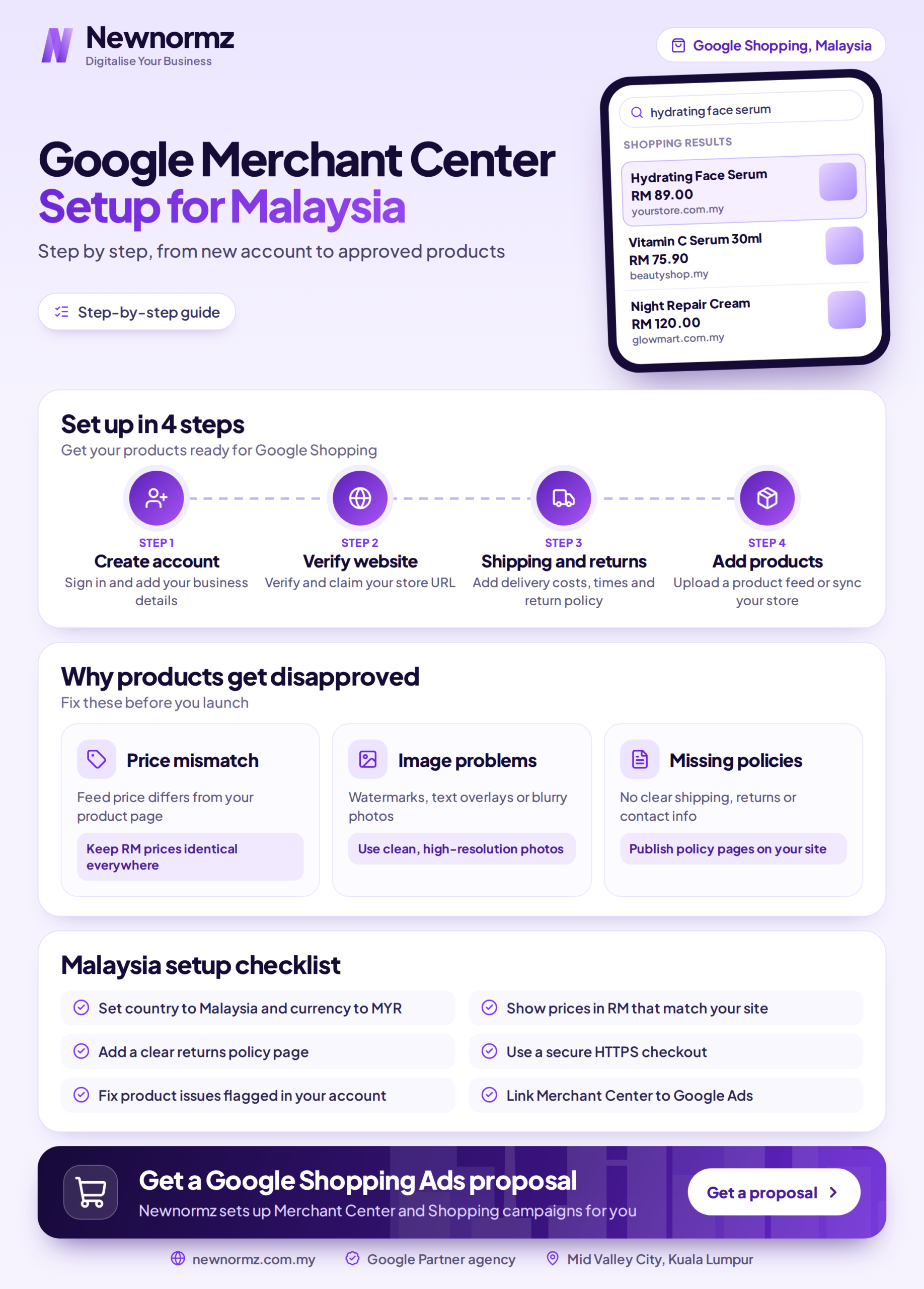
The current Merchant Center flow runs through six clear stages.
1. Create the account
Go to merchants.google.com, sign in, and enter your business name, country (Malaysia), and time zone.
2. Add business information
Enter your registered business name and contact details. These need to match your website exactly, since a mismatch here can trigger a misrepresentation flag later.
3. Verify and claim your website
Verify ownership using an HTML tag, an uploaded file, Google Tag Manager, or Google Analytics. Then claim the URL separately. These are two distinct steps, and it’s the single most common thing new accounts get half done.
4. Set up shipping and tax
Configure at least one Malaysia shipping service and set your tax handling. Google cross-checks both of these against what a buyer actually sees at your checkout.
5. Set up the product feed
Upload your products through a connected platform app, a Google Sheet, a scheduled fetch, or the Content API.
6. Link Google Ads
Connect your Google Ads account so you can build Shopping campaigns from the products that have already been approved.
Your Product Feed: The Required Attributes
Your feed is a structured file where every row is one product and every column is an attribute. The core required set is id, title, description, link, image_link, price, and availability. Here’s what a Malaysian store needs to submit for each product.
| Attribute | Required? | What it is | Example |
|---|---|---|---|
| id | Required | Unique product identifier | SKU-BW-250 |
| title | Required | Product name, up to 150 characters | Brightening Body Wash 250ml |
| description | Required | Product detail, up to 5000 characters | Gentle brightening body wash with niacinamide, 250ml |
| link | Required | Landing page URL | yourstore.my/products/body-wash |
| image_link | Required | Main image, minimum 500 by 500 pixels | yourstore.my/img/bw250.jpg |
| availability | Required | Stock status | in_stock |
| price | Required | Price in local currency | 39.00 MYR |
| brand | Required if branded | Manufacturer brand | Your brand name |
| gtin | Required if it exists | Global Trade Item Number (barcode) | 9551234567890 |
| item_group_id | Required for variants | Groups size or colour variants together | SKU-BW |
Why Products Get Disapproved (and How to Fix Each One)
Disapprovals cluster around a handful of predictable causes. Check the Diagnostics tab in your account first rather than guessing from the feed file itself, since it tells you exactly which products and which fields failed.
| Disapproval reason | The fix |
|---|---|
| Price mismatch: feed price differs from the page | Sync your feed to real-time site data, including tax, so both figures always agree |
| Missing or invalid GTIN | Only submit barcodes you’re certain of; leave the field blank rather than guess |
| Image quality: under 500 by 500 pixels, watermarked, or broken URLs | Use clear photos on a plain background at full required resolution |
| Missing policy pages | Publish returns, refund, privacy, and contact pages before you submit a feed |
| Missing item_group_id on variant products | Add it so Google can group size or colour variants instead of rejecting the family |
One resolution date is worth flagging early: Google raised the minimum product image resolution to 500 by 500 pixels, with enforcement starting 31 January 2027. If your current images sit below that, plan the reshoot now rather than scrambling later.
Malaysia Specifics: Currency, Shipping, Tax
Currency
Submit prices in MYR. Don’t mix in USD anywhere in the feed. The value in your feed has to equal the Ringgit price a buyer sees at checkout, not a converted approximation.
Shipping
You need at least one active shipping service configured before any product can be approved. Set flat or region-based rates for West and East Malaysia that match what buyers actually pay at checkout, since Google cross-checks the two against each other.
Tax
Malaysia’s SST is generally handled through the price itself rather than a separate US-style sales tax field. Build any applicable tax into the price you submit so the feed and your on-site total agree. Mismatched tax is a quiet, easy-to-miss cause of price-mismatch disapprovals.
A Real Example: One Product Feed Row
Here’s a single product row for a Malaysian store with the required attributes filled in correctly.
id: SKU-BW-250
title: Brightening Body Wash 250ml with Niacinamide
description: Gentle brightening body wash with 5 percent niacinamide, suitable for daily use, 250ml bottle
link: yourstore.my/products/brightening-body-wash
image_link: yourstore.my/img/bw-250.jpg
availability: in_stock
price: 39.00 MYR
brand: Your Brand
gtin: 9551234567890
item_group_id: SKU-BW
The title is the part that decides both approval and click-through. Lead with brand, product, and key attributes, not marketing language.
| Version | Title | Result |
|---|---|---|
| Before (weak) | BEST SELLER!! Body Wash SALE Buy Now Free Gift | Rejected for promotional text, no brand, no specifics |
| After (strong) | Brightening Body Wash 250ml with Niacinamide | Approved: brand, product, size, and key ingredient are all clear |
Common Mistakes That Delay Approval
Verifying but forgetting to claim the website, which leaves every product disapproved with no obvious explanation in the interface. Promotional text in titles, like “SALE” or “FREE”, which breaks the product data specification outright. Feed and site prices drifting apart during a promotion nobody remembered to sync. Guessing at GTINs instead of leaving the field empty when you’re not sure. Ignoring Diagnostics warnings until they escalate into a full account suspension. And no shipping service configured at all, which blocks approval no matter how clean the rest of the feed is.
The Setup Checklist
Live website with working product pages and no broken links. Returns, privacy, and contact pages published. Account created with a business name that matches the website exactly. Website both verified and claimed, not just one or the other. At least one Malaysia shipping service configured. Tax included correctly in the MYR prices you submit. Feed uploaded with all seven required attributes plus brand and gtin where they apply. Images at least 500 by 500 pixels, with no watermarks or text overlays. Google Ads account linked. Diagnostics tab checked and clear of warnings.
Frequently Asked Questions
Is Google Merchant Center free to use in Malaysia?
Yes. The account itself and free product listings cost nothing. You only pay once you run Shopping ads through a linked Google Ads account. Most Malaysian retailers list products for free first, then add paid Shopping campaigns once the feed is approved and performing.
What is the difference between verifying and claiming my website?
Verifying proves you own the domain, using an HTML tag, a file, Tag Manager, or Analytics. Claiming links that already-verified domain to your specific Merchant Center account so no one else can use it. Both steps are required, and most new accounts complete verification but forget to claim, which quietly blocks every product approval.
Do I need GTINs for my products?
If your product has a manufacturer barcode, submit it, since an invalid or missing GTIN is one of the leading disapproval causes. For genuinely custom or handmade goods with no barcode, leave the field out rather than guessing. Never invent a GTIN: an incorrect one gets the product disapproved anyway.
Why are my products disapproved for price mismatch?
The price in your feed doesn’t equal the price on your landing page, often because of tax, an active promotion, or a feed that hasn’t refreshed. Fix it by syncing your feed to real-time site data and building any tax into the submitted MYR price so both figures match exactly.
What image size does Google require now?
Google raised the minimum product image resolution to 500 by 500 pixels, with enforcement from 31 January 2027. Avoid watermarks, promotional text overlays, and placeholder images. Clear, high-quality photos on a plain background help both approval and click-through rate.
How long does approval take?
Google typically reviews products within a few business days after you upload a feed, sometimes faster. New accounts can face a longer initial review while Google assesses account trust. Keeping policy pages live, business details consistent, and the Diagnostics tab clear helps speed things along.
Can I connect Merchant Center to Shopify or WooCommerce?
Yes. Both platforms have official Google integration apps that sync your catalogue automatically, including stock and pricing updates. This is the most reliable feed method for Malaysian stores because it keeps the feed matched to live site data, which prevents most price and availability mismatch disapprovals.
Feed approved but sales still flat?
Get a Free Website and Feed Health Check
Newnormz has run SEO campaigns across F&B, healthcare, ecommerce, and local services in Malaysia, backed by a performance guarantee of 70 percent of targeted keywords on Google’s first page.
30 minutes, no obligation, no jargon.

Bryan Tan is an SEO Specialist and CEO at Newnormz, helping hundreds of businesses achieve first-page rankings on Google. With a passion for driving organic growth, Bryan blends innovative strategies with hands-on experience to optimize websites for maximum visibility. Always at the forefront of the latest SEO insights and trends, he consistently adapts to the evolving digital landscape.