Short verdict
Technical SEO is the work that lets Google find, crawl, understand and index your pages. If it’s broken, your content and backlinks barely count. Most technical SEO beginners Malaysia-wide are running a WordPress, Wix or Shopify site that someone else built. The good news is that about half the job is ticking boxes in Google Search Console and your CMS, and you can do it this week without touching code. The other half (redirects, server settings, migrations, multilingual sites) can quietly wipe out traffic if you experiment. This guide sorts each common task into one of three groups: do it yourself, brief your developer, or hire a specialist.
Technical SEO Basics: The Three Jobs Google Has to Do Before Anyone Sees Your Page
Statcounter puts Google’s share of Malaysian search at roughly 93 to 96%. That means Google’s crawling and indexing rules decide whether your website gets seen. Those rules come down to three jobs, and technical SEO is about making each one easy.
Job 1: Crawl. Googlebot finds pages by following links and reading your sitemap. Your robots.txt file, a plain text file at the root of your domain, tells crawlers which paths they shouldn’t visit. One wrong line (Disallow: /) blocks the entire site. Pages that no other page links to, called orphan pages, are also hard for Google to find.
Job 2: Index. Crawling a page doesn’t mean Google stores it. Your XML sitemap lists the URLs you want indexed. A canonical tag tells Google which of several near-identical URLs is the main one. A noindex tag tells Google to leave a page out completely. Google can read a page and still decide it isn’t worth keeping, which is why some pages never show up in search.
Job 3: Understand. Google uses the mobile version of your page for indexing and ranking. This is called mobile-first indexing. If your mobile layout hides text, menus or links that appear on desktop, Google may never count them. Schema markup helps by labelling what things are (your business, a product, a price, an FAQ) in a format machines read reliably.
Three more items complete the picture, and each one needs its own guide. Page speed shapes how both visitors and Google experience your site. HTTPS, the padlock that comes from an SSL certificate, is a baseline Google has publicly confirmed as a ranking signal. Core Web Vitals, which you can check in PageSpeed Insights, are Google’s measurements of loading, responsiveness and visual stability. If any of these terms are new to you, keep our plain-English glossary of technical SEO terms open in another tab.
What Technical SEO Problems Look Like on a Real Malaysian Website
Technical problems rarely show up on the page itself. The site looks fine and the WhatsApp button works, but enquiries from Google have dried up. These are the patterns we see most often on Malaysian SME sites.
The launch checkbox nobody unticked. WordPress has a setting under Settings > Reading called “Discourage search engines from indexing this site”. Developers turn it on while building the site and sometimes forget to turn it off at launch. The site goes live, but Google is told to stay away.
A redesign that changed every URL. Your old page at /services/aircond-servicing becomes /aircond-service-kl, and no one sets up a 301 redirect. Every link and ranking the old URL earned now points to an error page. Our guide on whether to fix or redirect a 404 explains how to handle each case.
English, BM and Chinese pages with no hreflang. Many Malaysian businesses publish three language versions of the same service page. Without hreflang tags linking them, Google can show the English page to someone searching in Chinese. If the BM or CN version is only partly translated, Google may fold it into the English one as a duplicate. The steps for finding and fixing duplicate pages apply here as well.
WhatsApp-only contact and service pages. A page that is just a wa.me button, a map and “WhatsApp us for price” gives Google almost nothing to index. It may convert visitors well, but it is thin content and rarely ranks for anything.
The freelancer who still holds the logins. This isn’t strictly technical SEO, but it blocks every fix. If someone else controls the domain registrar or the hosting account, you can’t verify Search Console properly, set up redirects or restore a backup. Before anything else, find out who holds those passwords.
Client example
My Lovely Baby: 100% of lost traffic recovered after a site upgrade broke its URLs
Problem: A site upgrade broke the baby shop’s URLs, and organic traffic dropped overnight.
What we did: A migration audit to map what had broken, followed by a structured recovery of the lost URLs and rankings.
Result: 100% of lost traffic recovered, and 85% of target keywords on page 1 within 9 months, including “baby shop”, “baby stroller” and “baby car seat”.
The Mistake We See Most in Audits
From our audits
The most common serious problem is a staging setting carried over to the live site: either the WordPress “discourage” box, a sitewide noindex, or a robots.txt containing User-agent: * followed by Disallow: /. Staging sites are supposed to be hidden, and the setting goes live with everything else. You can check in two minutes. Open yourdomain.com/robots.txt and look for that Disallow line. Then run your homepage through URL Inspection in Search Console and look for “Excluded by ‘noindex’ tag” or “Blocked by robots.txt”. If you see either one and didn’t intend it, that is your problem.
Technical SEO vs On-Page SEO vs Off-Page SEO (and Why Beginners Mix Them Up)
| Type | What it covers | Who usually does it | Example task |
|---|---|---|---|
| Technical SEO | Whether Google can crawl, index and understand the site: robots.txt, sitemaps, redirects, canonicals, mobile rendering, schema | Site owner for the basics; developer or specialist for code and server work | Setting up 301 redirects after a URL change |
| On-page SEO | What is on each page: titles, headings, copy, keywords, images, internal links | Marketer or content writer | Rewriting a service page title to match how people search |
| Off-page SEO | Signals from other websites, mainly backlinks and brand mentions | Marketer, PR team or agency | Getting listed on a relevant industry directory |
Beginners mix these up because audit tools put them all in one list. A site audit in Ahrefs or Semrush shows a missing meta description (on-page) right next to a redirect chain (technical) under the same health score. Treat the score as a to-do list, not a grade. A missing meta description costs you a little click-through. A sitewide noindex costs you everything.
What You Can Fix Yourself, What to Brief Your Developer On, and What to Hire Out
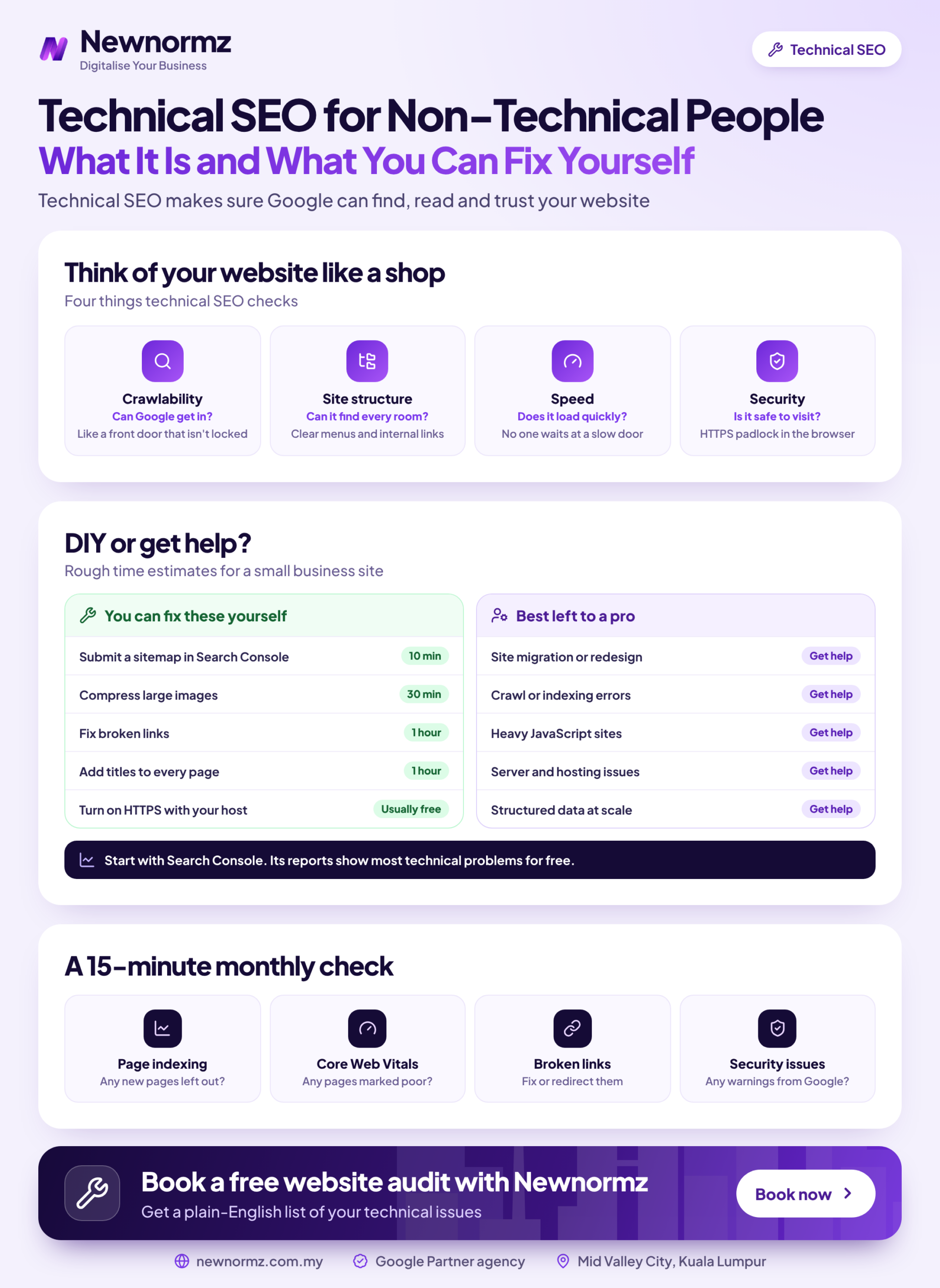
If you’re asking “can I do technical SEO myself?”, the honest answer is yes for diagnosis and simple settings, and no for anything that touches server files or site structure. The rules below cover the technical issues that drag rankings down most often, with a clear point where you should stop.
That last rule matters for technical SEO for small business sites. A 15-page WordPress site for a clinic or a renovation contractor usually has less that can go wrong than a 5,000-product store. Run the checks below every month, fix what’s in your column, and save the budget for content until something actually breaks.
Platform Notes for WordPress, Wix and Shopify Users
WordPress has had a built-in sitemap at /wp-sitemap.xml since version 5.5, and Yoast SEO or Rank Math replace it with a more controllable one (usually /sitemap_index.xml). Both plugins also let you set noindex and canonicals page by page. WordPress gives you the most control, but also the most ways to break things: themes, page builders and plugin conflicts are where most technical problems come from.
Wix generates your sitemap automatically, includes SSL, and lets you edit robots.txt and per-page SEO settings from its SEO dashboard. You can’t touch server settings at all, which keeps beginners safe but limits fixes on larger sites.
Shopify creates sitemap.xml and robots.txt automatically and adds canonical tags to product pages. Its known quirk is that products are reachable through collection URLs as well as /products/ URLs. The canonical tag handles this, but it’s worth knowing when a crawler reports “duplicates”.
A 30-Minute Starting Plan for Technical SEO Beginners in Malaysia
Treat this as a technical SEO simple guide for your first session. It’s the Google Search Console for beginners routine we’d give any new client on day one, and it also covers the question new clients type into Google most often: how to check if Google indexed my website.
Verify a Domain property in Google Search Console
Pick “Domain” rather than “URL prefix” so it covers http, https, www and any subdomains. Verification means adding a TXT record at your domain registrar, so this is where you find out whether you have that login or the old freelancer does.
Submit your XML sitemap
Go to Indexing > Sitemaps and enter your sitemap address (wp-sitemap.xml, sitemap_index.xml or sitemap.xml, depending on platform). XML sitemap submission takes a minute. What you’re looking for is a “Success” status and a count of discovered URLs that roughly matches the number of pages you actually have.
Read the “Why pages aren’t indexed” table
Open Indexing > Pages. Not every reason listed is a problem: “Page with redirect” and “Alternate page with proper canonical tag” are usually fine. Worry when a page you care about appears under “Excluded by ‘noindex’ tag”, “Blocked by robots.txt”, “Not found (404)” or either of the “currently not indexed” statuses.
Inspect your top 3 money pages
Paste each URL into the URL Inspection bar at the top. You want “URL is on Google”, and the “Google-selected canonical” should match the page itself. If it shows a different URL, Google treats your page as a copy of another one.
Check robots.txt basics
Visit yourdomain.com/robots.txt. A short file that blocks admin areas is normal. A line reading Disallow: / under User-agent: * blocks your whole site and needs fixing today.
Crawl the site with a free tool
The free version of Screaming Frog crawls up to 500 URLs, which is enough for most SME sites. Sort the results by status code: 4xx errors are broken pages, and 3xx URLs that point to other 3xx URLs are redirect chains to pass to your developer.
Once these six steps are clean, work through our full technical SEO checklist for the next layer of checks.
Found a Search Console status you can’t make sense of? Send it to us and we’ll tell you whether it’s a DIY fix or one for your developer.
When DIY Stops Being Worth Your Time
The clearest sign you’ve reached your limit is a sudden drop in traffic after a change you can’t fully trace. If that’s happening now, start by understanding why organic traffic suddenly drops before you change anything else, because guessing at fixes often makes things worse.
Three situations almost always cost more in lost traffic than a professional fix: ecommerce catalogues where filters and variants create thousands of near-duplicate URLs, platform or domain migrations, and multilingual sites. Hreflang across English, Bahasa Malaysia and Chinese is easy to get wrong, which is one reason our team of 10+ SEO specialists works in all three languages.
A technical SEO audit Malaysia businesses pay for should do more than hand over a tool’s health score. Be wary of SEO services Malaysia providers who send a long PDF export and call it an audit. A useful one prioritises issues by revenue impact and tells you who fixes each one. At Newnormz, technical work is the “Architecture” stage of the RANKED Framework we built from 200+ Malaysian campaigns. If you’d rather hand the whole thing over, our SEO services in Malaysia include it as standard.
Set realistic expectations either way. In our campaigns, technical fixes usually happen in weeks 2 to 6, and the first ranking movement shows up around day 60 to 90. Sunway TCM Centre is a good example: after a technical rebuild with crawl and indexing fixes, 80% of its target keywords were on page 1 within 4 months. That was a fast result, and it came from fixing the foundations first.
Technical SEO FAQs
What is technical SEO, in simple terms?
Technical SEO is the work that makes sure Google can find, crawl, understand and index your pages. It covers settings like robots.txt, sitemaps, redirects, canonicals and mobile rendering, rather than the words on the page.
Can a technical SEO Malaysia beginner handle the work without coding?
Yes, for the diagnostic half: Search Console checks, sitemap submission, noindex settings and basic redirects through a plugin. Anything involving server files, theme code, migrations or hreflang is better briefed to a developer or specialist.
How do I check if Google has indexed my website?
Paste a page’s URL into the URL Inspection tool in Google Search Console and look for “URL is on Google”. For the whole site, the Indexing > Pages report shows how many pages are indexed and why the rest aren’t. A site:yourdomain.com search on Google gives a rough check but isn’t exact.
Is technical SEO a one-time job or ongoing?
Both: the first cleanup is a project, and monitoring is ongoing. Plugin updates, new pages, theme changes and redesigns all create new issues, so a monthly look at Search Console catches problems before they cost traffic.
How long does it take for technical SEO fixes to show results?
Simple fixes, such as removing an accidental noindex, can show up within days of Google recrawling the page. Broader work takes longer: in Newnormz campaigns, the first ranking movement usually appears around day 60 to 90, depending on how often Google crawls your site.
Does a small business website really need technical SEO?
Yes, but usually only the basics. A small site needs to be crawlable, indexed and mobile-friendly. Beyond that, a site with under 30 pages and a clean Search Console report gets more value from better content than from a paid technical audit.
Free SEO audit
Not sure which of your technical issues you can fix yourself? We’ll sort them for you.
- ✓A check of your indexing status, robots.txt and sitemap, including staging settings carried over to the live site
- ✓A redirect, 404 and duplicate URL review of your most important pages
- ✓Each issue sorted into do it yourself, brief your developer, or needs a specialist

Bryan Tan is an SEO Specialist and CEO at Newnormz, helping hundreds of businesses achieve first-page rankings on Google. With a passion for driving organic growth, Bryan blends innovative strategies with hands-on experience to optimize websites for maximum visibility. Always at the forefront of the latest SEO insights and trends, he consistently adapts to the evolving digital landscape.