A red PageSpeed Insights score of 34 looks like an emergency, and plenty of Malaysian business owners are told it’s the reason they can’t rank. The honest answer, and the starting point for every website speed SEO Malaysia audit we run, is less dramatic. Google’s own page experience documentation says it ranks the most relevant content first, and page experience matters most when several pages are equally useful. So a slow site rarely sinks your rankings on its own. It does lose those close calls, it wastes Googlebot’s time, and it quietly loses WhatsApp enquiries from people who got tired of waiting.
This guide is for Malaysian SME owners and in-house marketers, usually on WordPress. By the end you’ll know whether speed is really behind your ranking problem, which seven mistakes to fix for free this week, and when it’s worth paying for hosting, a developer or an agency.
Website Speed SEO Malaysia: How Much a Slow Site Really Costs You
Does website speed affect SEO? Yes, but as a tiebreaker. Core Web Vitals feed into Google’s page experience signals. If your page answers the search better than a faster competitor’s, you can still outrank them. If the two pages are close, the slower one tends to lose. So the page speed Google ranking connection is real, but narrow.
The bigger costs don’t show up in your rankings. A visitor on a phone who waits five seconds for your banner often just hits back and taps the next result, and you never see that lost enquiry. Slow server responses also mean Googlebot crawls fewer pages per visit. For a 30-page service site that barely matters. For an online store with thousands of product and filter URLs, it can leave new products waiting weeks to be indexed.
Speed is a tiebreaker in Google’s ranking, not a rocket. Fix it for your customers first and the ranking benefit follows.
Run a Free Website Speed Test the Way Google Sees It
Here’s how to check website speed properly in about 10 minutes. Google holds roughly 93 to 96% of Malaysian search (Statcounter), so Google’s tools and thresholds are the only ones worth chasing.
Open Google PageSpeed Insights, enter your homepage and your most important service or product page, and look at the Mobile tab first. Google uses mobile-first indexing, so the mobile version of your page is the one it judges. The report has two halves. The top part is field data from the Chrome User Experience Report (CrUX): real visitors over the last 28 days. The lower part, with the 0 to 100 score, is lab data from one simulated load on a mid-range phone.
Then open Google Search Console and go to the Core Web Vitals report. It groups your URLs into Good, Needs improvement and Poor using the same field data, which shows you whether the problem is one template or the whole site.
| Metric | Good (Google’s threshold) | Poor | What your visitor feels |
|---|---|---|---|
| Largest Contentful Paint (LCP) | 2.5 seconds or less | Over 4 seconds | The main banner or headline appears late, so the page looks blank |
| Interaction to Next Paint (INP) | 200 milliseconds or less | Over 500 milliseconds | They tap the menu or WhatsApp button and nothing happens for a moment |
| Cumulative Layout Shift (CLS) | 0.1 or less | Over 0.25 | The page jumps as it loads and they tap the wrong thing |
| PageSpeed Insights score (lab) | 90 to 100 | 0 to 49 | Nothing directly. It’s a diagnostic number, not what Google ranks on |
Google judges each metric at the 75th percentile of real visits, so most of your visitors need a good experience, not just you on office Wi-Fi. In the Core Web Vitals Malaysia audits we run, mobile LCP is usually the first metric to fail. For what each score means in more depth, see our guide to what each Core Web Vitals score means.
Why Many Malaysian SME Sites Show “No Data” (and What to Trust Instead)
If PageSpeed Insights says there’s no real-user data for your site, you haven’t done anything wrong. CrUX only reports a page or site once enough Chrome users have visited it over the past 28 days, and many local service businesses never reach that level. Search Console’s Core Web Vitals report will usually be empty for the same reason.
Malaysia note
Without field data, use two checks. First, the lab numbers (LCP and Total Blocking Time in particular). Second, a real test: open your site on an ordinary Android phone over mobile data, not Wi-Fi, and time how long the banner and WhatsApp button take to appear. DataReportal’s Digital 2026: Malaysia report puts the country at 35M+ internet users and about 98% penetration, and most of those people will find you on a phone.
If you want a second opinion beyond Google’s tools, we’ve compared the free SEO tools we have tested, including the speed testers worth keeping.
7 Website Loading Speed Mistakes We See Again and Again in Malaysian Site Audits
These patterns come up over and over when we audit Malaysian SME websites. They’re listed roughly in order of how much damage they do, and all but the last can be fixed for free.
1. Uploading 4MB Phone Photos as Homepage Banners
✗ The shop photo straight from the phone goes into the hero slot
A modern phone photo is often 4,000 pixels wide and several megabytes. The banner is usually the largest element on the page, so it decides your Largest Contentful Paint. On a mobile connection, that one file can push LCP well past 4 seconds.
✓ The fix
Resize the image to the width it actually displays at (around 1,920px for a full-width desktop banner), convert it to WebP and compress it with a free tool such as Google’s Squoosh. Illustrative example: a 4.2MB JPEG resized and saved as WebP at 80% quality often comes out at 150 to 250KB. Don’t lazy-load the hero image, because that delays the very element LCP measures. Lazy-load the images further down the page instead.
2. Hosting in the US When Your Customers Are in Kuala Lumpur
✗ The cheapest shared plan, on a server on the other side of the world
Every uncached request travels from Klang Valley to a data centre in the US and back. That adds delay before the browser receives a single byte, which raises server response time and pushes every other metric back with it. Cheap overseas shared plans also tend to pack hundreds of sites onto one server.
✓ The fix
When comparing web hosting Malaysia speed claims, ignore the marketing and check where the data centre is: choose a plan in Malaysia or Singapore. If you can’t move yet, put the free Cloudflare plan in front of your site so images, CSS and scripts are served from servers closer to your visitors. Our view: skip the RM10-a-month overseas plan. It’s the most expensive saving you’ll make.
3. Loading Full Chinese Web Fonts on Every Page
✗ A bilingual EN/CN site that downloads an entire Chinese font set
Chinese (CJK) fonts contain thousands of characters, so a full font file can run to several megabytes per weight, against tens of kilobytes for a Latin font. Google Fonts now splits Chinese fonts into smaller pieces, but many themes and page builders self-host or bundle the full file, and some load it even on English-only pages. Text stays invisible or reflows until the font arrives.
✓ The fix
Use system fonts for Chinese text (PingFang on Apple devices, Microsoft YaHei on Windows, Noto Sans CJK on most Android phones). They’re already on the visitor’s device and look clean. If brand rules require a custom Chinese font, subset it to the characters you actually use. Keep your Latin font to two weights, such as regular and bold.
4. Stacking WhatsApp Widgets, Live Chat and Three Pixels Until the Page Freezes
✗ Every marketing tool fires the moment the page opens
Meta Pixel, TikTok pixel, GA4, a live chat plugin and a WhatsApp chat widget all compete for the phone’s processor while the page loads. Often GA4 is installed twice, once in the theme and once in Google Tag Manager. The result is a poor INP score, slower mobile page speed and a WhatsApp button that doesn’t respond when tapped, which is the one tap you most need to work.
✓ The fix
Open Google Tag Manager and list every tag. Remove duplicates and anything nobody has looked at in six months. Replace the WhatsApp chat plugin with a plain button linking to wa.me/60XXXXXXXXX: it does the same job without any script. Delay non-essential scripts, such as chat and secondary pixels, until the visitor first scrolls or taps, using the delay-JavaScript option many WordPress optimisation plugins provide.
INP replaced First Input Delay as a Core Web Vital in 2024, which is why script-heavy sites that used to pass now fail. Our explainer on Google’s switch from FID to INP covers what changed.
5. Running Elementor With 40 Plugins and No Caching
✗ Years of “just install a plugin for that”
Elementor itself is workable. The problem is the pile around it: three add-on widget packs, a slider plugin, a form plugin you replaced but never removed, all loading their CSS and JavaScript on every page. Without page caching, WordPress rebuilds every page from the database for every visitor.
✓ The fix
Take a backup, then deactivate unused plugins one at a time, testing the site after each one, and delete the ones you don’t need. Add a free caching plugin (LiteSpeed Cache if your host runs LiteSpeed, otherwise a free option such as WP Super Cache). Stop sliders and add-on widgets loading sitewide when only one page uses them. This one step covers most of the WordPress speed optimisation Malaysia SME sites need.
6. Sliders, Pop-ups and Late Banners That Push the Page Around
✗ The layout jumps just as the visitor goes to tap
Images without set dimensions, a promo bar that drops in after two seconds, and a homepage carousel resizing between slides all push content down. That’s Cumulative Layout Shift, and on mobile it means accidental taps and frustrated visitors.
✓ The fix
Set width and height on every image, reserve fixed space for any banner or embed, and replace the carousel with one static hero image and one clear call to action. Decision rule: check the click data, and if nobody clicks slide 2, delete the slider.
7. “Fixing” Speed With a Redesign That Breaks Every URL
This is the costliest mistake on the list, and it usually starts with good intentions. Someone decides the old site is too slow, a new one goes live, the URLs change and nobody redirects the old ones. Every ranking those pages had built up is gone overnight.
Client example
My Lovely Baby: 100% of lost traffic recovered after a broken upgrade
Problem: A site upgrade broke the store’s URLs and traffic dropped overnight.
What we did: A full migration audit and recovery to reconnect old URLs with their new pages.
Result: 100% of lost traffic recovered, with 85% of target keywords on page 1 within 9 months, including “baby shop”, “baby stroller” and “baby car seat”.
The recovery worked, but it took months that a redirect map would have saved. Before any rebuild, export every live URL, map each one to its new address and set up 301 redirects before launch. If the damage is already done, follow our steps for recovering from a sudden ranking drop.
From our audits
The pattern we see most isn’t one big problem. It’s mistakes 1, 4 and 5 together: an oversized banner, a stack of scripts and an overloaded WordPress install. Each one alone is survivable, but together they turn a 2-second page into an 8-second one. That’s why there’s no single slow website fix, and why the order below matters more than any one trick.
How to Improve Website Speed in Malaysia for Free: The Order That Gets the Biggest Wins First
Most guides on how to improve website speed Malaysia SMEs read start with hosting. Start with images instead. Each step below is ranked by how much it usually improves the result for each hour of work, and you should re-run PageSpeed Insights after every step so you know what actually helped.
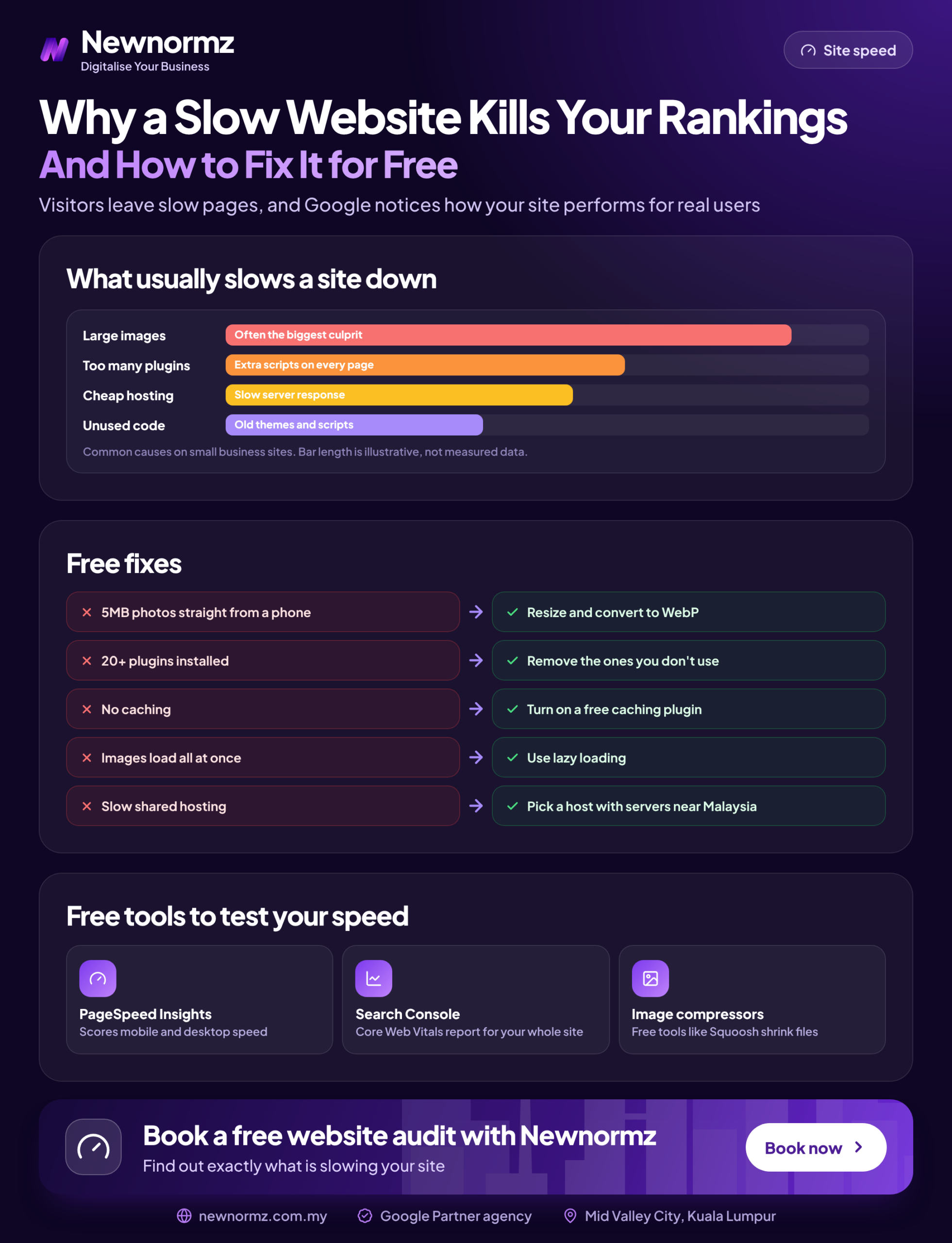
Images (1 to 2 hours)
Resize and convert your banner and above-the-fold images to WebP, and turn on lazy loading for everything below the fold. This is usually the biggest single LCP gain.
Scripts (1 hour)
Clean up Google Tag Manager, remove duplicate tracking, swap the WhatsApp widget for a wa.me button and delay chat and secondary pixels.
Plugins and caching (2 hours)
Remove unused plugins one at a time, then install and configure one free caching plugin. Never run two caching plugins together.
Free CDN (30 minutes)
Point your domain through the free Cloudflare plan, especially if your host is outside Malaysia or Singapore. Purge its cache after any design change.
Fonts (30 minutes)
Switch Chinese text to system fonts or a subset, and cut Latin fonts to two weights.
Layout shift (1 hour)
Add image dimensions, reserve banner space and replace the slider with a static hero image. Then test again on a real phone over mobile data.
What a Faster Site Is Worth: Run Your Own Numbers
Here’s a way to put a ringgit value on speed work. The figures below are illustrative, so swap in your own from Google Analytics and your WhatsApp records. This is a calculation method, not a promised uplift.
Say your site gets 2,000 mobile visits a month and 2% of them send a WhatsApp enquiry: that’s 40 enquiries. If you close one in four at an average job value of RM500, that’s 10 jobs and RM5,000 a month. If a faster, more responsive page moves the enquiry rate from 2.0% to 2.2%, you get 44 enquiries, 11 jobs and RM5,500. That’s RM500 more a month, or RM6,000 a year, from roughly a day of free work.
The six steps above cover the fixes that matter most for Malaysian sites. For more website loading speed fixes, including server-side options, see our wider guide.
Quick self-check before you pay anyone
- ✓Your hero image is under about 300KB and isn’t lazy-loaded.
- ✓Each tracking tag fires once, and chat scripts are delayed.
- ✓One caching plugin is active and unused plugins are deleted.
- ✓Your server is in Malaysia or Singapore, or behind Cloudflare.
- ✓Nothing on the page jumps while it loads on your own phone.
Page Speed and Google Ranking: What Changes After You Fix It
Expect results in three stages. Lab scores in PageSpeed Insights change the moment you re-test. Field data takes longer because CrUX uses a rolling 28-day window, so Search Console’s Core Web Vitals report needs about a month to confirm the fix. When you click “Validate fix”, Search Console watches the affected URLs over that same 28-day period.
Rankings are the slowest and least predictable stage, because speed is one signal among many. If your content is thin or you have few links, a fast site still won’t rank, and Google has said publicly that no one can guarantee a specific ranking position. For context, on full Newnormz SEO campaigns the typical timeline is technical fixes in weeks 2 to 6 and first ranking movement around day 60 to 90. That’s for complete campaigns, not a promise for speed work alone.
If your speed passes and rankings still haven’t moved, check the other technical problems holding rankings back, such as indexing gaps and duplicate pages.
When Free Fixes Stop Being Enough
Free fixes take most SME sites from poor to acceptable. If yours is still slow after all six steps, the bottleneck is usually something you can’t fix from the WordPress dashboard.
Technical work pays off most when it’s part of a complete SEO plan rather than a one-off speed project. If you’d rather hand over speed, crawling, content and links together, that’s what our SEO services in Malaysia cover, on month-to-month terms from RM2,900/month (excl. SST).
Client example
Sunway TCM Centre: 80% of target keywords on page 1 within 4 months
Problem: Technical issues were holding back a strong TCM practice in the Klang Valley.
What we did: A technical rebuild, crawl and indexing fixes, and AEO structuring as part of a full SEO campaign.
Result: +150% keywords and 80% of target keywords on page 1 within 4 months, including “TCM Malaysia” and “Acupuncture KL”.
If your theme is the problem and a rebuild makes sense, our web design services in Malaysia build fast sites with SEO migration planned from the first day.
Website Speed SEO Questions Malaysian Owners Ask Us
Does website speed affect Google ranking in Malaysia?
Yes, but modestly. Core Web Vitals are part of Google’s page experience signals and work the same way in Malaysia as anywhere else. Google says relevance comes first, so speed mostly decides between pages that are otherwise equally good.
What is a good PageSpeed Insights score for SEO?
Passing Core Web Vitals matters more than the score. The 0 to 100 PageSpeed Insights score is a lab diagnostic, and 90+ counts as good. A mobile score in the 60s or 70s with passing LCP, INP and CLS field data is fine for ranking.
Why does PageSpeed Insights say “no data” for my website?
Your site hasn’t had enough Chrome visitors in the past 28 days for the Chrome User Experience Report to publish field data. This is normal for smaller sites. Use the lab results plus a real-phone test on mobile data instead.
Why is my WordPress website slow on mobile?
The usual causes are oversized images, too many plugins and scripts, and slow or distant hosting. PageSpeed Insights simulates a mid-range phone on a throttled connection, so problems your office desktop hides show up clearly on mobile.
Can I improve website speed without hiring a developer?
Yes, for most SME sites. Compressing images, removing plugins, adding a caching plugin, turning on Cloudflare’s free plan and replacing the WhatsApp widget all need no code. You need a developer for theme rebuilds, server configuration or custom code.
Does hosting my website outside Malaysia make it slower?
Usually yes for uncached pages, because every request travels further. A Malaysia or Singapore data centre keeps response times short for local visitors. A CDN narrows the gap for images and files, but not for the first page request.
How long after fixing speed will my Google rankings improve?
Expect about a month before Google’s field data reflects the fix, and longer for rankings. CrUX uses a rolling 28-day window. Ranking movement then depends on your content and links, and on full campaigns we typically see first movement around day 60 to 90.
Do I need a PageSpeed score of 100?
No. Once your pages pass Google’s Core Web Vitals thresholds, extra points bring little ranking benefit. Spend that time on content and enquiries instead.
Not sure whether speed or something else is holding your rankings back?
Newnormz runs SEO for 200+ Malaysian businesses on month-to-month terms, with a written page 1 guarantee and a 5.0 rating from 214+ Google reviews. No lock-in contracts. Ask for a technical and speed review: send us a WhatsApp message on +60 17-588 2291 and a strategist will reply within business hours.
Prefer a form? Free SEO audit

Bryan Tan is an SEO Specialist and CEO at Newnormz, helping hundreds of businesses achieve first-page rankings on Google. With a passion for driving organic growth, Bryan blends innovative strategies with hands-on experience to optimize websites for maximum visibility. Always at the forefront of the latest SEO insights and trends, he consistently adapts to the evolving digital landscape.