Picture a Kuala Lumpur company blog with 80 posts. Three of them bring in most of the organic traffic. About a dozen sit on page 2 of Google. Nobody has opened the rest since 2023. Most people searching “update old content SEO Malaysia” are in exactly this position, and the answer is to start with those dozen page-2 posts. Google has already indexed them, already shows them to searchers and already ranks them in positions 11 to 20. A targeted refresh moves them up faster than any new article can, because a new post starts from zero.
This guide is for SME owners, in-house marketers and content executives with 20 to 200 ageing blog posts. By the end you will be able to pick, refresh and track your first 3 posts, spending about one working day on each.
Why Updating Old Content Beats Writing New Posts When You’re Starting Out
A post that has been live for two years has things a new post doesn’t: impressions, a crawl history, perhaps a few backlinks and internal links. Over time it also suffers content decay. Competitors publish fresher pages, your facts go out of date, and the post slowly slips from page 1 to page 2. The fix is known as historical optimisation SEO: improving what already exists instead of starting again. When you refresh blog posts for SEO, you build on all that history. A new post has to earn it from scratch.
Here is why the gap matters in ringgit. The numbers are illustrative, so swap in your own. Say a post sits at position 14 and gets 3,000 impressions a month in Search Console. At page-2 click-through rates of around 0.5%, that is about 15 clicks. Move it to position 5 at about 5% CTR and you get about 150 clicks. At a 2% enquiry rate, that is 3 WhatsApp or form enquiries a month instead of 0.3. If you sell a service with an RM1,500 average job value and close one enquiry in three, one refreshed post brings in roughly RM1,500 a month, or RM18,000 a year. Run this sum for every page-2 post and you can rank your refresh list by revenue, not traffic.
Sometimes a new article really is the better choice, for example when no existing post comes close to matching the query. In that case, follow our framework for writing SEO blog posts. The rest of this guide is about the posts you already have.
From our audits
The outdated content SEO problems we find on Malaysian blogs are the same again and again. Prices are quoted in RM figures that changed two price lists ago. Posts still mention the old 6% service tax, which rose to 8% for most taxable services in 2024. Titles still say “2022”, WhatsApp numbers no longer reply, and tutorials point to tools that have shut down. Every one of these tells readers, and Google, that nobody looks after the page.
Before You Start: What You Need to Refresh Blog Posts Properly
Get these ready before you start. Most of them are free, and setting them up takes less than an hour.
Content refresh checklist: tools and access
- ✓Google Search Console access with at least 12 months of data, so you can compare year on year.
- ✓Google Analytics 4, with WhatsApp clicks and form submissions set up as key events.
- ✓A spreadsheet to log each URL, what you changed, and the date you changed it.
- ✓WordPress editor access and an SEO plugin (Yoast SEO or Rank Math) for title tags, meta descriptions and schema.
- ✓Optional: a free or trial Ahrefs or Semrush account to check backlinks and competitor headings.
- ✓A current list of your prices, services and contact details, checked against your live site.
How to Update Old Content for SEO in Malaysia: The 8-Step Process
The process has two phases. First you find the posts that are worth your time. Then you fix whatever is holding each one back. Don’t skip the first phase: refreshing the wrong post is a day of work with nothing to show for it.
Phase 1: Find the Posts Worth Refreshing (Steps 1 to 3)
Pull your striking distance keywords
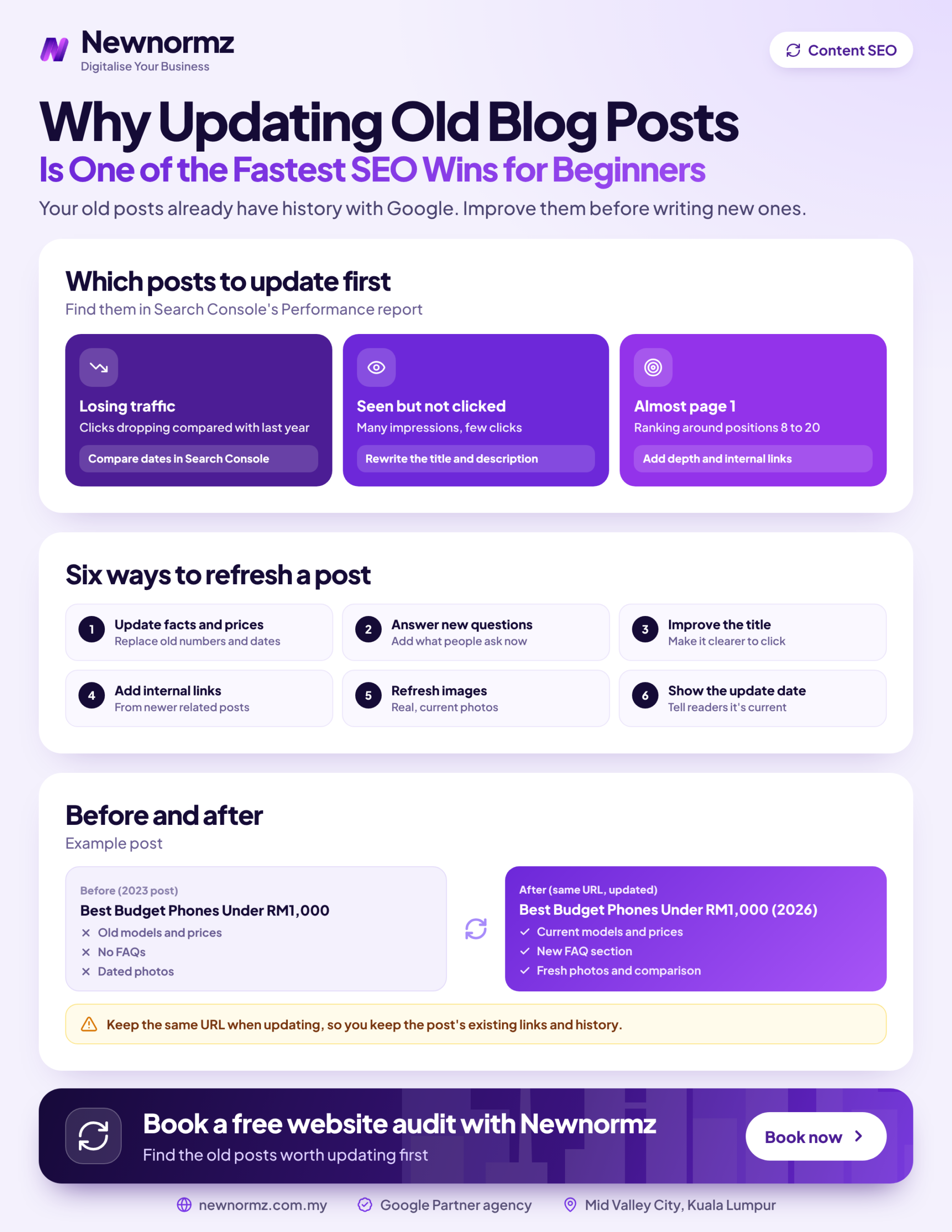
In Search Console, open Performance, set the date range to the last 3 months and switch on Average position. Use the table filter to show positions from 8 to 20, then sort by impressions. These Google Search Console page 2 keywords, and the pages ranking for them, make up your shortlist. Export the list to your spreadsheet.
Spot content decay year on year
Set the date filter to Compare and choose the last 3 months against the same period last year. On the Pages tab, look for URLs whose clicks or impressions have dropped sharply. A post that used to rank and is now sliding is usually the easiest win of all, because Google has already shown it can rank the page.
Sort every post into refresh, merge or prune
Your content update strategy depends on this one decision. Tag each URL in your spreadsheet using the rules below, then work through the refresh pile first, starting with the highest estimated revenue.
Pruning takes more care than it looks, so read our guide on when pruning beats refreshing before you delete anything.
Phase 2: Fix What’s Holding Each Post Back (Steps 4 to 8)
Answer the queries the post already gets
In Performance, filter by the page URL and open the Queries tab. You will often see Bahasa Malaysia and Manglish searches your English post was never written for, such as “harga servis aircond” on an aircond servicing guide. Work the missing topics into new H2s or H3s and a short FAQ, and use structuring answers around real questions as your model.
Replace every outdated fact
Check prices against your current price list, update years and screenshots, correct SST references, test every phone and WhatsApp number, and swap out discontinued tools. Add something only you can offer, such as a real example or a recent figure from your own work, because that first-hand experience is what E-E-A-T rewards. Cut stale sections, but leave in place the ones that already rank.
Rewrite the title tag and meta description, not the URL
Page-2 posts often have titles that no longer match the query people type. In Yoast or Rank Math, rewrite the title so the main query comes first and the promise is specific. Write a meta description that gives searchers a reason to click. Leave the slug exactly as it is.
Point internal links at the refreshed post
Add 2 or 3 links to the refreshed post from newer, related posts, using descriptive anchor text. Then link from it to your relevant service page so the extra traffic has somewhere to convert. If your blog has never had a structure, start with a proper internal linking plan.
Update the date and schema, then request indexing
Show a visible “last updated” date only when the changes are substantial. Google’s helpful content guidance asks site owners directly whether they change dates to make pages seem fresh when the content hasn’t really changed. Update the dateModified field in your Article schema, add FAQPage schema if you added a FAQ, then paste the URL into Search Console’s URL Inspection tool and click Request Indexing.
This approach builds on itself over time. For Oriental Kopi, we optimised existing content around the queries people actually search, such as “kopi”, “white coffee” and “3 in 1 coffee”, and added full schema. Ranked keywords grew by 350%, and over a 2-year SEO campaign the site gained 24,500 more ranking keywords.
How to Check Your Content Update Strategy Actually Worked
For each refreshed URL, compare the 28 days before the refresh with the 28 days after it, using Search Console’s date comparison filtered to that page. Watch three numbers: impressions, average position and CTR. Then check GA4 to see whether the post is producing more key events, such as WhatsApp clicks and form submissions. Traffic that doesn’t turn into enquiries only counts as half a win.
| Metric | Where to find it | What “good” looks like |
|---|---|---|
| Impressions | Search Console, Performance, page filter | Rising, with new queries appearing |
| Average position | Search Console, Performance | Moving from 11 to 20 towards single digits |
| CTR | Search Console, Performance | Higher at the same position (your new title is working) |
| Key events | GA4, Reports, Engagement, Key events | More WhatsApp clicks and form submits from the page |
Set realistic expectations. Google usually recrawls a refreshed page within days to a few weeks. For posts that were already on page 2, rankings usually move within 4 to 8 weeks. That is faster than a full SEO campaign, where Newnormz tells clients to expect first ranking movement between day 60 and day 90, and traffic and lead growth in months 4 to 8. Google itself says no one can guarantee a ranking, so treat these as typical ranges, not promises.
There is also a bonus for AI search. Industry studies put about 76% of Google AI Overview citations on pages already in the traditional top 10, so getting a post onto page 1 also gives it a much better chance of being cited. Sunway TCM Centre shows how this works: after AEO structuring, 80% of its target keywords reached page 1 within 4 months, and the site now appears in AI Overviews for treatment searches. Our article on how freshness affects AI search visibility covers this in more depth.
Common Mistakes When Refreshing Old Blog Posts (and the Fixes)
✗ Changing the URL during the refresh with no 301 redirect
A “cleaner” slug looks harmless, but Google treats it as a brand-new page and the old rankings can disappear overnight. We saw how costly broken URLs are with My Lovely Baby: a site upgrade broke URLs and traffic dropped overnight. It took a full migration audit and recovery to win back 100% of the lost traffic and get 85% of target keywords onto page 1 within 9 months.
✓ The fix
Keep the URL. If you absolutely must change it, add a 301 redirect from the old URL on the same day and update every internal link that points to it.
✗ Updating the date and nothing else
This is fake freshness. Readers notice the 2022 prices under a 2026 date, and Google’s own guidance warns against it.
✓ The fix
Change the date only after you have made real changes in Steps 4 to 7, and record those changes in your spreadsheet.
✗ Rewriting the whole post from scratch
A full rewrite often deletes the paragraphs Google was ranking the post for in the first place, and the post drops further.
✓ The fix
Use the Queries tab to find out which sections bring in impressions. Keep those, and add what’s missing around them.
✗ Refreshing 30 posts at once with no tracking
When everything changes in the same week, you can’t tell which edits helped, so you can’t repeat them.
✓ The fix
Refresh 3 to 5 posts, log the dates, wait 4 weeks and review the results. Then do the next batch using what worked.
If you have hundreds of posts, or the refresh uncovers problems like redirect chains, indexing errors or duplicate pages, that is the point to bring in an SEO agency in Malaysia that can fix the technical side while the content work continues.
If the tracking is easy but finding a day per post is not, our SEO content writing support can handle the rewrites while you keep control of the plan.
Not sure which of your old posts are worth saving? We’ll show you the page-2 posts closest to page 1.
Refresh Blog Posts SEO FAQs
How often should I update old blog posts for SEO?
Review your important posts every 6 to 12 months, and refresh them whenever Search Console shows decay or a fact goes out of date. Posts that mention prices, tax or regulations need checking more often than evergreen how-to guides. A quarterly look at your page-2 list is a manageable habit for most SME blogs.
Does changing the post date help SEO?
No. Changing the date on its own does not improve rankings, and Google’s helpful content guidance specifically warns against it. A new date only helps when it reflects real changes, because it tells readers the information is current. When you republish old blog posts, do the substantive work first.
Should I change the URL when I update an old post?
Almost never. The URL holds the post’s ranking history and backlinks, so changing it puts all of that at risk. If you must change it, set up a 301 redirect from the old URL immediately and update your internal links.
How long does it take to see results after updating old content?
For posts already on page 2, rankings usually start to move within 4 to 8 weeks. Google tends to recrawl within days to weeks, especially if you request indexing. Posts that ranked lower to begin with, or that sit on sites with technical problems, take longer.
Is it better to update an old post or write a new one?
If an existing post already gets impressions for the query, update it. That is the quickest way to improve rankings of existing pages. Write a new post only when nothing on your site matches what the searcher wants, or when the topic is different enough to deserve its own page.
Which of your old posts are closest to page 1?
Newnormz runs SEO for 200+ Malaysian businesses on month-to-month terms, with a written page 1 guarantee and a 5.0 rating from 214+ Google reviews. Send us a WhatsApp message and a strategist will reply within business hours.
Prefer a form? Free SEO audit

Bryan Tan is an SEO Specialist and CEO at Newnormz, helping hundreds of businesses achieve first-page rankings on Google. With a passion for driving organic growth, Bryan blends innovative strategies with hands-on experience to optimize websites for maximum visibility. Always at the forefront of the latest SEO insights and trends, he consistently adapts to the evolving digital landscape.