Internal linking is the practice of connecting the pages on your own website to each other with hyperlinks, and it is one of the few ranking levers you control completely. Done well, it tells Google which pages matter most, helps search engines crawl your whole site instead of missing large parts of it, and gives every article context about what it is actually about. You do not need new backlinks or a bigger content budget to see movement here. Most sites already have enough pages published; those pages just are not talking to each other.
A Simple Way to Think About It
A Warehouse With No Aisle Signs
📦 No Signage
Picture a warehouse packed floor to ceiling with boxes, no aisle numbers, no directory at the door. Even the best stock in the building goes unsold, because nobody, staff included, can find it.
🗺️ A Clear Directory
Now picture the same warehouse with numbered aisles and a directory at the entrance. A new shipment gets shelved, tagged, and connected to related stock within the hour, and anyone walking in finds it straight away.
Your website works the same way. The sections below cover how to build that signage: anchor text, cluster structure, and the orphan pages currently sitting in the dark.
Why Internal Links Matter
An internal link points from one page on your site to another page on the same site. That sounds trivial, but it does three separate jobs at once, and getting them right is often the difference between content that ranks and content that sits invisible.
Crawling and Discovery
Search engines find pages by following links. Pages buried four or more clicks from your homepage get crawled far less often than pages within two clicks. In one large-scale study of 2.5 million links, roughly a quarter of the pages checked had received no internal links at all, which makes them genuinely hard for Google to find. A shallow, well-linked structure gets crawled and indexed faster than a deep, disconnected one.
Authority Flow
Links pass ranking signals, often called link equity, from one page to another. When a strong page links to a weaker one, it shares some of that strength. This is why pointing internal links at your key pages on purpose, rather than scattering them randomly, actually moves rankings. If you run an SEO agency in Malaysia comparison in your head, this is one of the parts most agencies skip because it takes patience rather than a big budget.
Context
The anchor text and the content around it tell Google what the linked page is actually about. A cluster of related articles all linking to one central page signals that the central page is the authority on that topic. This matters more than it used to, now that search and AI systems are trying to map how the pieces of your site fit together, not just count pages.
Getting Anchor Text Right
Anchor text is the visible, clickable words of a link, and it is the single most controllable signal in internal linking. Most sites waste it on vague phrases like “click here” or “read more” that tell Google nothing about the destination.
The rule is simple: anchor text should be descriptive, reasonably short, and relevant to both the page it sits on and the page it points to. If you are linking to a page about SEO pricing, the anchor should say something close to “SEO pricing packages,” not “learn more.” That single habit helps readers know where they are going before they click, and helps Google understand the destination page.
A few practical rules to keep in mind: vary your anchors naturally instead of repeating the exact same phrase on every link, keep them short, and make sure the words genuinely describe the target. Do not stuff a keyword into every anchor. Write for a human first, and the relevance signal follows on its own.
Hub-and-Spoke Cluster Linking
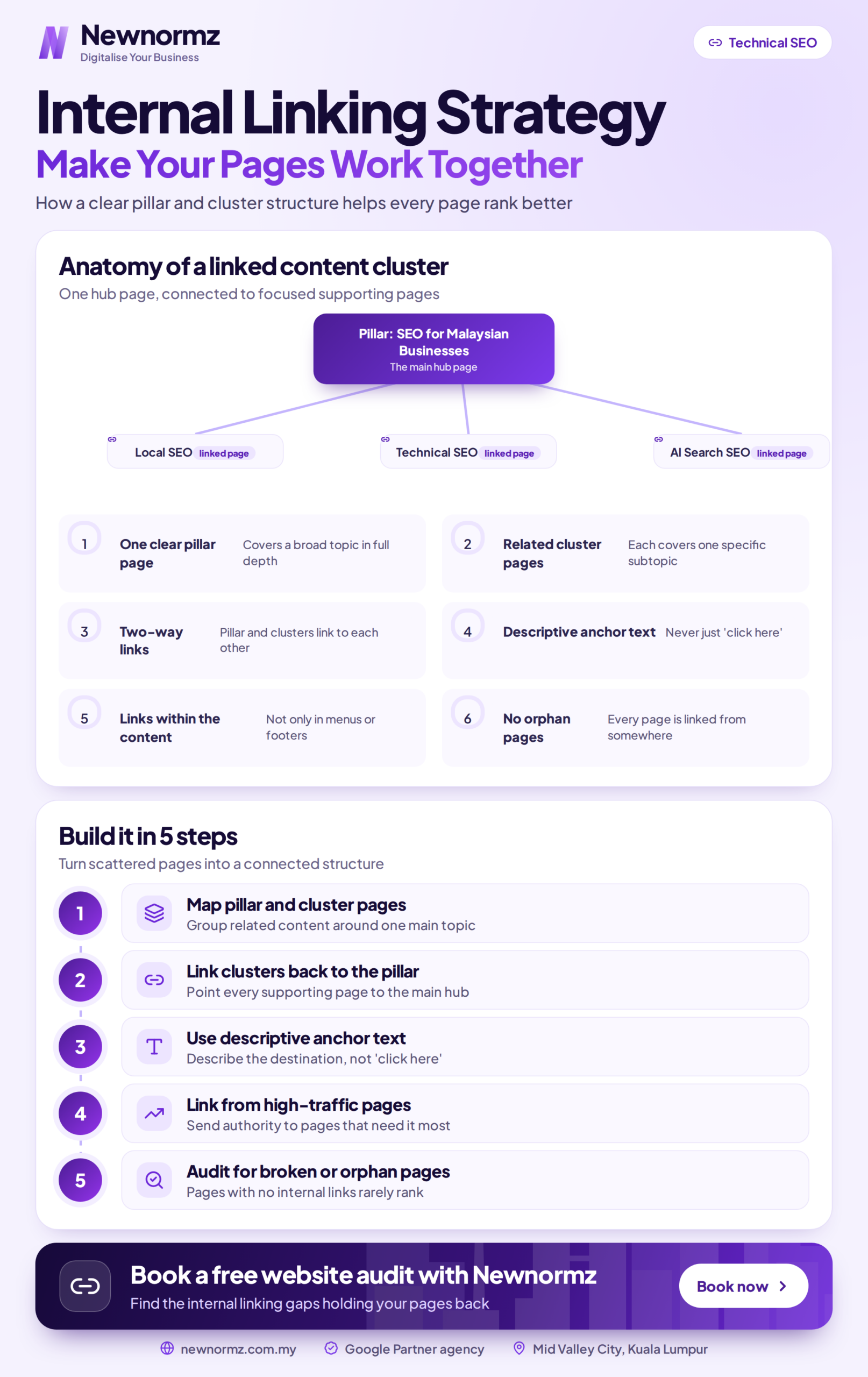
The most reliable internal linking model is hub-and-spoke, sometimes called topic clusters. You build one broad, authoritative page (the hub) and several detailed articles on subtopics (the spokes). Every spoke links up to the hub, the hub links down to each relevant spoke, and related spokes link across to each other where it makes sense.
This structure concentrates authority around the hub and signals topical depth to Google. Content organised into clusters tends to hold rankings longer than isolated one-off posts, simply because the pages reinforce each other instead of quietly competing for the same handful of readers. If your business serves specific areas of Malaysia, the same logic applies to your local SEO pages: they should link to and from the content that supports them, not sit on their own.
The practical takeaway: before you publish anything, know which cluster it belongs to and which hub page it should support. Random links across unrelated topics do very little. Deliberate links within a tight topic do a lot.
Finding and Fixing Orphan Pages
An orphan page is a live page with no internal links pointing to it. Google can struggle to find it, it rarely ranks, and it quietly drains crawl budget that should be going to your important content. Most sites have more of these than they realise: old blog posts, landing pages, or product pages that were published once and never linked to again.
To find them, crawl your site with a tool such as Screaming Frog, Ahrefs, or Semrush, then cross-reference the crawl against your XML sitemap. Any indexable URL in the sitemap with zero internal links pointing to it is an orphan. The fix is straightforward: add two or three contextual links to each orphan from relevant, existing pages, ideally from within its topic cluster. Redirect or remove the ones that genuinely serve no purpose anymore. Treat this as a recurring habit, not a one-off cleanup you do once and forget.
How Many Internal Links Is Sensible
There is no magic number, but there is a sensible range. A common rule of thumb is roughly one contextual link every 150 to 300 words, which keeps links relevant instead of forced in just to hit a target.
| Article Length | Sensible Internal Links | What They Should Cover |
|---|---|---|
| Under 1,000 words | 2 to 4 | The hub page plus one or two related posts |
| 1,000 to 2,000 words | 5 to 8 | The hub, sibling posts, and one relevant service page |
| 2,000+ words (hub page) | 10 to 15+ | Every spoke in the cluster it supports |
Google can crawl well over a hundred links on a single page, so the old idea of a hard “150 link maximum” is outdated as a strict rule. The real risk is not a raw number, it is dilution: cramming in dozens of low-value links spreads authority thin and reads as spam to both readers and Google. Every link should earn its place by being genuinely useful to whoever is reading.
A Five-Link Checklist for Every New Post
Theory is easy; the habit is what actually moves rankings. Say you have just written a new post on, for example, keyword research basics. Before you hit publish, plan its links in both directions: pages this post should link out to, and existing pages that should link back to it.
| Direction | Page | Why It Works |
|---|---|---|
| Out, up to the hub | Your main SEO or service page | Passes context up to the page you most want to rank |
| Out, to a sibling post | A closely related article in the same cluster | Natural next step for the reader, keeps them on site |
| In, from the hub | Your main SEO or service page, edited to add a link down | Sends authority down to the new post immediately |
| In, from an older post | Your strongest existing article on the topic | Passes established ranking power to brand new content |
Before this exercise, a new post typically goes live with no internal links pointing to it at all. It is effectively an orphan on day one, invisible to its own cluster and slow to get crawled. After it, three outbound links place the post inside the cluster, and two inbound links from the hub and an older, stronger post pass authority to it straight away. The new post has context, discoverability, and a share of your site’s ranking power from the moment it publishes, instead of waiting months to be noticed. Repeat this for every post, and within a quarter your blog starts behaving like a connected network instead of a pile of disconnected pages.
Common Internal Linking Mistakes
Generic anchor text. “Click here” and “read more” waste your strongest context signal on nothing.
Linking only outward. Every new post needs inbound links from existing pages too, not just links going out from it.
Ignoring old content. Your oldest, strongest pages are usually the best sources of authority for new posts, and they get overlooked constantly.
Random, off-topic links. Links across unrelated topics do little for either readers or rankings; deliberate links within a tight cluster do a lot.
Never auditing. Orphan pages and broken links accumulate silently in the background. Check on a set schedule, not “whenever there’s time.”
Frequently Asked Questions
What is internal linking in SEO?
Internal linking is the practice of connecting pages on the same website with hyperlinks. It helps search engines discover and crawl your pages, passes ranking authority between them, and uses anchor text to signal what each linked page is about. It is one of the few high-leverage SEO tactics you fully control.
Do internal links actually affect rankings?
Yes. Internal links pass authority to the pages they point to and help Google understand which pages on your site matter most. Many ranking gains come from restructuring internal links rather than building new backlinks, because you are directing authority you already have toward the pages you most want to rank.
How many internal links should a page have?
A sensible guide is roughly one contextual link every 150 to 300 words, so a 1,500-word post might carry five to eight. Long hub pages can hold fifteen or more. There is no strict limit, but every link should be genuinely relevant rather than added just to hit a number.
What is an orphan page?
An orphan page is a live page with no internal links pointing to it from anywhere else on your site. Search engines struggle to find it, it rarely ranks, and it wastes crawl budget. Fix orphans by adding two or three contextual links from relevant existing pages, or redirect the ones that have no real purpose left.
What anchor text should I use for internal links?
Use descriptive, concise anchor text that reflects the destination page, such as “SEO pricing packages” rather than “click here.” Google uses anchor text to understand the linked page, so relevant wording helps both readers and search engines. Vary your anchors naturally and avoid stuffing the same keyword into every link.
How often should I audit internal links?
Review your internal link structure at least once a quarter, and add links to every new post the moment you publish it. A quarterly crawl with a tool like Screaming Frog, Ahrefs, or Semrush catches orphan pages, broken links, and clusters that have drifted apart, before they quietly cost you rankings and enquiries.
Not sure your pages are pulling their weight?
Get a Free Internal Link and SEO Health Check From Newnormz
Newnormz has run SEO campaigns across F&B, healthcare, ecommerce, and local services in Malaysia, backed by a performance guarantee of 70 percent of targeted keywords on Google’s first page.
30 minutes, no obligation, and you will see exactly which pages are orphaned.

Bryan Tan is an SEO Specialist and CEO at Newnormz, helping hundreds of businesses achieve first-page rankings on Google. With a passion for driving organic growth, Bryan blends innovative strategies with hands-on experience to optimize websites for maximum visibility. Always at the forefront of the latest SEO insights and trends, he consistently adapts to the evolving digital landscape.