To improve your website’s loading speed, compress and correctly size your images, turn on caching, minify your CSS and JavaScript, serve static files through a CDN, cut down on unnecessary plugins and scripts, and put the site on hosting that can actually handle your traffic. Do those six things and you fix the vast majority of what’s slowing a typical Malaysian business website down, and Google’s own research backs up why it’s worth the effort: as mobile load time goes from 1 to 3 seconds, the chance of a visitor bouncing rises by 32 percent, and it climbs to 90 percent by 5 seconds.
A Simple Way to Think About It
Moving House With the Wrong Boxes
📦 The Overstuffed Box
Imagine moving house by shoving everything you own into one giant box, then struggling to drag it a few inches at a time. Everyone waiting on the other end loses patience and leaves before you arrive.
🚚 The Right-Sized Boxes
Now imagine packing several boxes, each sized for what’s actually inside. You carry them quickly, one after another, and everyone is moved in before lunch.
Most slow websites are the first box. The seven fixes below are how you get to the second one.
Why a Slow Website Is Costing You More Than You Realise
A slow page costs you twice over. First, visitors leave before it even finishes loading, so you lose the enquiry or sale you already paid to attract through ads or local SEO. Second, Google treats page experience as part of how it ranks you, so a slow site is also less visible to begin with. On mobile, where most Malaysian traffic sits, patience runs out fast.
| Finding | Impact |
|---|---|
| Load time goes from 1s to 3s | Bounce probability up 32 percent |
| Load time goes from 1s to 5s | Bounce probability up 90 percent |
| Every extra second of load time | Conversions drop by roughly 7 percent |
| User expectation | 47 percent expect a page to load in 2 seconds or less |
What Google Is Actually Measuring: Core Web Vitals
Core Web Vitals are Google’s three measures of real-world page experience. Fixing loading speed directly improves the first one, and often the second, which is why speed work tends to pay off across all three at once.
| Metric | What It Measures | Good Threshold |
|---|---|---|
| LCP (Largest Contentful Paint) | How fast the main content loads | 2.5 seconds or less |
| INP (Interaction to Next Paint) | How quickly the page responds to a tap or click | 200 milliseconds or less |
| CLS (Cumulative Layout Shift) | How stable the layout is as it loads | 0.1 or less |
The 7 Fixes That Actually Move the Needle
These are ordered roughly by impact. Start at the top; on most sites, the first two fixes alone account for the bulk of the improvement.
1. Compress and correctly size your images
Images are usually the heaviest thing on a page, and they’re the most common reason a site fails Core Web Vitals. Compress them, convert to a modern format like WebP, and export them at the size they’re actually displayed at instead of uploading a full-resolution original and letting the browser shrink it.
2. Turn on browser and page caching
Caching stores a ready-made version of your page so repeat visitors and search engine crawlers don’t have to rebuild it from scratch every time. On WordPress, a caching plugin handles this with a few clicks.
3. Minify your CSS, JavaScript and HTML
Minifying strips unnecessary characters and whitespace out of your code, so the same files load faster without changing how the page looks or behaves. Most caching and optimisation plugins can do this automatically.
4. Serve static content through a CDN
A content delivery network keeps copies of your site on servers around the world, so a visitor loads it from whichever server is physically closest to them. This matters even for a Malaysia-focused business, since it speeds things up for overseas visitors and search bots alike.
5. Cut down on plugins and defer non-essential scripts
Every plugin and third-party script you install adds weight to the page, whether or not a visitor ever uses it. Remove what you don’t actually need, and set the rest to load after your main content instead of before it.
6. Choose hosting that can handle your traffic
Hosting sets the ceiling on how fast your site can ever be. You can do everything else right and still be capped by cheap, overloaded shared hosting. Invest in hosting that matches your actual traffic, especially if you’re running paid campaigns or ranking for competitive terms through SEO.
7. Measure before and after with PageSpeed Insights
Test your key pages in PageSpeed Insights to see your actual Core Web Vitals scores and Google’s specific recommendations, then fix the biggest issue first rather than guessing. Re-test after each change so you know it actually worked.
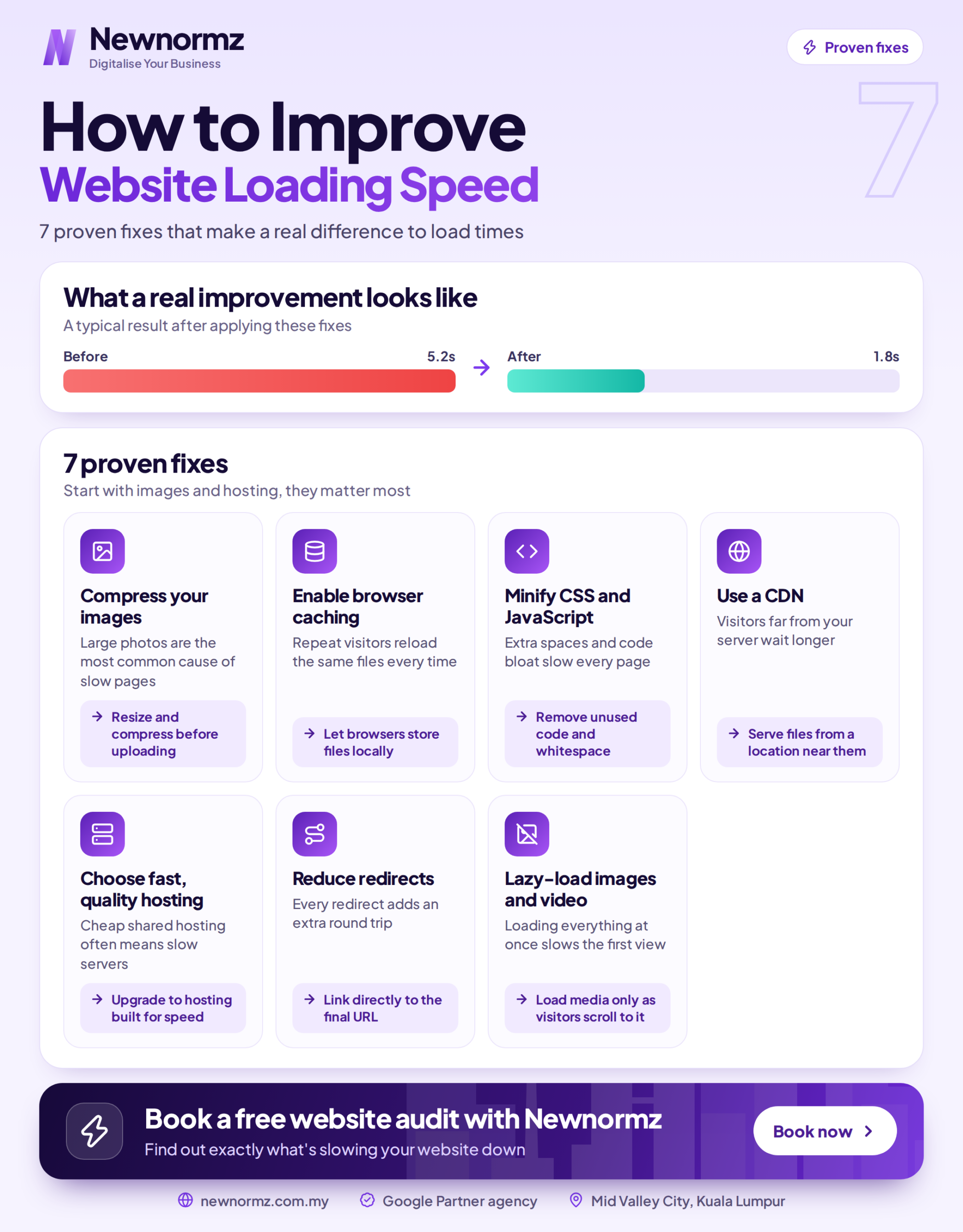
What Happened When We Fixed Just One Image
Numbers make the point better than theory does. Here’s what happened on a homepage where we changed nothing except the hero image.
Before: a 4.2 MB hero photo, saved as a full-resolution JPG and served at its original dimensions, then scaled down by the browser. That one file pushed Largest Contentful Paint to 4.1 seconds, well past the 2.5 second “good” threshold, so the page was failing Core Web Vitals on mobile.
After: the same image exported as a correctly sized WebP at the width it actually displays at, coming in at 280 KB. Largest Contentful Paint dropped to 1.8 seconds.
That’s a file 15 times smaller and an LCP improvement of 2.3 seconds, from one change. It’s often enough on its own to move a page from failing to passing Core Web Vitals, which is why images are the first place to look.
Common Mistakes to Avoid
Uploading huge images. Still the single most common cause of a slow page.
Plugin bloat. Every plugin and third-party script adds weight. Keep only what you actually use.
Skipping caching. Serving every page fresh wastes speed you could get for free.
Optimising the site but ignoring hosting. Cheap hosting caps your best efforts no matter what else you fix.
Guessing instead of measuring. Fix what PageSpeed Insights actually flags, not what you assume is the problem.
The Website Speed Checklist
Images are compressed and correctly sized, WebP where possible. Caching is enabled. CSS, JavaScript and HTML are minified. A CDN is serving your static content. Unused plugins and scripts are removed or deferred. Hosting is fast and suited to your actual traffic. Core Web Vitals meet the targets: LCP under 2.5 seconds, INP under 200 milliseconds, CLS under 0.1.
Frequently Asked Questions
How do I make my website load faster?
Start by compressing and correctly sizing your images, then enable caching, minify your code, add a CDN, remove unnecessary scripts, and choose hosting that can handle your traffic. Measure with PageSpeed Insights first so you fix the biggest bottleneck rather than guessing.
Does website speed affect SEO?
Yes. Google uses page experience signals, including Core Web Vitals, as part of ranking, and slow pages also lose visitors before they convert. Faster pages improve your search visibility and your conversion rate at the same time.
What is a good page load time?
Aim for your main content to load within about 2.5 seconds, which is the target for a good Largest Contentful Paint score. Faster is better, especially on mobile, where 47 percent of users expect a load in 2 seconds or less.
Why is my website so slow?
The most common causes are large uncompressed images, no caching, too many plugins or scripts, bloated code, and slow hosting. Run your page through PageSpeed Insights to identify the specific issues, then tackle the heaviest one first, usually images.
Do I need a developer to improve site speed?
Not always. Compressing images, installing a caching plugin, and removing unused plugins are things many business owners can do themselves. Deeper fixes like code minification, CDN setup, or a hosting migration are best handled by a developer or an agency.
How slow is your site, really?
Get a Free Website Health Check From Newnormz
Newnormz has run SEO campaigns across F&B, healthcare, ecommerce, and local services in Malaysia, backed by a performance guarantee of 70 percent of targeted keywords on Google’s first page.
30 minutes, no obligation. We’ll show you exactly what’s slowing your site down.

Bryan Tan is an SEO Specialist and CEO at Newnormz, helping hundreds of businesses achieve first-page rankings on Google. With a passion for driving organic growth, Bryan blends innovative strategies with hands-on experience to optimize websites for maximum visibility. Always at the forefront of the latest SEO insights and trends, he consistently adapts to the evolving digital landscape.