Key takeaways
- ✓A Click-to-WhatsApp ad brings in a chat at 9.47pm, nobody replies until 10am, and by then the customer has booked a competitor. A WhatsApp chatbot closes that gap. It answers, sorts and qualifies chats straight away, then passes warm leads to a person.
- ✓The bot’s job is to sort language, location, budget and intent in the first 60 seconds. Closing the sale is still your team’s job.
- ✓The free WhatsApp Business App only gives you auto replies. A real chatbot runs on the WhatsApp Business Platform, usually through a Business Solution Provider (BSP).
- ✓Plan the flow from your last 100 real chats. Offer English, Bahasa Malaysia and 中文 as the first choice, and keep a “Talk to a person” button visible at every step.
- ✓Judge the bot on cost per qualified chat and cost per customer. Cost per chat on its own can mislead you.
This guide is for Malaysian business owners and marketing managers who get 30 or more WhatsApp enquiries a week. By the end, you can have a working bot live in 1 to 3 weeks.
6 WhatsApp Chatbot Use Cases That Pay Off (and 2 That Don’t)
Most WhatsApp chats in a Malaysian SME’s inbox are some version of “price?”, “still available?” or “where are you located?”. A WhatsApp chatbot for business pays for itself when it handles those repeat questions and lets your team spend its time on the chats that can turn into sales. These are the WhatsApp chatbot use cases that usually earn their keep.
| Use case | Malaysian example | What the bot handles | When a human takes over |
|---|---|---|---|
| Lead qualification for Click-to-WhatsApp ads | Property launches, renovation contractors, tuition and private colleges | Language, service, area, budget band, timeline | Once the lead is tagged as qualified |
| Appointment booking | Clinics, salons, confinement centres | Branch, service, preferred date and time, confirmation | Special requests, rescheduling clashes, anything clinical |
| Order status and delivery questions | Ecommerce brands that sell on their own site | Order lookup, courier tracking link, delivery timelines | Lost parcels, damaged items, refunds |
| Catalogue browsing with WhatsApp Catalog | Retail boutiques, F&B outlets, festive hampers | Showing products, prices and stock, building a cart | Bulk or corporate orders, customisation |
| FAQ deflection | Any outlet that gets asked about location, hours, parking or halal status | Fixed, approved answers with a map link | The question isn’t covered by the approved answers |
| Post-purchase follow-up | Clinics, car servicing, beauty products | Utility templates for receipts, reminders and care instructions | The customer replies with a problem |
Two jobs should never belong to the bot alone. The first is complaints and price negotiations: an angry customer stuck in a menu will leave a one-star review, and a bot can’t judge how much discount a deal is worth. The second is medical or financial advice from an AI bot. One confident wrong answer about a treatment or a loan can cost you far more than the bot ever saved in admin time.
Rule-Based, AI or Hybrid: Which WhatsApp Chatbot Fits Your Business
Choose the type of bot based on how varied your questions are and how much damage a wrong answer could do. Don’t choose it because a vendor’s demo looked clever.
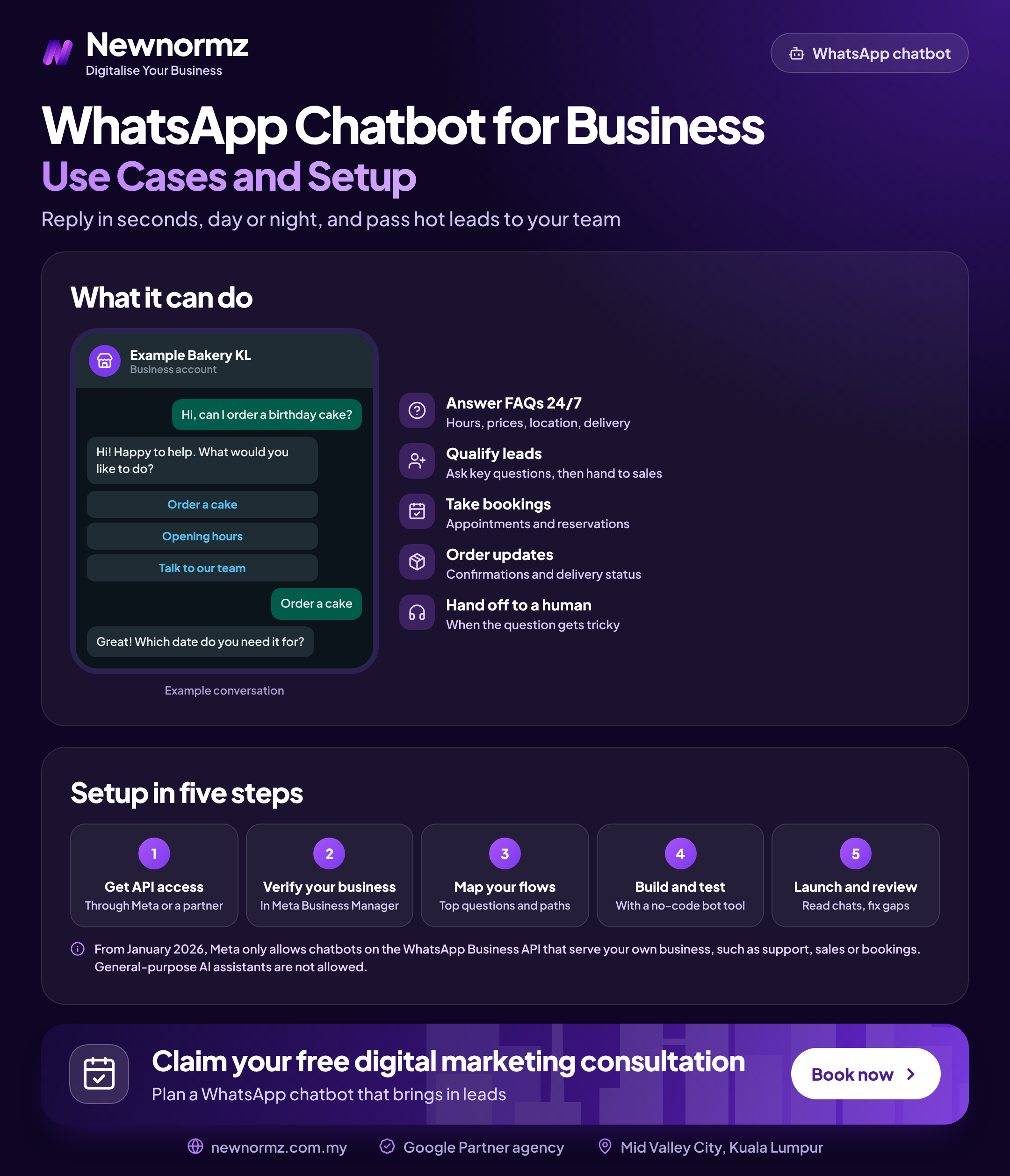
Before you plug an AI chatbot into WhatsApp, read the rules on AI. Meta’s WhatsApp Business Solution terms restrict general-purpose AI assistants on the platform. A bot that serves your own customers about your own business is the use the platform is built for. Meta updates these terms, so read the current version and confirm your BSP’s AI features comply. If you want the same assistant to work on your website and other channels too, see our guide to AI chatbots beyond your website.
Before You Build: What a WhatsApp Chatbot Setup Needs
Have these ready before day one
- ✓A phone number that isn’t active on the WhatsApp app, or one you are ready to migrate. Ask your BSP whether it can keep the Business App running on the same number.
- ✓A Meta business portfolio (formerly Business Manager) with business verification completed
- ✓Either a Business Solution Provider (BSP) or a developer who can work with the Cloud API directly
- ✓A display name that clearly matches your brand, so Meta approves it
- ✓A way to collect opt-ins, plus a PDPA notice that explains how you use chat data
- ✓Your last 100 real chats, exported
- ✓One named person who is responsible for handoffs
The free app’s greeting message, away message and quick replies are WhatsApp Business App auto replies. They are not a chatbot. They can’t branch, qualify or tag a lead. A true bot runs on the WhatsApp Business API, now called the WhatsApp Business Platform. If you are still choosing your stack, our list of WhatsApp Business tools worth adding covers the options around it.
How to Set Up a WhatsApp Chatbot in 8 Steps
If you are working out how to create a WhatsApp chatbot, keep the build simple and spend your effort on planning. Most failed bots were built before anyone read the chats they were meant to handle.
Phase 1: Plan the Conversation From Real Chats
Export and tag your last 100 chats
Give each chat one intent label, such as price, availability, location, booking, order status or complaint. Note which language it was written in and when it arrived. This takes about an afternoon and tells you more than any vendor demo.
Pick the 5 to 7 intents the bot will own
Choose the intents that come up most often and have the simplest answers. Everything else goes to a person. A bot that does five things well beats one that does twenty things badly.
Write the flow, starting with language
The first message offers English, Bahasa Malaysia and 中文. Every useful answer should be no more than 3 taps away, and a “Talk to a person” button should be visible at every step. Write it in a shared document before anyone opens a builder.
Phase 2: Build and Connect on the WhatsApp Business Platform
Choose a BSP or chatbot builder
Compare four things: a shared multi-agent inbox, integration with your CRM, AI options you can restrict to your own content, and how the vendor bills Meta’s message charges (passed through at cost or marked up). Ask for a trial with your real flow, not their sample one.
Register, verify and submit message templates
Register the number, complete business verification and submit your WhatsApp message templates for approval. Use utility templates for confirmations and reminders. Send marketing templates only to contacts who have opted in. Meta categorises templates as marketing, utility or authentication, and may reclassify a “utility” template that reads like a promotion.
Build with buttons, lists and Flows
Use reply buttons for short choices and list messages for longer menus. Use WhatsApp Flows for in-chat forms that collect name, area, budget and preferred date. Meta charges for template messages, while your replies inside the 24-hour customer service window are priced differently. Check Meta’s official WhatsApp pricing page for current rates before you budget.
Phase 3: Connect Your Entry Points and Hand Off to Humans
Connect every entry point with its own opening message
Click-to-WhatsApp ads in Meta Ads Manager, your website button and in-store QR codes should each send a different pre-filled message, for example “Hi, I saw your renovation ad” or “Hi, from the website”. The bot can then tell where the chat came from and start the right flow. It also gives you source data for reporting.
Set handoff rules, then test every path
Hand a chat to staff when the customer types a trigger keyword (“agent”, “orang”, “人工”), when the bot tags the lead as qualified, or when the chat falls outside office hours. Set a human reply target, such as 10 minutes during office hours. Then test every path on Android and iPhone, in all three languages, before you spend a ringgit on ads.
Step 8 is where WhatsApp lead generation usually succeeds or fails. When click-to-WhatsApp ads send warm leads into an inbox that nobody watches, you are paying to annoy people.
A Copy-Ready Lead Qualification Flow for Click-to-WhatsApp Ads
Here is a flow for a renovation contractor, written in English. Build the Bahasa Malaysia and Chinese versions as separate flows, not as translations of this one.
| Bot message | Buttons or input | What it tells your sales team |
|---|---|---|
| “Thanks for your message! Which language do you prefer?” | English / Bahasa Malaysia / 中文 | Which salesperson should take the chat |
| “What do you need help with?” | List: full home renovation / kitchen / bathroom / commercial space | Project type and likely deal size |
| “Where is the property?” | Klang Valley / Penang / JB / Other | Whether you serve the area, and which team covers it |
| “Roughly what budget are you planning?” | 3 budget bands that match your packages | Whether this is a fit, before anyone spends time on a site visit |
| “When is the best time for our designer to call you?” | Morning / afternoon / evening | When to call so the lead actually picks up |
| “Thanks! [Name] from our team will message you within 10 minutes during office hours.” | Handoff: lead tagged as qualified and assigned | A full lead summary is waiting in the inbox |
Plan the ad, the creative and the chat flow together. If the ad promises “free 3D design” and the bot’s first question is about budget, the customer feels misled. Working out how those three pieces fit is the job of a social media marketing agency in Malaysia that judges results on enquiries rather than views.
How to Check Your WhatsApp Chatbot Is Working: 5 Numbers to Watch
WhatsApp customer service automation works only if the right chats reach a person faster. These five numbers tell you whether that is happening.
| Metric | What it tells you | Warning sign |
|---|---|---|
| Flow completion rate | The share of chats that reach the end of the flow | It falls after you add a question |
| Drop-off step | The exact question where people give up | One step loses far more people than the others |
| Handoff rate | How often the bot passes chats to staff | Near zero (customers are trapped) or very high (the bot isn’t helping) |
| Minutes from handoff to first human reply | Whether your team keeps the bot’s promise | It regularly goes past your stated target |
| Cost per qualified chat | Ad spend divided by chats the bot tags as qualified | It rises while cost per chat looks cheap |
Worked example (illustrative numbers, not market rates): say a WhatsApp chatbot in Malaysia sits behind RM3,000 of Click-to-WhatsApp spend. The ads bring in 300 chats (RM10 per chat). The bot qualifies 120 of them (RM25 per qualified chat), and sales closes 24 (RM125 per customer).
Now add a budget band to the ad copy and keep the budget question at step 4 of the flow. Fewer casual browsers start a chat: say 220 chats, so cost per chat rises to RM13.64. The bot qualifies 110 (RM27.27 each). Because sales now spends its time on serious buyers, it closes 30. Cost per customer drops to RM100. Cost per chat went up and the business made more money. If campaigns still stall after you fix the flow, these reasons WhatsApp campaigns fall flat are worth checking.
Malaysia note
Build a separate flow for each language. One English flow put through machine translation reads wrong to everyone. The bot should also cope with free-typed Manglish and mixed-language replies such as “berapa harga ah” or “how much ar”, using keyword matching or an AI fallback. Our strategists work in English, Bahasa Malaysia and Chinese, and these replies are normal in Malaysian chats. Plan template approvals and staffing well before Hari Raya, Chinese New Year and the 11.11 and 12.12 sales, when chat volume jumps.
WhatsApp Chatbot Mistakes We See in Audits (and How to Fix Them)
Most broken WhatsApp automation fails in one of these three ways.
✗ No way out to a human
Customers go round the same menu, type “hello??” twice and leave. The chats that leave this way are often the ones closest to buying, because their questions didn’t fit a button.
✓ The fix
Keep a “Talk to a person” option on every message. After hours, add a clear promise such as “Our team replies from 9am.”
✗ Sending marketing templates to people who never opted in
People block and report the messages. That lowers your quality rating, can limit how many people you are allowed to message, and risks PDPA complaints. Read up on the WhatsApp marketing compliance rules before you send any promotion.
✓ The fix
Ask for opt-in at the first contact, in the bot itself or on your form, and give a clear STOP option in every marketing message. For a longer-term approach, see this guide to building an opted-in broadcast list.
✗ An AI bot with no limits
It makes up a discount, quotes an old price, or answers a medical or financial question it should never touch. Once a customer has a screenshot, you are stuck with what the bot said.
✓ The fix
Limit the AI to approved content only. Give prices as fixed answers. Send clinical, financial and complaint topics straight to staff.
Want your Click-to-WhatsApp ads and chatbot flow built as one funnel? Talk to our WhatsApp team.
WhatsApp Chatbot FAQs
Can I build a WhatsApp chatbot with the free WhatsApp Business App?
No. The free app gives you a greeting message, an away message and quick replies, but it can’t branch, qualify or tag leads. A real chatbot needs the WhatsApp Business Platform, usually accessed through a BSP. If you get fewer than about 20 chats a day, the app’s auto replies may be all you need for now.
How much does a WhatsApp chatbot cost in Malaysia?
The cost of a WhatsApp chatbot depends on four things: the BSP or platform subscription, Meta’s per-message charges for templates, the time it takes to design and build the flow, and AI usage if you add it. Ask each vendor whether it passes Meta’s charges through at cost. Check Meta’s pricing page for the current template rates.
Can a WhatsApp chatbot reply in Bahasa Malaysia and Chinese?
Yes. Most builders support multiple languages. The best way is to offer a language choice as the first message and run a separate flow for each language. Add keyword matching or an AI fallback for mixed-language replies, which are common in Malaysian chats.
Is it allowed to use an AI chatbot like ChatGPT on WhatsApp Business?
Generally yes, if the AI serves your own customers about your own business. Meta’s WhatsApp Business Solution terms restrict general-purpose AI assistants, so a bot that answers anything on any topic is a risk. Read Meta’s current terms and limit the AI to your approved content.
Is a WhatsApp chatbot PDPA compliant?
A chatbot can be run in a PDPA-compliant way, but that depends on how you set it up, not on the tool. Under the Personal Data Protection Act 2010, tell customers what data you collect and why, get consent before sending marketing messages, and control who can see chat data in your inbox and CRM. For your specific case, get advice from someone qualified in PDPA.
Free WhatsApp marketing consultation
Getting WhatsApp enquiries you can’t answer fast enough?
Newnormz plans, creates and runs social media and paid social for Malaysian brands, and judges every campaign on enquiries, not just views. 5.0 rating from 214+ Google reviews.
Talk to Us About Your WhatsApp Bot →
No obligation. A strategist replies within business hours.

Bryan Tan is an SEO Specialist and CEO at Newnormz, helping hundreds of businesses achieve first-page rankings on Google. With a passion for driving organic growth, Bryan blends innovative strategies with hands-on experience to optimize websites for maximum visibility. Always at the forefront of the latest SEO insights and trends, he consistently adapts to the evolving digital landscape.