Your WhatsApp Business App works fine until a Click-to-WhatsApp ad starts working. Then 40 chats arrive before lunch on one phone shared by three people, and half of them get a reply after the customer has already bought from someone else. That is usually when the WhatsApp Business API vs app question comes up. The short answer: the app is a free, phone-based tool built for one small team. The API (Meta’s WhatsApp Business Platform) is infrastructure for many agents, automation and opt-in messaging at scale, and Meta charges for it per message. If chats are going unanswered or you are paying for ads that send people to WhatsApp, run the audit below before you switch. For many SMEs, the problem is the reply process, not the tool.
This guide is for Malaysian business owners and managers whose sales or customer service runs on the WhatsApp Business App. After five short audits, you will know whether to stay on the app, move to the API through a Business Solution Provider, or fix your process first.
Run this checklist at any of these points: before you raise Click-to-WhatsApp ad spend, when you hire a second or third person to answer chats, after a staff member leaves with the “sales phone”, or when a vendor pitches you a WhatsApp API plan. Each audit takes about 15 minutes with your phone and last month’s ad report in front of you.
WhatsApp Business API vs App: The Differences That Actually Change How You Sell
Feature lists run long, but only a few differences decide how you sell. Here they are.
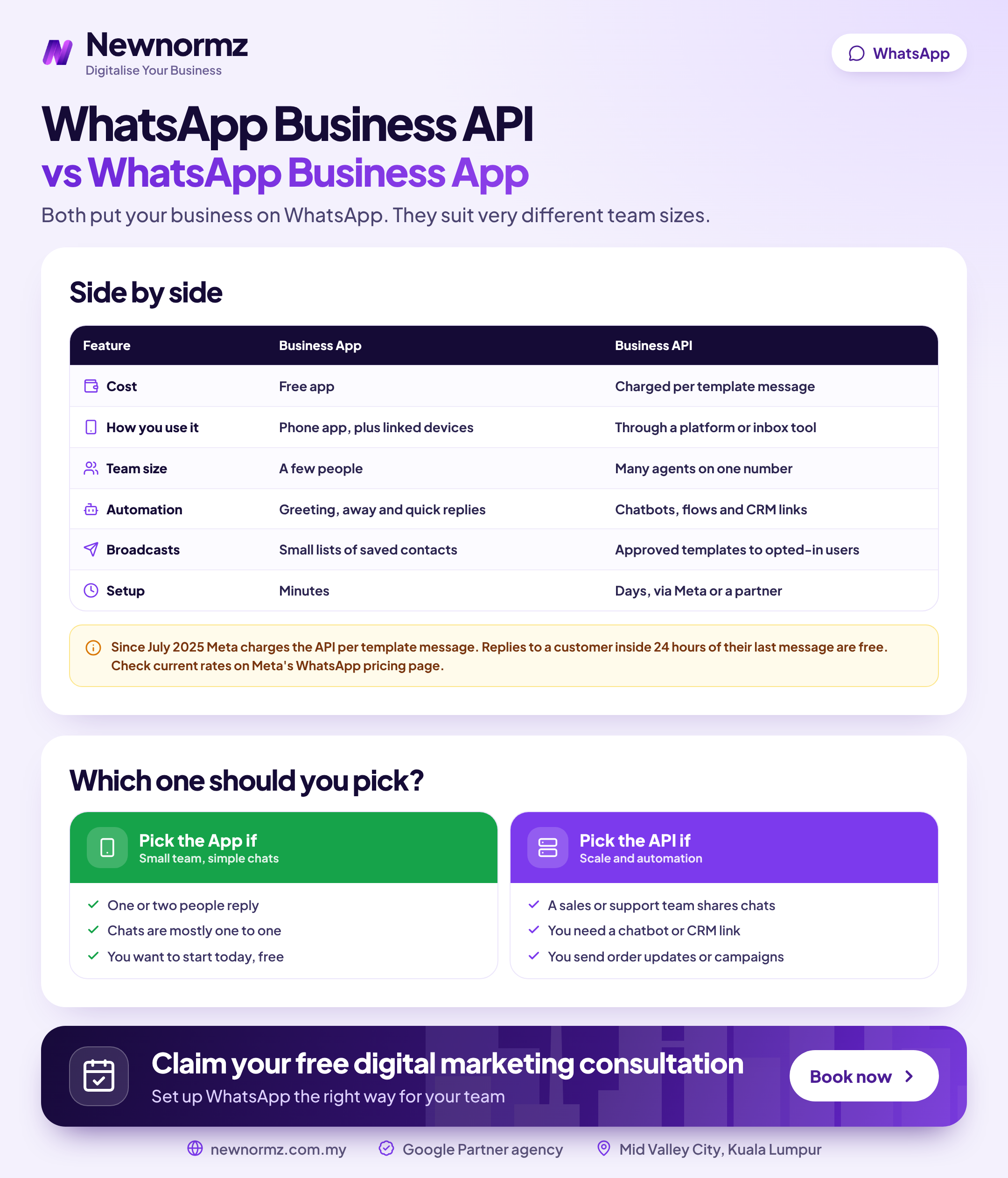
| What matters | WhatsApp Business App | WhatsApp Business Platform (API) |
|---|---|---|
| Built for | An owner or small team working from a phone | Teams handling high chat volume across several agents and systems |
| Cost model | Free | Per Meta’s WhatsApp Business Platform pricing page, charged per delivered template message, by category and country. Service replies inside the 24-hour customer service window are not charged. BSP fees are extra. |
| WhatsApp multiple users | One main phone plus a limited number of linked devices (see WhatsApp’s Help Centre for the current limit) | Many agents at once through a shared team inbox, with no phone needed |
| Broadcast and outbound | Broadcast lists only reach contacts who have saved your number. WhatsApp’s Help Centre caps each list at 256 contacts. | Approved message templates to opted-in customers, whether or not they saved your number. Volume depends on your quality rating and messaging limits. |
| WhatsApp automation | Greeting messages, away messages, quick replies, labels | Chatbots, rule-based routing, triggered messages such as order and booking updates |
| CRM and ad integrations | WhatsApp catalogue and Click-to-WhatsApp ads, with no native CRM sync | CRM integration, ad-source tagging and reporting through your BSP or your own build |
| Set-up route | Download the app and verify your number | Meta Business Manager, business verification, display name approval, then the Cloud API directly or through a BSP |
| Opt-in | Good practice. Enforced in practice by customers blocking and reporting you. | Required under WhatsApp’s Business Messaging Policy before you start a conversation |
Audit 1: Is Your Chat Volume Already Breaking the App?
Volume and reply-time check
- ✓You know how many new chats (not messages) arrive per day, split by weekday and weekend.
- ✓You know your median time to first reply during business hours.
- ✓You count how many chats are still unread at 9am after an evening of ads running.
- ✓No single phone gets passed between staff to cover shifts.
- ✓No leads have been lost because a staff member left and took the phone, or its chat history, with them.
Most businesses get the second item wrong. They know they “get a lot of WhatsApps” but have never measured time to first reply. To check, open 20 chats from last week and note the gap between the customer’s first message and your first human answer. An automated greeting doesn’t count. If the median is under 15 minutes in business hours, volume isn’t your problem yet.
If it’s slower, try the free fixes first. Quick replies for your five most common questions, labels for lead stage and an honest away message often cut reply time without any new software. Our guide to built-in WhatsApp Business tools covers how to set each one up.
A Worked Example: What a Slow Reply Costs When the Lead Was Paid For
Start with what a paid lead is worth. Our Google Ads campaign for a KL confinement centre (paid search, not social) produced qualified leads at RM9.58 each. That is an efficient result, and it still means every ignored enquiry is money spent with nothing to show for it. On a Google Ads campaign for a PJ chiropractic centre, 60 to 70% of leads became appointments. That shows the real value is in what happens after the enquiry arrives.
Now a hypothetical Click-to-WhatsApp scenario. Example only, not market rates:
| Example line | Example figure |
|---|---|
| Monthly Click-to-WhatsApp ad spend | RM3,000 producing 300 chats (RM10 per chat) |
| Chats waiting more than an hour | 30%, so 90 chats |
| Slow chats that go cold | Half, so 45 chats (RM450 of wasted ad spend) |
| Lost customers at a 20% chat-to-sale rate | 9 customers x RM800 average sale = RM7,200 lost revenue |
| Example API running cost | Say RM600 a month for a BSP plan plus RM400 in Meta template charges = RM1,000 (illustrative only; get real quotes and check Meta’s rate card) |
The decision rule: if the leads you lose each month are worth more than the cost of running the API, the API pays for itself. One condition applies. It only pays if the shared inbox actually gets more people answering faster. Software doesn’t reply to customers. People and routing rules do.
Audit 2: Who Answers, and Can You See What They Said?
Team and visibility check
- ✓You know how many people need to answer chats at the same time during your peak hour.
- ✓Each chat has one clear owner, so two staff never reply to the same customer.
- ✓Handover from sales to support happens inside the chat, not by forwarding screenshots.
- ✓Chat history stays with the business when a staff member leaves.
- ✓A manager can review reply quality without borrowing someone’s phone.
The app lets you link a limited number of extra devices to one account. Check WhatsApp’s Help Centre for the current number, because it has changed before. Linked devices help two or three people share the load. But they don’t assign chats, show who is handling what or keep a clean audit trail, and these are the WhatsApp Business App limitations that hurt most once a team grows. If you need three or more people answering at peak time, this audit usually points to a shared inbox on the API.
Malaysia note
Any serious plan for WhatsApp marketing Malaysia-wide has to deal with language. Customers message in English, Bahasa Malaysia, Chinese and Manglish, often within the same day. On one shared phone, a Chinese-speaking customer can wait while the only Mandarin speaker is at lunch. A shared inbox can route chats by language, for example from the ad or keyword that started the conversation. In our experience, this is one of the strongest reasons for a multilingual team to move.
Audit 3: Are Your Broadcasts and Follow-Ups Compliant, or Living on Borrowed Time?
Opt-in and compliance check
- ✓Opt-in is recorded with the date and source, for example “ticked box on booking form, 3 March”.
- ✓Every promotional message tells people how to stop receiving them, and you honour stop requests.
- ✓Customer data is handled with the Personal Data Protection Act 2010 (PDPA) in mind: collected for a stated purpose, stored securely and not shared around on personal phones.
- ✓No unofficial “WhatsApp blasting” tools are connected to a personal or app number.
- ✓WhatsApp message templates are written to match their category. A promotion is never disguised as a “utility” update.
The WhatsApp broadcast limit on the app is a feature, not just a restriction. Your message only reaches people who have saved your number, so you are mostly messaging people who already know you. Our guide to building a broadcast list people respond to shows how to grow that list properly.
✗ Blasting a bought or scraped list from the app or an unofficial tool
The business hits the 256-contact cap, so it runs an unofficial blasting tool on its app number. Strangers report the messages as spam, and WhatsApp restricts or bans the number. Every customer conversation on that number goes with it.
✓ The fix
If you need scale, use opt-in lists and approved templates on the API. If you don’t, send smaller, segmented broadcasts on the app to people who saved your number and actually want to hear from you.
On the API, Meta gives your number a quality rating based on recent customer signals such as blocks and reports. Your messaging limits set how many unique customers you can start conversations with in a rolling 24-hour period. Good quality helps you move up to higher limits. Poor quality can hold you back or get templates paused. Meta’s WhatsApp Business Platform documentation lists the current tiers. For the legal side, read these WhatsApp marketing compliance tips before your next campaign.
Audit 4: Are Click-to-WhatsApp Ads Connected to Your CRM, or an Island?
Ads and CRM connection check
- ✓Click-to-WhatsApp ads are tracked past “conversation started” to qualified lead and sale.
- ✓Every conversation is tagged with its source: which ad, organic post, website button or Google listing.
- ✓Your WhatsApp catalogue is set up so customers can browse without asking “price?”.
- ✓Lead details reach your CRM or sales sheet without anyone retyping them.
- ✓An automated first reply asks two or three qualifying questions (area, budget, timing).
On the app, you can tag sources by hand with labels and give each of your click to WhatsApp ads its own pre-filled message, so you can see which ad started each chat. That is tedious but it works. On the API, a BSP can tag sources automatically, sync leads to your CRM and run chatbots that qualify enquiries before a human takes over. Chatbots are a big enough topic to need their own guide.
Decision rule: if you can’t say which ad produced which WhatsApp sale, fix tracking before you buy more ad budget. Otherwise Ads Manager keeps optimising for cheap conversations, not paying customers. If you need help connecting the two, our Facebook ads management team builds campaigns around qualified chats rather than chat volume.
Audit 5: What Switching to the WhatsApp Business API in Malaysia Involves Before You Sign with a BSP
Pre-signing checklist
- ✓Your Meta Business Manager (Meta Business Suite) account is in the company’s name and business verification is complete.
- ✓You have decided on the phone number: a new number, or your existing one. If you keep the existing one, ask whether the BSP supports coexistence, which lets one number run on the app and the API, and confirm it works for your account.
- ✓Your display name matches your registered business or brand, so Meta approves it. Ask separately whether Meta Verified is available for your account.
- ✓Your first five templates are drafted: a booking confirmation, a payment reminder, a follow-up and two promotions.
- ✓The contract states in writing that you own the WhatsApp account, the number and the chat data.
- ✓The quote shows the BSP’s platform fee separately from Meta’s per-message charges, so you can see any mark-up.
- ✓Exit terms explain how you move your number and history to another provider.
Do you need a whatsapp business solution provider at all? Not strictly. Meta offers the Cloud API directly. But the Cloud API gives you no inbox, so you would need developers to build one. That is why most WhatsApp Business API Malaysia set-ups for SMEs go through a BSP for the shared inbox, template tools and local support. If you want someone to compare providers and handle set-up with you, our WhatsApp marketing services cover set-up and the campaigns that run on it.
How to Prioritise What the Audit Found
Most audits turn up six to eight problems. Here is how to rank them, and where to fix each one.
| Issue | Business impact | Effort | Fix on app or API |
|---|---|---|---|
| Slow first reply | High | Low | App first: quick replies, away messages, labels, a reply rota |
| One phone shared by staff | High | Medium | API with a shared inbox |
| No opt-in records | High | Low | Either |
| Untracked Click-to-WhatsApp ads | High | Medium | Either |
| Chat history lost when staff leave | High | Medium | API |
| EN, BM and CN chats reaching the wrong person | Medium | Medium | API routing (labels on the app as a stopgap) |
| Need to message opted-in customers who haven’t saved your number | Medium | Medium | API with templates |
| No catalogue, so every chat starts with “price?” | Medium | Low | App |
Four of these eight fixes don’t need the API at all. Start with the high-impact, low-effort fixes, and switch only when the remaining problems are about several people answering, automation or scaled opt-in messaging. Many of these problems also show up in our list of why WhatsApp campaigns fail, and none of them is solved by a new tool.
From our audits
We keep seeing businesses move to the API to fix slow replies, when the real problem is who answers and when. The tool changes, but the reply time doesn’t, because the same one person still covers chats between other jobs. We judge social and WhatsApp work on enquiries that turn into customers, not views or chat counts. So the first fix is usually a reply rota and a qualifying script, and the software comes second.
If your ads, content and WhatsApp follow-up are run by different people who never compare notes, hand the whole funnel to one team. A social media marketing agency in Malaysia that also runs SEO and Google Ads can trace each WhatsApp enquiry back to the post, ad or search that started it.
FAQ: WhatsApp Business App vs API in Malaysia
How much does the WhatsApp Business API cost in Malaysia?
There is no fixed monthly fee from Meta: WhatsApp Business API pricing is based on delivered template messages. Your WhatsApp API cost per message depends on the category (marketing, utility or authentication) and the customer’s country, as listed on Meta’s WhatsApp Business Platform pricing page. Replies inside the 24-hour customer service window are not charged. If you use a BSP, its platform fee comes on top, so ask for the two costs to be listed separately.
Can I use the same phone number for the WhatsApp Business App and the API?
Possibly, if your BSP supports coexistence, which lets one number run on the app and the API at the same time. Confirm with the BSP that it is available for your account and what limits apply before you migrate. Otherwise, moving the number to the API means it stops working on the app.
Do I need a BSP to use the WhatsApp Business API?
No. Meta offers the Cloud API directly, but it comes without a team inbox or dashboard. Most SMEs use a BSP because they need a shared inbox, template tools and local support without hiring developers.
Can I send broadcast messages to customers who haven’t saved my number?
Not from the app: broadcast lists only reach contacts who have saved your number. On the API, you can message customers who have opted in, using approved message templates, even if they never saved your number. How many people you can message depends on your quality rating and messaging limits.
Will I get banned for sending bulk WhatsApp messages from the app?
You can. Numbers that send unwanted bulk messages, especially through unofficial blasting tools, get reported and can be restricted or banned. To stay safe, message only people who opted in, keep broadcasts small and relevant, and move to the API with approved templates if you genuinely need volume.
Not sure whether you’ve outgrown the WhatsApp Business App?
Newnormz plans, creates and runs social media and paid social for Malaysian brands, and judges every campaign on enquiries, not just views. 5.0 rating from 214+ Google reviews. Send us a WhatsApp message and a strategist will reply within business hours.
Prefer a form? Free WhatsApp marketing consultation

Bryan Tan is an SEO Specialist and CEO at Newnormz, helping hundreds of businesses achieve first-page rankings on Google. With a passion for driving organic growth, Bryan blends innovative strategies with hands-on experience to optimize websites for maximum visibility. Always at the forefront of the latest SEO insights and trends, he consistently adapts to the evolving digital landscape.