Key takeaways
- ✓Facebook ads not delivering is rarely a Meta bug. It is usually your own setup: a thin budget, a cap set too low, an audience cut too small or creative left running until it’s tired.
- ✓Read the Delivery column and its reason before you change anything. Each status points to a different fix.
- ✓Duplicating, restarting and daily edits send the ad set back into learning, so the usual panic fixes tend to make delivery worse.
- ✓In Malaysia, ad sets split by language and postcode, plus CPM spikes around Raya, CNY and the 9.9 to 12.12 sales, cause more stalled campaigns than anything Meta does.
Here’s a common one. You set RM50 a day, the ad set has said “Active” since Monday, and by Wednesday it has spent RM3.20. If your Facebook ads are not delivering like this, the cause is almost always something in your setup, and you can usually find it in about 10 minutes. This guide covers the 12 causes we see most often, in the order to check them, and the fix for each one.
This guide is for anyone running their own Meta Ads Manager account. By the end you’ll know which of the 12 causes is yours and how to fix it without resetting learning.
Facebook Ads Not Delivering? Read the Delivery Column Before You Touch Anything
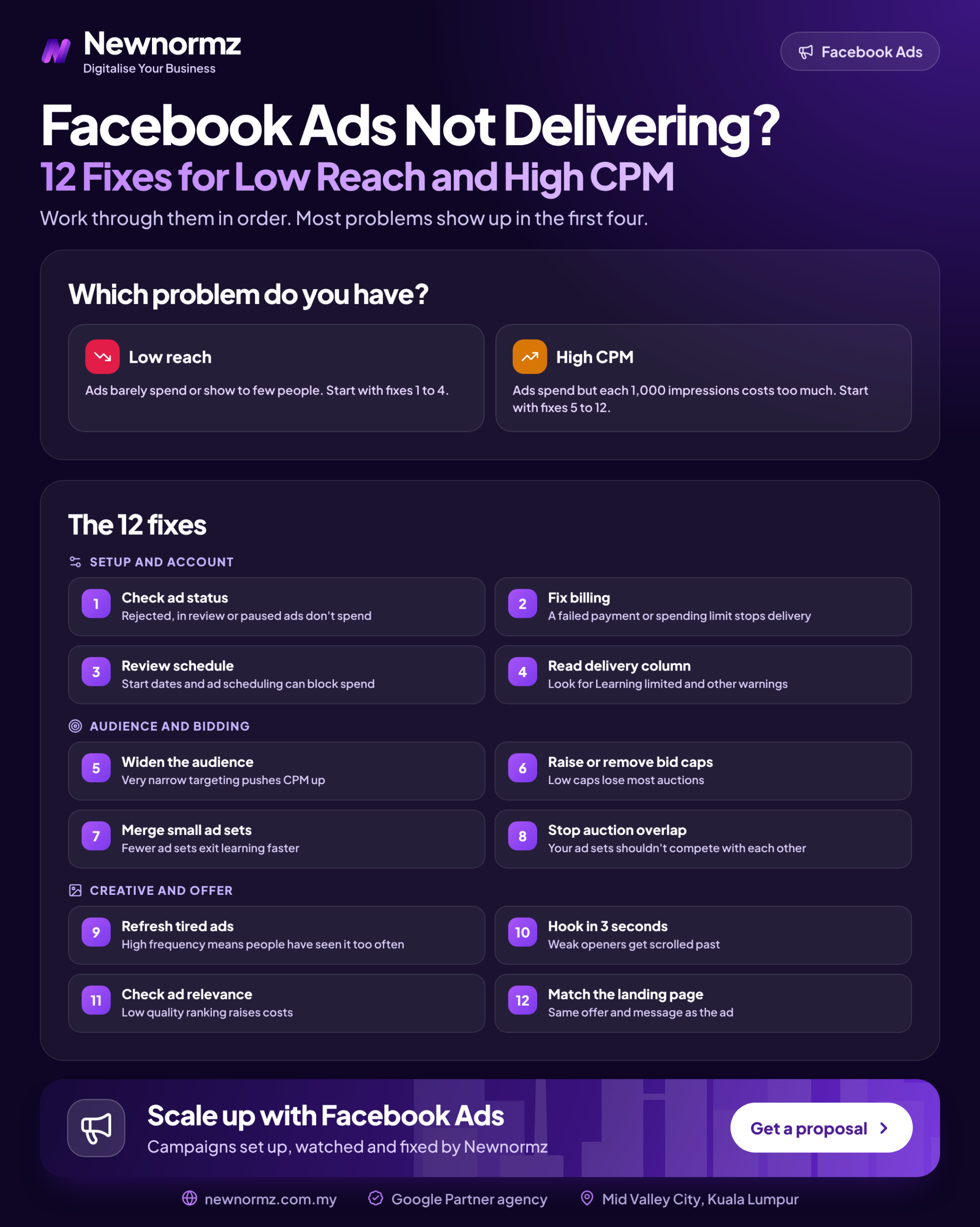
Most Meta ads delivery issues come with a label. In Ads Manager, the Delivery column shows a status for every campaign, ad set and ad, and if you hover over it or click it, Meta usually tells you the reason. If you’re asking “why is my Facebook ad not getting impressions”, start here. Don’t start by changing the budget.
Check every level, not just the campaign. A Facebook ad rejected or in review shows that status at ad level, so the campaign and ad set can look fine while nothing is actually running.
| Delivery status | What it usually means | Go to |
|---|---|---|
| In review | Meta hasn’t approved the ad yet. Most reviews finish quickly. A long wait often means the ad was flagged for manual checking. | Fix 2 |
| Rejected | The ad, landing page or text breaks an advertising standard | Fix 2 |
| Not delivering | Something is blocking spend: payment, spending limit, schedule, end date, or an audience or bid the auction won’t accept | Fixes 1, 3, 5, 7 |
| Learning | Normal. Meta is still working out who converts. Costs swing during this period. Leave it alone. | Fix 6 |
| Learning limited | The ad set is unlikely to get enough optimisation events to stabilise | Fixes 4, 7, 8 |
| Active, but low or no spend | You’re losing auctions: the cap is too tight, the audience too narrow, placements too restricted or the creative ranks poorly | Fixes 5, 7, 9, 10 |
| Inactive, Completed or Off | Something above it is switched off, or the end date has passed | Fix 3 |
One warning before you open anything: if the status says “Learning”, wait. Editing an ad set during learning is the most common way people turn a three-day wait into a three-week one.
Account and Setup Problems That Stop Spend Completely (Fixes 1 to 3)
Fix 1: Clear the Payment Failure or Account Spending Limit Nobody Remembers Setting
✗ The account can’t pay, or isn’t allowed to
A declined card pauses every campaign in the account. With Malaysian debit cards, the usual cause is that online or overseas transactions are switched off in the banking app. The other cause is an account spending limit someone set months ago to “be safe”, which spend has now reached.
✓ The fix
Open Billing and payments in Ads Manager. Look for a failed payment or an outstanding balance, and check whether an account spending limit is set. Turn on online and overseas transactions for the card in your bank’s app, then pay the balance by hand. Also check Account Quality (some older guides call it Business Support Home) for any restriction on the ad account or your profile.
Fix 2: Get the Ad Out of “In Review” or “Rejected” Without Triggering a Restriction
✗ Re-uploading the same rejected ad until one gets through
We see the same rejection triggers again and again in Malaysian accounts. One is before-and-after images for slimming, skin and dental offers. Another is copy that asserts personal attributes, such as “Are you struggling with debt?” or “Other diabetics in KL are switching to…”. If you keep submitting the same ad, Meta can treat that as repeated policy violations, and that puts the whole account at risk.
✓ The fix
If you believe the rejection is wrong, request a review once through Account Quality. If it isn’t wrong, rewrite the copy so it talks about the product rather than the reader’s condition (“A debt plan built around your salary”), and use a product or process image instead of a before-and-after. To see how competitors word similar claims and still get approved, search their pages in the Meta Ad Library.
Fix 3: Check the Schedule, End Date and Special Ad Category
✗ Small settings that quietly block delivery
Ad sets copied from last month’s promo still carry last month’s end date. Some accounts were created with a US time zone, so an ad you scheduled for “midnight” actually starts in the KL afternoon. Property and finance advertisers have a different problem: a special ad category (housing, credit or financial products, employment, social issues) removes options such as age, gender and detailed targeting. An ad set built on those options then shrinks to almost nothing.
✓ The fix
Check the end date, the ad schedule and the time zone in your ad account settings. If you sell property, loans or other financial products, declare the category honestly. Then rebuild the targeting around what is still allowed: broad location targeting and creative that speaks clearly to the buyer you want. Fighting the category by leaving it off risks rejection, and Malaysian rules for these industries add their own limits, so check those with your compliance team.
Budget and Bidding Mistakes That Starve the Auction (Fixes 4 to 6)
Fix 4: Raise the Budget to Match the Event You’re Optimising For, or Optimise for a Cheaper Event
Meta’s Business Help Centre says an ad set generally needs around 50 optimisation events within 7 days to exit the Facebook ads learning phase. Meta works this out from your budget before the ad set has even started. If the maths can’t reach 50, you get “Learning limited”.
Example (labelled, not market rates): you spend RM40 a day, which is RM280 a week, and you optimise for purchases that realistically cost about RM60 each. That buys 4 to 5 purchases a week, nowhere near 50. A Facebook ad set at learning limited on these numbers isn’t broken. It’s arithmetic. To hit 50 purchases at RM60, you’d need about RM3,000 a week.
Most small accounts can’t do that, so change the event instead. Say a conversation from click to WhatsApp ads costs RM6 in the same example. Then RM280 a week buys around 46 conversations, which is close enough for Meta to learn from, and your sales team closes the deal in the chat.
Getting the budget, event and structure to line up, then keeping them that way as costs move, takes ongoing attention. That’s the part most business owners hand over to Facebook ads management once they’ve run the numbers.
Fix 5: Loosen the Cost Cap or Bid Cap Set Below What the Auction Will Pay
When you set a cost per result goal or a bid cap, you’re telling Meta to skip any auction it expects to cost more than that figure. Set it below reality and Meta skips nearly all of them. Example (labelled): you set a cost per result goal of RM8 because a forum said leads cost RM8, but your real lead cost is RM22. Meta can’t find auctions it can win at RM8, so spend sits near zero, which is a common reason for Facebook ads not spending budget.
Base the cap on your own data. Take your average cost per result over the last 30 days, set the goal at or a little above it, and tighten it gradually once delivery is steady. If you don’t have 30 days of data yet, use the highest volume bid strategy while the ad set learns, and only add a cost goal or ROAS goal once you know what a result really costs.
Fix 6: Stop Editing Daily, Duplicating and Restarting
Meta’s help pages list the edits that restart learning. They include changes to targeting, creative, the optimisation event or the bid strategy, adding a new ad, large budget changes, and pausing for 7 days or more. A duplicated ad set is new, so it starts learning from zero. It also competes in the same auctions as the original.
Most ad sets that never exit learning were edited out of it.
The rule we use: make one change, then wait 3 to 5 days before judging it. The exception is when something is clearly broken, such as a dead landing page, a wrong price or a rejected ad. When you want more budget, raise it in moderate steps rather than doubling it overnight.
Audience and Structure Problems Behind Facebook Ads Low Reach (Fixes 7 to 9)
Fix 7: Widen Audiences Cut Down by Postcode, Language and Interest Stacking
This is the setup we see most in Malaysian SME accounts: a 5km radius around one outlet in Puchong, then “Chinese” as the language, then three interests, then ages 25 to 34 only. Each filter seems sensible. Put together, they create the classic audience too small Facebook ads problem: Meta has to fight over the same few thousand people, so CPM (cost per 1,000 impressions) climbs and delivery stalls.
Use Advantage+ audience or broad targeting (location plus a sensible age floor), and let the creative do the filtering. A Mandarin video about a Puchong confinement package will mainly reach people who care about it. Instead of one tiny ad set per language, run one ad set with separate creative for English, Bahasa Malaysia and Chinese, with each caption written for its audience rather than translated.
Fix 8: Merge Overlapping Ad Sets That Bid Against Each Other
Five ad sets at RM20 a day, all aimed at overlapping people, split your results five ways. None of them reaches the 50 events from Fix 4, and they bid against each other in the same auctions. Combine them into one or two ad sets and move the variety into the ads inside them. If you sell online, Advantage+ campaigns can do much of this consolidation for you. Our piece on why simpler campaign structures win explains the reasoning in more detail.
Fix 9: Let Advantage+ Placements Run Unless You Have a Proven Reason Not To
Limiting an ad set to Facebook Feed only removes most of the inventory Meta could buy for you, so it has to bid harder for what’s left and CPM rises. Keep Advantage+ placements on by default. Restricting placements makes sense when you have a proven reason, such as creative that only works in vertical 9:16, or results showing one placement brings in junk leads. Even then, consider adding vertical cuts so Reels and Stories can run too. If Instagram is where your audience actually is, Instagram advertising deserves its own creative, not a cropped Facebook post.
Creative and Auction Problems Behind High CPM on Facebook Ads in Malaysia (Fixes 10 to 12)
Most of the high CPM Facebook ads Malaysia advertisers show us come down to one of three things: creative people are tired of, a signal that points Meta at the wrong people, or a festive auction everyone is crowding into.
Fix 10: Replace Tired Creative Before Frequency Kills the Ad
Ad frequency and creative fatigue go together. Frequency is the average number of times each person has seen your ad. When it keeps rising while CTR (click-through rate) falls and CPM goes up week after week, people have stopped responding and Meta is charging more to keep showing the ad. Check the ad relevance diagnostics columns too: a below-average quality ranking or engagement rate ranking means your ad is losing out to competitors’ ads shown to the same people.
A testing plan that works for most budgets: 3 new concepts each month, each with 2 different hooks (the first 1 to 3 seconds), so 6 ads in one ad set. Keep the winners, retire the weakest, and repeat. Example hooks:
- English: “If your aircond still smells after servicing, it wasn’t serviced properly.”
- Bahasa Malaysia: “Jangan beli tilam baru sebelum tengok video ni.”
- Manglish: “Boss, RM50 a day also can run ads ah? Can, but only if you do this first.”
Phone-shot, low-polish videos often beat studio ads here, because they look like content rather than ads. Our guide to low-polish content Malaysians stop scrolling for shows what that looks like.
Fix 11: Fix the Signal So Meta Optimises Toward Real Leads, Not Cheap Clicks
Meta optimises for whatever event you tell it to. If the Pixel fires twice, if there’s no Conversions API to back it up, or if the ad set is set to optimise for link clicks, Meta will find you cheap clicks and few customers. Check Events Manager for warnings before you blame delivery.
Instant Forms are the clearest example. On “More volume”, forms deliver well and bring in a lot of junk. “Higher intent” forms or click to WhatsApp ads cost more per lead and often less per customer. Example (labelled): RM15 leads with 10% qualified works out at RM150 per qualified lead. RM35 leads with 40% qualified works out at RM87.50. Judge on cost per qualified lead, not cost per lead. This is also how running profitable Meta ads in Malaysia works in practice: the cheapest-looking campaign is rarely the one that makes money.
Fix 12: Plan Around the Malaysian Festive and Mega-Sale Calendar Instead of Fighting It
Facebook ads cost Malaysia advertisers more at the same points every year: Ramadan and Hari Raya, Chinese New Year, Deepavali, and the 9.9, 10.10, 11.11 and 12.12 sales, when ecommerce brands crowd into the auction. Example (labelled): a RM1,500 budget at RM12 CPM buys 125,000 impressions. At RM20 CPM, the same RM1,500 buys 75,000. Your ad didn’t get worse. The auction got more crowded.
Malaysia note
Launch festive campaigns 2 to 3 weeks before the peak, so they’re out of learning by the time CPMs rise. Have the Raya or CNY creative ready a month ahead, not the week before. If you sell services rather than mega-sale products, move lead-gen budget out of the 11.11 week and spend it in the quieter weeks around it.
When It’s Not Your Ads: Signs the Problem Is the Offer or the Follow-Up
Sometimes delivery is fine. The ad spends, people click, and nothing sells. Then the problem is further along: an offer that’s no better than a competitor’s, a landing page that takes six seconds to load on mobile data, or WhatsApp enquiries that nobody answers until the evening.
From our audits
The most expensive leak we find isn’t in Ads Manager. It’s a WhatsApp enquiry answered 6 hours later, by which time the customer has already messaged two competitors. Before you blame targeting, time how long your team takes to reply to the next ten chats.
Fixing this means connecting the whole chain: creative, testing, delivery and the follow-up conversation. That’s how a social media marketing agency in Malaysia like Newnormz works. We’ve run Facebook campaigns for brands such as Taiwan Excellence, and we run social alongside SEO and Google Ads so WhatsApp enquiries can be traced back to the campaign that produced them.
A 10-Minute Weekly Delivery Check for Your Meta Ads Account
Every Monday, check:
- ✓Delivery status on every active ad set, and the reason behind any warning
- ✓Learning status: anything still “Learning limited” after two weeks needs Fix 4 or Fix 8
- ✓Spend against budget: under 80% spent points to a cap, audience or placement problem
- ✓Frequency, CPM and CTR trends compared with last week
- ✓Quality, engagement rate and conversion rate rankings on your main ads
- ✓Cost per qualified lead, taken from your CRM or WhatsApp records, not from Ads Manager
- ✓Warnings in Events Manager and Account Quality
- ✓Festive or mega-sale dates in the next 4 weeks
Delivery only tells you the ads are running. To check whether the spend is paying back, put your numbers into our free social media ROAS calculator once a month.
Facebook Ads Delivery FAQ
Why is my Facebook ad active but not delivering?
Usually because it’s losing auctions or has nobody to show the ad to. The common causes are a cost or bid cap set too low, an audience that’s too small, restricted placements, or creative that ranks poorly. Hover over the delivery status for Meta’s stated reason, then use the triage table above.
Why is my Facebook ad set learning limited, and how many results does it need?
It means Meta doesn’t expect the ad set to get enough optimisation events to stabilise. Meta’s Business Help Centre puts the threshold at around 50 events in 7 days. Combine ad sets, raise the budget, or optimise for a cheaper event to get there.
Should I turn off, restart or duplicate an ad that isn’t delivering?
Usually not. A duplicate starts learning from zero and competes with the original, and a long pause can restart learning too. Find the cause in the Delivery column, fix that one thing, and give it 3 to 5 days.
How much daily budget do Facebook ads need in Malaysia to deliver properly?
There’s no single number. Work it out from about 50 optimisation events a week multiplied by your realistic cost per result, then divide by 7. Example (labelled): at RM10 per WhatsApp conversation, that’s roughly RM70 a day. Purchase optimisation needs far more.
Why does my Facebook ad get reach but no leads?
Most often the ad is optimised for reach or clicks rather than leads, or the problem is after the click: the offer, the landing page or slow WhatsApp replies. Check the optimisation event first (Fix 11). If your buyers are younger and respond to short video, look at whether TikTok suits you better.
Free Meta ads account audit
Still stuck in “Learning limited”? We’ll find which of the 12 causes is yours.
Newnormz plans, creates and runs social media and paid social for Malaysian brands, and judges every campaign on enquiries, not just views. 5.0 rating from 214+ Google reviews.
Get Your Free Meta Ads Audit →
No obligation. We’ll review delivery and learning status, budget against your optimisation event, and creative fatigue.

Bryan Tan is an SEO Specialist and CEO at Newnormz, helping hundreds of businesses achieve first-page rankings on Google. With a passion for driving organic growth, Bryan blends innovative strategies with hands-on experience to optimize websites for maximum visibility. Always at the forefront of the latest SEO insights and trends, he consistently adapts to the evolving digital landscape.