High performance web development in 2026 means three things: passing Google’s Core Web Vitals on real visitors’ phones (not just your office fibre), serving your important content as plain HTML so both Google and AI crawlers can read it without running JavaScript, and hosting it close enough to Malaysian users that distance stops being a delay. Speed alone won’t push a weak page to the top of Google. It’s a signal, not a shortcut. Where it pays off is further down the funnel: fewer people bouncing, better landing page scores for your ads, and a site that doesn’t fall over when a campaign drives a traffic spike. For most enterprises, the biggest gains come from removing what’s slowing the site down, not from adding clever new technology.
A Simple Way to Think About It
The Menu That Never Arrives
🍽️ The Grand Restaurant
Chandeliers and marble floors, but the menu takes ten minutes to reach your table. Half the diners have left before anyone orders.
☕ The Busy Mamak
Plastic chairs and a menu painted on the wall. Your teh tarik arrives before you’ve properly sat down, so the tables are always full.
You don’t have to pick between looking good and being fast. The sections below cover how an enterprise site can do both, and which fixes are worth paying for.
What “High Performance” Actually Means in 2026
“Fast” is vague. Google isn’t. It measures page experience through three Core Web Vitals, based on real visitor data from Chrome users, and a page passes when at least 75 percent of visits hit the “good” threshold. That 75th percentile detail matters. Your site might feel instant on a new MacBook in Mid Valley, but the score comes from the visitor on a three-year-old Android phone on mobile data in Kuching.
In March 2024, Interaction to Next Paint (INP) replaced First Input Delay as the responsiveness metric. That caught out a lot of enterprise sites. FID only measured the first tap. INP measures every click, tap, and keypress across the whole visit, so a page that loads quickly but freezes when someone opens a dropdown menu now fails.
| Metric | What it measures in plain terms | Good | Poor |
|---|---|---|---|
| Largest Contentful Paint (LCP) | How long until the main content (usually the hero image or headline) appears | 2.5 seconds or less | Over 4 seconds |
| Interaction to Next Paint (INP) | How quickly the page visibly reacts when someone taps, clicks, or types | 200 milliseconds or less | Over 500 milliseconds |
| Cumulative Layout Shift (CLS) | How much the layout jumps around while loading (the reason people tap the wrong button) | 0.1 or less | Over 0.25 |
Treat these thresholds as the minimum to pass, not something to chase a perfect score on. Once you’re comfortably inside “good” on real-user data, going from 2.1 seconds to 1.4 seconds rarely moves rankings. Your development budget is usually better spent on the templates that are still failing.
The Honest Truth About Speed and Rankings
A lot of agencies oversell this, so here’s the real picture. Google has said publicly that page experience is one of many ranking signals, and that a page with the most relevant, helpful content can still rank well even if its page experience is weaker. Speed works more like a tiebreaker. When two pages are equally useful, the faster, more stable one tends to win. A fast page with thin content doesn’t jump over a slower page that actually answers the question.
That’s why performance work belongs inside a proper SEO service, not in place of one. When Sunway Medispa saw a 700 percent traffic increase over a six-month campaign, that came from content, technical fixes, and authority building working together, not from a speed tweak on its own. Anyone promising that a faster site alone will get you to position one is promising something Google itself says nobody can guarantee.
Where Slow Sites Actually Lose Money
The clearer business case for speed is what happens after the click. Three places where it shows up on an enterprise P&L:
Paid traffic you’re paying for twice
Google includes landing page experience in its Quality Score calculation for Google Ads. A slow, jumpy landing page can mean paying more per click, and then losing some of those paid visitors before the page even finishes loading. If you’re spending five figures in ringgit a month on ads, a slow landing page is one of the most expensive problems you can have.
Lead forms that frustrate people
INP problems show up most in the places that matter most: enquiry forms, quote calculators, booking widgets, product filters. If a visitor taps “Submit” and nothing visibly happens for a second, some will tap again, some will leave, and some will assume the form is broken. You won’t see this in rankings. You’ll see it as lead volume that doesn’t match your traffic.
Campaign spikes that take the site down
Enterprise sites rarely fail on an ordinary Tuesday. They fail during a product launch, a 11.11 sale, or a TV spot, when traffic jumps 10 times in an hour. A site that serves pre-built pages from a CDN handles that easily. A site that builds every page from scratch on one server often doesn’t.
Why Enterprise Websites Get Slow in the First Place
Almost no enterprise site was built to be slow. It gets slow over the years as more things are added. The usual causes, in roughly the order we find them in audits:
- Third-party scripts. Analytics, heatmaps, chat widgets, retargeting pixels, A/B testing tools, cookie banners. Each team adds one, nobody removes any, and together they block the browser’s main thread. This is the most common cause of poor INP.
- Heavy page builders and themes. Multipurpose themes load code for dozens of features you never use, on every page.
- Oversized hero images and videos. A 4MB banner photo straight from the design team is the classic LCP killer.
- Content that only appears after JavaScript runs. The page arrives empty and the browser has to build it, which slows down every visitor and every crawler.
- Hosting in the wrong place. A server in the US or Europe adds delay to every request from Malaysia before any of your code even runs.
Look at that list and you’ll notice most of the fixes are about removing things. Before approving a budget for a new framework, ask what could simply be deleted.
Performance and AI Search: What’s Real and What’s Hype
Generative search (Google’s AI Overviews, ChatGPT, Perplexity, and similar tools) has added a new reason to care about how your site is built. There’s a lot of hype around this, but one point is solid: many AI crawlers fetch your page’s raw HTML and don’t run JavaScript the way Googlebot does. If your product details, pricing, or service descriptions only appear after client-side JavaScript runs, those crawlers may see an almost empty page.
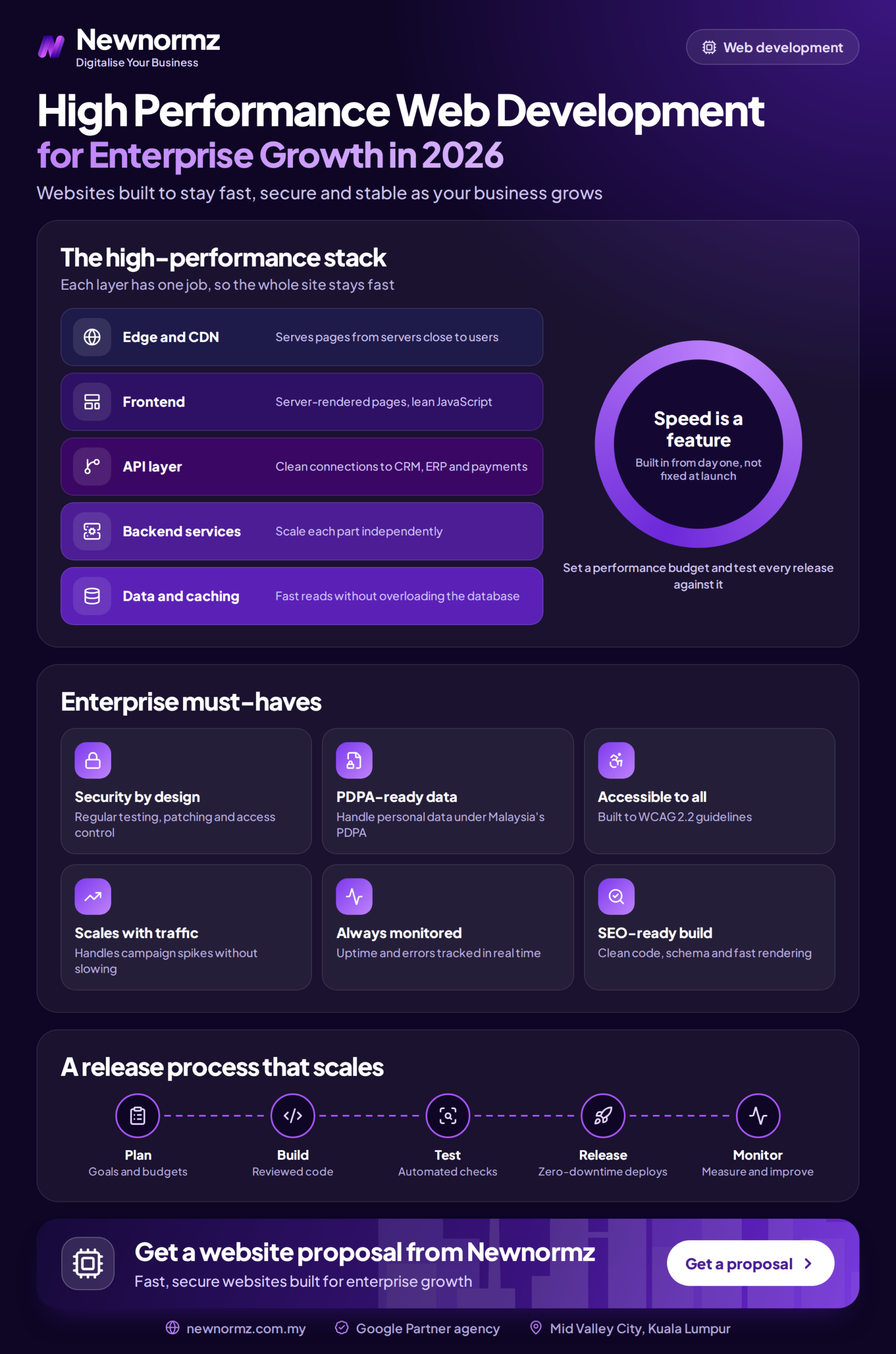
The fix is an architecture decision, not a speed trick. Server-side rendering or static generation means the important content is already in the HTML when the server sends it. That’s the same thing that improves LCP for human visitors, so one decision helps both audiences.
The honest limit: rendering your content properly makes it possible for AI tools to read and cite you. It doesn’t make them cite you. That still depends on whether your content is the clearest, most trustworthy answer to the question. Performance gets you through the door. Content earns the mention.
The Malaysian Infrastructure Angle
Malaysia had 35.4 million internet users and 98 percent internet penetration at the end of 2025 (DataReportal Digital 2026 Malaysia), and Google handles around 93 percent of local search. Your audience is online and searching. The question is how quickly your site reaches them.
- Host close to your users. For a Malaysia-focused business, a data centre in Malaysia or Singapore is the sensible default. A cheap overseas plan adds delay to every single request.
- Use a CDN with local edge locations. Major CDN providers have points of presence in Kuala Lumpur, so images, scripts, and cached pages are served from nearby rather than from your origin server.
- Test beyond the Klang Valley. Mobile connections in parts of Sabah, Sarawak, and rural Peninsular Malaysia can be much slower than city fibre. If those visitors matter to your business, test under throttled mobile conditions, not just on office Wi-Fi.
- Watch your font loading for multilingual sites. Sites serving English, Bahasa Malaysia, and Chinese audiences often load large Chinese font files. Load only the character sets each page actually needs.
Fix It or Rebuild It?
Not every slow site needs a revamp. Plenty of enterprise sites pass Core Web Vitals after a few weeks of focused cleanup. Here’s how to tell which situation you’re in:
| Situation | Usually fixable in place | Usually signals a rebuild |
|---|---|---|
| LCP failing | Oversized images, no CDN, slow hosting | Main content only appears after JavaScript builds the page |
| INP failing | Too many third-party scripts that can be removed or delayed | The theme or framework itself ships heavy JavaScript on every page |
| CLS failing | Missing image dimensions, late-loading banners and ads | Layout depends on scripts that restructure the page after loading |
| Every change breaks something | Rarely fixable with patches alone | Years of plugins and custom hacks stacked on an outdated platform |
If most of your problems fall in the middle column, clean up first and hold off on a rebuild. If they fall in the right column, patching will keep costing money every year. A planned revamp is usually cheaper in the long run, as long as it’s done with proper redirects and SEO migration checks so you don’t lose the rankings you already have.
How to Audit Your Site Properly
- Start with field data, not lab scores. Google Search Console’s Core Web Vitals report and the “real users” section of PageSpeed Insights show what actual visitors experience. The lab score further down is a diagnostic tool, not your grade.
- Audit by template, not by page. Enterprise sites have thousands of URLs but only a handful of templates (home, category, product, article, landing page). Fix the template and every page built on it improves.
- List every third-party script and who owns it. If nobody can explain why a script is there, it’s a candidate for removal.
- View your key pages with JavaScript disabled. Whatever disappears is what many AI crawlers can’t see either.
- Test on a mid-range phone on mobile data. That’s closer to your real audience than any desktop test.
Frequently Asked Questions
Will a faster website improve my Google rankings?
It can help, but usually only a little. Page experience is a real ranking signal, but Google weighs relevance and content quality more heavily. Expect speed to act as a tiebreaker against similar competitors, with the bigger payoff in conversions and ad efficiency.
My PageSpeed score is 45 but Search Console says my pages pass. Which is right?
Search Console. It reflects real visitors, and that real-user data is what Google uses for ranking. The lab score simulates a slow device and is useful for finding problems, but a low lab score with passing field data isn’t something to panic about.
Do I need to move off WordPress to get a high performance site?
Not necessarily. A lean WordPress build with a lightweight theme, disciplined plugin use, good hosting, and a CDN can pass Core Web Vitals comfortably. Headless or custom frameworks make sense for complex, high-traffic, or app-like experiences, but they cost more to build and maintain. Choose based on what your site actually needs to do.
Should my site be hosted in Malaysia or Singapore?
Either is fine for a Malaysian audience. Both are close enough that the difference is small next to hosting in the US or Europe. Reliability, support quality, and good CDN coverage matter more than which side of the Causeway the server sits on.
How long does performance work take to show results?
Conversion and bounce improvements can show up almost immediately after deployment. Core Web Vitals data in Search Console is based on a rolling 28-day window, so expect around a month before the report fully reflects your fixes. Any ranking impact follows after that, and as covered above, it’s usually modest on its own.
Is your website quietly costing you leads?
Find out what’s slowing your site down, and which fixes are actually worth paying for.
Newnormz has run SEO campaigns across F&B, healthcare, ecommerce, and local services in Malaysia, backed by a performance guarantee of 70 percent of targeted keywords on Google’s first page.
30 minutes, no obligation, with a straight answer on whether you need a fix or a full rebuild.

Bryan Tan is an SEO Specialist and CEO at Newnormz, helping hundreds of businesses achieve first-page rankings on Google. With a passion for driving organic growth, Bryan blends innovative strategies with hands-on experience to optimize websites for maximum visibility. Always at the forefront of the latest SEO insights and trends, he consistently adapts to the evolving digital landscape.