Facebook lead ads collect a name and phone number through an Instant Form that opens inside Facebook or Instagram. The visitor never leaves the app, so leads come in cheaply and fast. That ease is also why so many Malaysian businesses end up with lists full of wrong numbers and people who don’t remember filling in the form. The ads do work. The result depends less on the ad and more on the settings around it: the form type, the questions you ask, what you tell Meta to optimise for, and how fast someone messages the lead on WhatsApp. Judge them on cost per qualified lead and cost per customer, never on cost per lead alone.
This guide is for Malaysian business owners and marketing managers who are about to spend their first few thousand ringgit on lead ads, or who already run them and get junk. By the end you will know how to set up forms that sales can use, and whether click-to-WhatsApp suits you better.
Why Facebook Lead Ads Produce Cheap Leads That Never Pick Up the Phone
Facebook Instant Forms are built to remove friction. Facebook pre-fills the name, email and phone number from the user’s profile, so one tap on “Submit” is often all it takes. Someone scrolling on the LRT can become a “lead” in two seconds without really meaning to.
Then the algorithm makes it worse. Meta looks for the people in your audience who are most likely to do the thing you are paying for. With the default setup, that thing is submitting a form. It is not buying, booking or answering a call. Over a few weeks, the delivery system learns to find people who submit forms easily, and those are often not your buyers. This is the main cause of poor Facebook lead ads quality, and it’s the same trap we describe in our piece on why lead volume is a trap.
The algorithm optimises for whatever you tell it counts as a lead
In Meta Ads Manager, a Leads campaign using Instant Forms usually defaults to optimising for leads, meaning form submits. The alternative is the Conversion leads optimisation goal. Instead of counting every submit, it learns from leads that went further, such as “qualified” or “booked” in your CRM.
The catch is that Meta can only learn this if you send the lead status back. That means connecting your CRM to Meta through the Conversions API (CAPI, the server-side link between your systems and Meta) and updating lead stages as they happen. Check whether Conversion leads is available in your Ads Manager for your account and campaign setup. If it is, and you can send status data reliably, it is usually the biggest single upgrade you can make to conversion leads optimisation.
More volume vs Higher intent: the one setting that changes lead quality most
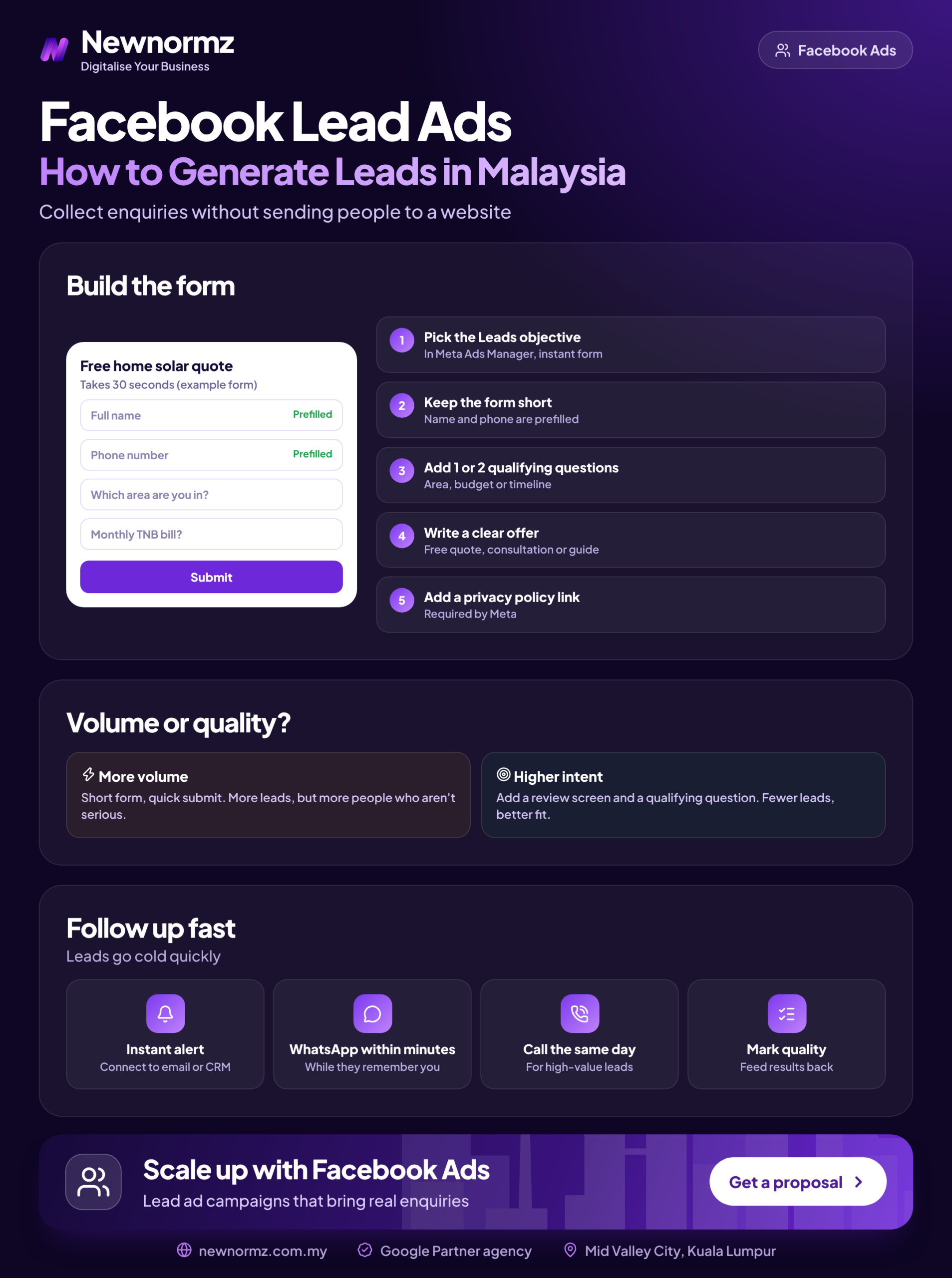
When you create a form, Meta asks you to choose a form type. “More volume” keeps the form as short and quick as possible. The “Higher intent” form type adds a review screen, where the person has to look over their details and confirm before submitting.
That extra step takes the one-tap accident out of the form. Your cost per lead will almost always rise, sometimes sharply. In our experience your cost per customer usually falls, because the people who confirm their number on a review screen tend to be the people who pick up when you call. For most service businesses, the higher intent form is the right starting point.
Pre-filled fields are both the strength and the problem
Autofilled phone numbers come from whatever the user once saved to their account. In Malaysia that is often an old number, a second line, or a work phone nobody checks. Autofill makes submitting quick, but you can’t count on the number being right.
Fix this with one or two Facebook lead form questions that the person has to answer themselves. Multiple-choice questions work best: “When are you planning to start?” or “Which area are you in?” They add a small amount of effort and give sales something to qualify on.
From our audits
The setup we see most often is a More volume form with only name, phone and email, no qualifying question, and no lead status sent back to Meta. Sales can’t tell a buyer from a browser, so they call everyone at the same speed, and Meta keeps optimising for the cheapest submits. Fixing those three settings often matters more than changing the ad creative.
Facebook Lead Ads in Malaysia: A Worked Example in Ringgit
Here is why, for Facebook lead ads in Malaysia, a higher cost per lead can be the better deal. The numbers below are a hypothetical example to show the maths, not market rates. Your own costs will depend on your industry, offer, creative and season.
| Example: RM3,000 a month | Form A: More volume, no questions | Form B: Higher intent + 2 qualifying questions |
|---|---|---|
| Cost per lead | RM12 | RM30 |
| Leads | 250 | 100 |
| Reachable and qualified rate | 20% (50 leads) | 60% (60 leads) |
| Cost per qualified lead | RM60 | RM50 |
| Customers at a 15% close rate | 7.5 | 9 |
| Cost per customer | About RM400 | About RM333 |
Form B costs 2.5 times more per lead and still wins. It brings in more customers for the same budget, and your sales team makes 150 fewer pointless calls. If you only report cost per lead, you would switch off the better campaign.
To run this maths with your own margins and close rate, plug your numbers into our free social media ROAS calculator before you set a budget.
The same caution applies when you compare channels. One of our Google Ads clients, a confinement centre in KL, received 266 qualified leads in 30 days at RM9.58 per lead. That is paid search, not Facebook, and the people behind those leads were already searching for a confinement centre. Put that RM9.58 next to a Facebook CPL without agreeing what “qualified” means, and you will draw the wrong conclusion. Our guide to choosing between Google and Facebook ads covers when each channel makes sense.
How to Set Up Facebook Lead Ads That Sales Can Actually Use
This is not a full tutorial. These are the six settings that decide whether your Meta lead ads give sales usable leads. If you’d rather have a team build and test this for you, see our Facebook ads management service.
Choose the Leads objective in Meta Ads Manager
If you sell financial products, property or jobs, select the matching special ad category (financial products and services, housing or employment) at the campaign level. These categories limit your targeting options, so plan around broader audiences such as Advantage+ audience instead of narrow interest stacks.
Set Instant Forms as the conversion location
At ad set level, pick Instant Forms. Choose the Conversion leads goal if your CRM can send lead status back; otherwise start with Leads and plan the CRM connection.
Pick the Higher intent form type
The review screen filters out accidental taps. Only test More volume once you have a qualified rate to compare against.
Add 2 to 3 multiple-choice qualifying questions
Budget range, timeline, and location (Klang Valley, Penang, Johor Bahru, other). Multiple choice means nobody has to type, and the answers let sales sort leads before the first call.
Link your privacy policy and add a plain consent line
Meta requires a privacy policy link on every Instant Form. Since you are collecting personal data under Malaysia’s PDPA, add a short line saying who will contact the person and how, for example “Our team will WhatsApp or call you about your enquiry.”
Put a WhatsApp button on the thank-you screen
Check which completion-screen buttons your Ads Manager offers. If there’s no WhatsApp option, use the website button with your wa.me link. A lead who starts the chat themselves is already half qualified.
Write the form in the language your buyer reads
Malaysian audiences split across English, Bahasa Malaysia and Chinese. Build a separate form and creative set for each language segment instead of one translated form. If someone clicks a Chinese-language video and then gets a qualifying question in English, many will drop off at that question, and the ones who carry on are harder to qualify on the phone. Match the follow-up language too, so the person who messages the lead speaks the language the form was in.
How to download Facebook leads within minutes, not hours later
You can download leads manually as a CSV from Meta Business Suite (the leads centre) or from the Forms library in your Page tools. That’s fine for testing, but leads can sit there for hours before anyone opens the file. Meta also limits how long leads stay downloadable, so check the current window in your Forms library and don’t treat Meta as your database.
For any real budget, set up a Facebook lead ads CRM integration. HubSpot and Zoho both have native connectors, and automation tools can push each lead into Google Sheets or straight to a WhatsApp Business inbox within seconds. That same connection is what lets you send lead status back to Meta later.
The Five-Minute Rule: Why WhatsApp Follow-Up Decides Your Cost per Customer
Malaysian leads expect a WhatsApp message, not an email. Many also fill in two or three forms from competing businesses in the same scrolling session. The first business to reply in a helpful, human way usually gets the conversation. Aim to send the first message within five minutes during business hours, and set an auto-reply for leads that come in after hours.
A lead that waits until tomorrow has already filled in your competitor’s form.
Here is a three-message lead ads follow up sequence you can copy into WhatsApp Business as quick replies:
3-message WhatsApp follow-up template
- ✓First touch (within 5 minutes): “Hi [Name], this is [Your name] from [Business]. Thanks for your enquiry about [service] on Facebook. You mentioned [answer from form]. Is now a good time for a quick 2-minute call, or would you prefer to chat here?”
- ✓Value message (next day): “Hi [Name], here’s [a price guide / before-and-after photos / our timetable] that answers what most people ask first. Happy to check what fits your [budget/timeline].”
- ✓Last attempt (day 3 or 4): “Hi [Name], I don’t want to keep messaging if the timing isn’t right. Just reply 1 if you’d still like help with [service], or 2 and I’ll close your enquiry.”
Localise each message for your Bahasa Malaysia and Chinese leads instead of machine-translating them. A natural tone matters more than perfect grammar.
Forms, CRM sync, status data and five-minute WhatsApp follow-up all have to work together. Our team runs that whole chain, and judges it on enquiries, not views.
When Click-to-WhatsApp Beats Facebook Lead Ads (and When It Doesn’t)
Click-to-WhatsApp ads skip the form and open a chat. You get fewer, warmer conversations, but only if someone is there to answer them. Use these rules to settle Facebook lead ads vs click-to-WhatsApp ads for your business:
If chat volume is what holds you back, the answer is usually better inbox handling, not a different ad type. Our WhatsApp marketing services cover the auto-replies, labels and routing that keep chats from going cold.
What to Check in Your First 30 Days of Facebook Ads in Malaysia
Your first month is for learning, not scaling. Track these every week:
30-day lead ads checklist
- ✓Qualified rate tracked per ad set, not just per campaign.
- ✓Contact rate within 24 hours: what share of leads actually replied or picked up.
- ✓Lead-to-appointment rate. On one Google Ads account, a chiropractic centre in PJ, 60 to 70% of leads became appointments. Set your own benchmark for Facebook leads.
- ✓Duplicate and fake-number rate, logged by sales in the CRM.
- ✓Frequency and creative fatigue: if cost per lead is rising while CTR (click-through rate) is falling, refresh the creative.
- ✓Lead status sent back to Meta through the Conversions API.
- ✓Budget and creative ready early for festive peaks (Hari Raya, Chinese New Year, 11.11), when competition for the same feeds pushes costs up.
This is the checklist we use when reviewing Facebook campaigns, including those for brands like Taiwan Excellence. If fatigue sets in quickly and your audience is young, it may be worth reading how TikTok ads compare with Facebook before adding budget.
Facebook Lead Ads FAQ
Are Facebook lead ads worth it for Malaysian businesses?
Yes, for most service, education, property, healthcare and B2B businesses, as long as you measure cost per qualified lead and cost per customer. They’re not worth it if nobody follows up quickly, because unreached leads cost money and bring nothing back.
What is a good cost per lead on Facebook in Malaysia?
There’s no honest single number, because it depends on your industry, offer and how strictly you qualify leads. Work out your own break-even instead: gross profit per customer × qualified rate × close rate. For example, RM1,500 profit × 60% × 15% gives a break-even cost per lead of RM135.
Why are my Facebook leads fake or unreachable?
Usually because the form is too easy to submit and Meta is optimising for submits rather than buyers. Switch to the Higher intent form type, add a multiple-choice qualifying question, and send lead status back to Meta so it learns which leads are real.
How fast should I follow up a Facebook lead?
Within five minutes during business hours, ideally on WhatsApp. Many Malaysian leads submit forms to several businesses in one sitting, and the first useful reply usually wins the conversation.
Do I need a privacy policy for Facebook lead ads?
Yes. Meta requires a privacy policy link on every Instant Form. Since you’re collecting personal data in Malaysia, the PDPA also applies, so state clearly how you’ll use and contact the lead.
Should I use Facebook lead ads or click-to-WhatsApp ads?
Use click-to-WhatsApp if your team can reply within minutes and your product needs explaining. Use lead ads if you need structured data for a CRM or call centre, or you’re in a regulated category where recorded consent matters.
Getting cheap leads that never pick up the phone?
Send us your current form and cost per lead, and we’ll tell you where qualified leads are leaking. Newnormz plans, creates and runs social media and paid social for Malaysian brands, and judges every campaign on enquiries, not just views. 5.0 rating from 214+ Google reviews. Send us a WhatsApp message and a strategist will reply within business hours.
Prefer a form? Get Your Free Meta Ads Audit

Bryan Tan is an SEO Specialist and CEO at Newnormz, helping hundreds of businesses achieve first-page rankings on Google. With a passion for driving organic growth, Bryan blends innovative strategies with hands-on experience to optimize websites for maximum visibility. Always at the forefront of the latest SEO insights and trends, he consistently adapts to the evolving digital landscape.