Key takeaways
- ✓This guide shows you how to run Instagram ads properly in Meta Ads Manager. Setup takes about 60 to 90 minutes, and at the end you will have a live campaign and a 14-day test plan with a clear pass or fail rule.
- ✓If you want leads, WhatsApp chats or sales, use Ads Manager. The Boost button in the app gives you too little control over what Meta optimises for.
- ✓Choose the objective that matches the action that makes you money. Meta optimises for exactly what you ask for, even when that turns out to be the wrong thing.
- ✓Get the Meta Pixel and Conversions API working before you scale, or the algorithm is learning from bad data.
- ✓Judge the campaign on cost per qualified lead and on how fast someone replies on WhatsApp. Likes and reach don’t tell you whether it worked.
Most Instagram ads in Malaysia fail before any money is spent. Someone taps Boost in the app and picks “more profile visits”. The ad then sends people to a WhatsApp chat that nobody answers until the next morning. The steps below take you through each setting in Ads Manager in order. They also treat your first campaign as what it really is: a 14-day test that you judge with numbers.
Before You Run Instagram Ads: The 15-Minute Setup Checklist
If your account has been running for a while with poor results, audit your social accounts first, because old problems carry into new campaigns. Otherwise, work through this list before you open Instagram Ads Manager. Each item takes a few minutes, and each one is a common reason a campaign stalls on day one.
Pre-launch checklist
- ✓Your Instagram is a professional account (Business or Creator). Go to Settings, then Account type and tools.
- ✓Instagram is linked to your Facebook Page through Accounts Center, and both sit inside the same business portfolio in Meta Business Suite.
- ✓Your ad account uses MYR and the Kuala Lumpur time zone. Check this carefully, because you can’t simply edit either one later. Fixing a mistake means opening a new ad account.
- ✓A payment method is added, and the name on the card or bank matches your business details.
- ✓The Meta Pixel is installed on your website, and Conversions API (CAPI, a server-side connection that sends events the browser misses) is either set up or scheduled. You can check both in Events Manager.
- ✓If you plan to run click-to-WhatsApp ads, your WhatsApp Business number is connected to the Page.
- ✓You have 3 to 6 creatives ready in 9:16 (Reels and Stories) and 4:5 (Feed), the ratios Meta recommends.
- ✓One named person is responsible for answering enquiries during the hours the ads run.
Boost Post vs Ads Manager: Which One Should You Use?
The difference between Boost and Ads Manager comes down to control. Boosting is quick, but you get a cut-down set of goals, placements and tracking. Ads Manager lets you choose the exact optimisation event, test several creatives against each other and see what each one costs per result. Here is a simple way to decide.
How to Run Instagram Ads in Meta Ads Manager, Step by Step
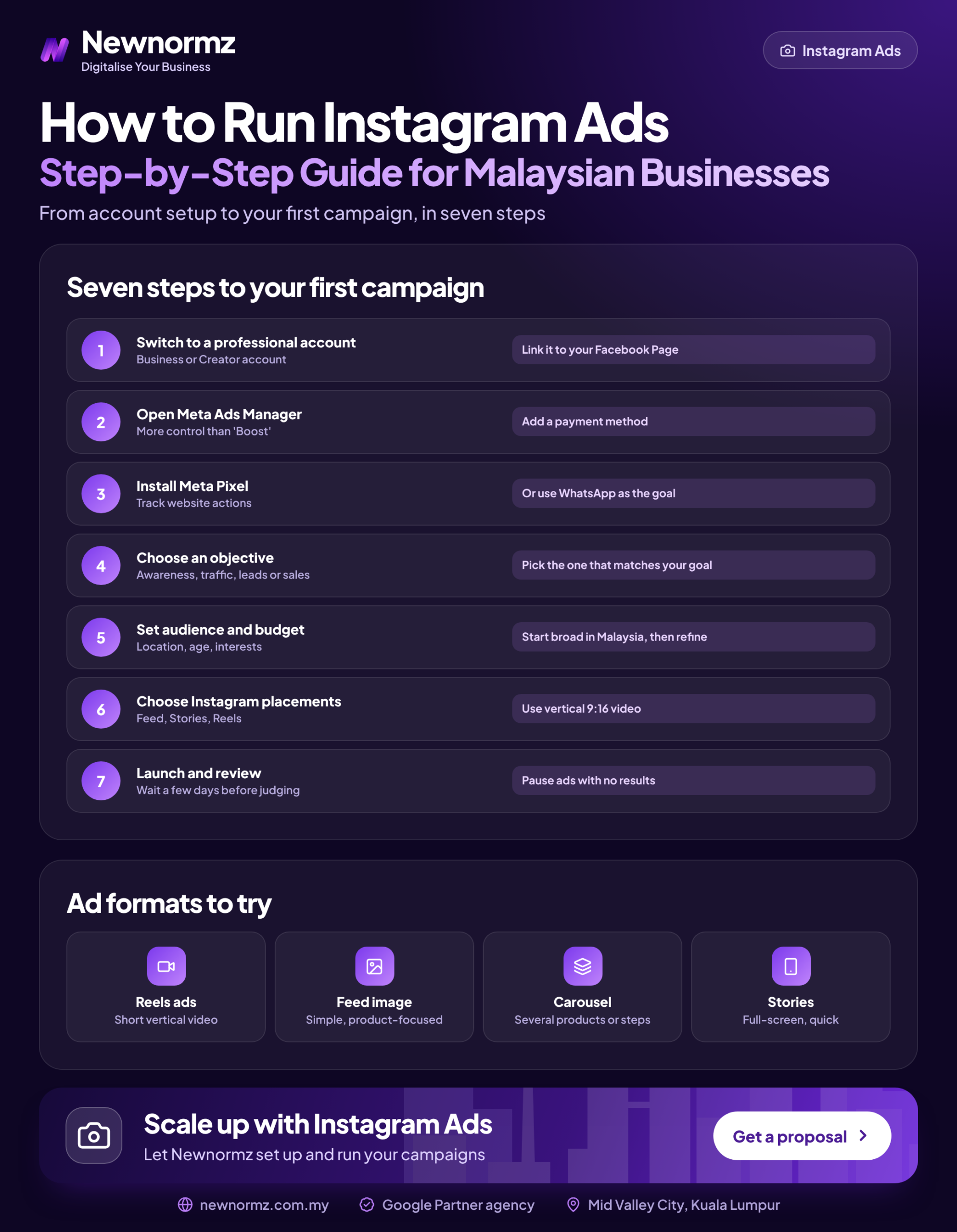
Every Meta campaign has three levels. The campaign level holds the objective. The ad set level decides who sees the ad, where, and what counts as a result. The ad level is what people actually see. Follow these eight steps in order.
Phase 1: Campaign Level (Objective and Budget Type)
Choose your Instagram ad campaign objective
Each objective suits a different goal. Awareness buys cheap reach. Traffic buys clicks, and many of those people never read the page. Engagement covers messages and interactions. Leads covers forms and qualified chats. Sales needs a working Pixel. The rule we use: if you want WhatsApp enquiries, pick Engagement or Leads and set WhatsApp as the conversion location. If you run an online store with a Pixel that is firing correctly, pick Sales.
Pick the budget type and check special ad categories
There are two budget types. A campaign budget (Advantage+ campaign budget) lets Meta move money between ad sets. An ad set budget fixes the amount each ad set spends. For a first test with one ad set, either works. Meta also has special ad categories, such as housing, employment, credit and financial products, and social issues, which limit your targeting options. If you work in property, finance or recruitment, check whether a category applies to you before you build the campaign.
Phase 2: Ad Set Level (Conversion Location, Audience, Placements)
Set the conversion location
This is where the action happens: your website, an Instant Form, WhatsApp, or the Instagram profile and DMs. For most Malaysian service businesses, WhatsApp is the place customers already prefer to talk. Pick it only if someone can reply within minutes.
Build the audience: broad, with a sensible location
For Instagram ad targeting, start broad. Use Advantage+ audience and a location that matches where you can actually serve customers, for example a radius around the Klang Valley, or nationwide if you deliver everywhere. Broad targeting usually beats a stack of interests, because the creative now does the targeting: people who respond to your ad tell Meta who to find next. Add Custom Audiences (website visitors, Instagram engagers) later, for retargeting.
Choose placements
Advantage+ placements shows your ad across Facebook, Instagram and Meta’s partner network, wherever results are cheapest. That is a good default. Switch to manual and tick only Instagram Feed, Stories, Reels and Explore if your creative only makes sense there (for example, a vertical video with a creator speaking to camera) or if your brand needs to appear on Instagram specifically.
Phase 3: Ad Level (Creative, Copy, Language and Destination)
Select your Instagram identity and upload 3 to 6 varied creatives
Under Identity, choose your Instagram account, not only the Page. Then upload genuinely different creatives: a Reels-native video, a Stories cut, a carousel. Changing the background colour doesn’t count as a new creative. Ad creative testing works when each version tries a different hook or angle.
Write captions per language as separate ads
Make a separate ad for each language you need (English, Bahasa Malaysia, Chinese). One ad with a translated caption pasted underneath isn’t enough. Each audience responds to different phrasing and different proof, and separate ads show you which language actually produces enquiries.
Set the destination and tracking
Add UTM parameters so the clicks show up correctly in your analytics, and confirm which Pixel event the ad set optimises for. For click-to-WhatsApp ads, write a pre-filled greeting that tells your team which ad the chat came from. For Instant Forms, choose the Higher intent form type, which adds a review screen before people submit. Add 1 or 2 multiple-choice qualifying questions, such as budget range or timeline.
The first 1 to 3 seconds of Instagram Reels ads and Instagram Stories ads decide whether people stop scrolling. Three hook formulas to try: name the audience plus the problem (“Renovating a condo in Mont Kiara? Read this before you sign”), show the result first (the finished kitchen, then rewind to the before), and say the objection out loud (“Why we don’t do the cheapest package”). There is more on making Stories and Reels that hold attention if you’re producing your own videos.
For the words under the video, these caption ideas for Malaysian brands are a good starting point. Rewrite them for each language rather than translating them word for word.
From our audits
One pattern we see again and again: an Instant Form set to “More volume” with no questions. The cost per lead looks excellent, then half the numbers don’t pick up or the person doesn’t remember filling in the form. Switching to Higher intent with a qualifying question usually raises the cost per lead and lowers the cost per customer. The customer is the number that matters.
Your First 14 Days: The Test Plan That Tells You If It’s Working
Meta’s Business Help Centre explains that an ad set leaves the learning phase after roughly 50 optimisation events in the 7 days since the last significant edit. Your budget has to make that possible. Here is a worked example for a click-to-WhatsApp campaign. Every number below is an example, not a market rate.
| Example input | Example value | What it means |
|---|---|---|
| Daily budget | RM60 (RM840 over 14 days) | One ad set, 3 to 6 creatives |
| Cost per WhatsApp conversation | RM8 | About 7.5 chats a day, roughly 52 a week: just enough to exit learning |
| Chats over 14 days | 105 | RM840 divided by RM8 |
| Share that become qualified leads | 30% (about 31 leads) | Right location, real need, realistic budget |
| Cost per qualified lead | About RM27 | The number you judge the test on |
Look at what happens if you split the same RM60 a day across three ad sets. Each one gets about 17 chats a week, none of them leaves learning, and Meta reports “Learning limited”. If your budget can’t reach about 50 events a week, combine everything into one ad set, or optimise for a higher-volume event first (for example, conversations rather than purchases).
The pass or fail rule. Work out what a qualified lead is worth to you before you launch. Example: if a customer brings in RM400 of margin and you close 1 in 5 qualified leads, you can afford up to RM80 per qualified lead. On day 14, the test passes if the cost per qualified lead is under that limit. Don’t touch the campaign for the first 3 to 4 days, because every significant edit restarts learning. After that, pause the weakest creative, not the whole ad set.
A clean result also depends on your data. If the Meta Pixel and Conversions API miss events, the algorithm learns from incomplete signals and your cost per lead looks worse than it really is. If you would rather someone else runs this test and the next round, that is what our Instagram ads management team does.
How to Check Your Instagram Ads Are Working (Beyond Likes)
We judge social media on the enquiries it brings in, not on views or likes. Use this table as your weekly report. The warning signs are the working rules we use, not industry benchmarks.
| Metric | What it tells you | Warning sign |
|---|---|---|
| Hook rate (thumb-stop) | 3-second video plays divided by impressions: how many people your opening stopped | One creative far behind the others: replace its first seconds |
| CTR (link) | Share of viewers who tapped through to WhatsApp, the form or your site | Falling week on week |
| Ad frequency | Average number of times each person has seen the ad | Rising while CTR drops |
| Cost per result | What Meta charges for each chat, lead or purchase | Climbing for 3 or more days in a row after learning |
| Cost per qualified lead | Spend divided by the leads your team would actually follow up | Above your allowable limit at day 14 |
| WhatsApp reply time | How long a new chat waits for a human answer | Chats left overnight or over the weekend |
The rule for creative fatigue: when frequency is climbing and CTR is falling together, the audience is tired of that ad. Swap in a new hook or format and leave the targeting alone. To check whether the numbers add up to a profit, run them through our free social media ROAS calculator.
Common Instagram Ad Problems and How to Fix Them
✗ The ad is rejected or sits “In review” for days
The usual causes are before-and-after images, personal claims (“Are you overweight?”), health or finance promises, or a landing page that doesn’t match the ad.
✓ The fix
Read the rejection reason in Account Quality, change the specific claim, and request a review. Search the Meta Ad Library to see how similar advertisers in your industry word their ads.
✗ Money is spent, chats come in, but nobody becomes a customer
Very often the ad is working. The follow-up isn’t. A chat that waits three hours for a reply has usually gone cold.
✓ The fix
Set up a WhatsApp Business greeting and quick replies, schedule ads only for hours when someone is staffing the chat, and track replies within 15 minutes as a team target.
✗ The ad set is stuck in “Learning limited”
There are too many ad sets for the budget, so none of them reaches enough events.
✓ The fix
Combine them into one ad set with broad targeting, or optimise for a higher-volume event until the volume builds up.
✗ The ad shows on Facebook but not on Instagram
Advantage+ placements may be sending most of the budget to Facebook, or the Instagram account was never selected as the identity.
✓ The fix
Check Breakdown, then By delivery, then Placement in Ads Manager. Confirm the Instagram identity at ad level, and restrict placements to Instagram if you need it there.
None of this is a one-off job. New creatives every few weeks, language versions, learning resets and a daily check on the chats add up to real hours. That ongoing work is where a social media marketing agency in Malaysia earns its fee. Our team runs social alongside SEO and Google Ads, so WhatsApp enquiries from every channel are tracked in one place.
Want a second opinion before you spend? We’ll review your objective, tracking and WhatsApp flow.
Instagram Ads in Malaysia: Calendar and Audience Nuances Most Guides Skip
Competition for ad space rises around Ramadan and Hari Raya, Chinese New Year, Deepavali and the 9.9 to 12.12 sales, and costs usually rise with it. Have your festive creative ready and tested 4 to 6 weeks early. That way the version you scale during the peak has already proven itself at normal prices.
Language matters as much as timing. A BM ad with Raya visuals, a Chinese ad built around CNY gifting and an English ad for the general audience should be three separate ads, each with its own results. We’ve run Meta campaigns for brands such as Taiwan Excellence on Facebook. Instagram follows the same rule: the creative has to suit the audience before the targeting can help. If you’re still deciding where your budget should go, read how Meta ads compare with TikTok.
FAQ
Can I run Instagram ads without a Facebook Page?
You can boost posts from the Instagram app without one, but for proper campaigns you should set up a Page. Ads Manager, click-to-WhatsApp ads and a business portfolio all work best with a Facebook Page linked to your Instagram account through Accounts Center.
Is it better to boost a post or use Ads Manager for Instagram ads?
Use Ads Manager for leads, WhatsApp chats and sales. Boosting is fine when you want more reach for a post that is already doing well. It doesn’t give you the objective, tracking or testing control you need to bring in enquiries.
How much should I spend on my first Instagram ad campaign in Malaysia?
Spend enough for one ad set to reach about 50 optimisation events a week, because that is the volume Meta’s learning phase works on. Divide 50 by 7, then multiply by your expected cost per result to get a daily budget. If that figure is too high for you, optimise for a cheaper, higher-volume event first.
How long do Instagram ads take to start working?
Results usually appear within the first few days, but you need about 14 days to judge a campaign properly. The first 3 to 4 days are the learning phase. Editing the campaign during that time restarts it, so hold off on changes until it has enough data.
What size should Instagram Reels and Stories ads be?
Use 9:16 vertical (1080 x 1920 pixels) for Reels and Stories, and 4:5 (1080 x 1350) for Feed. Keep text and logos away from the top and bottom edges, where the profile name and buttons cover the video.
Free Meta ads account audit
Get your Instagram ad setup checked before you spend your first ringgit
Newnormz plans, creates and runs social media and paid social for Malaysian brands, and judges every campaign on enquiries, not just views. 5.0 rating from 214+ Google reviews.
Get Your Free Meta Ads Audit →
We review your objective, tracking and WhatsApp flow. No obligation.

Bryan Tan is an SEO Specialist and CEO at Newnormz, helping hundreds of businesses achieve first-page rankings on Google. With a passion for driving organic growth, Bryan blends innovative strategies with hands-on experience to optimize websites for maximum visibility. Always at the forefront of the latest SEO insights and trends, he consistently adapts to the evolving digital landscape.