Key takeaways
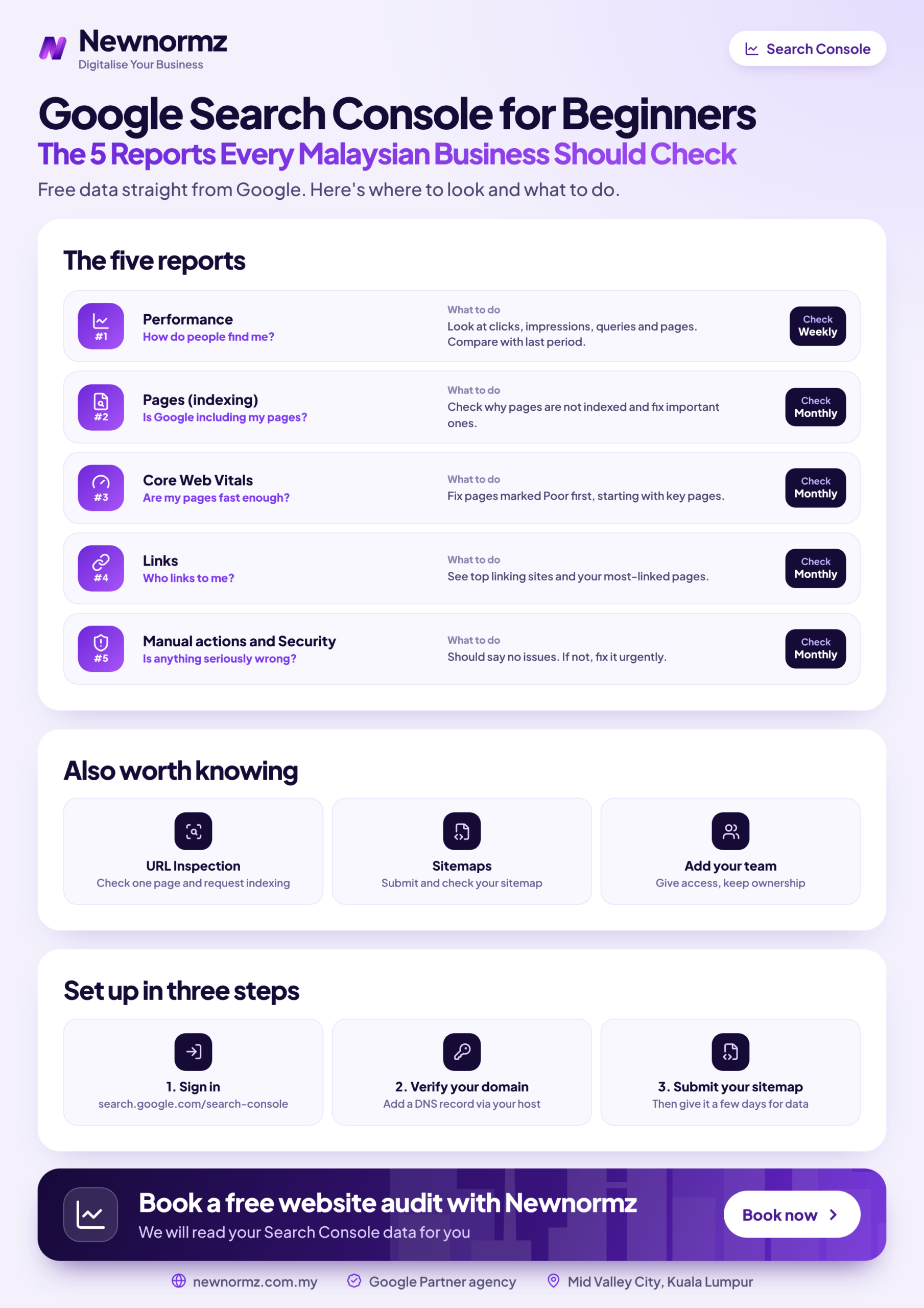
- ✓This Google Search Console beginners Malaysia guide comes down to five reports, 20 minutes, once a month, plus a quick check after any website change.
- ✓Those reports show whether customers can find you, whether Google can index your pages, and whether anything is seriously wrong.
- ✓Every report below ends in a decision: fix it, schedule it or ignore it.
- ✓Search Console can’t show WhatsApp enquiries, calls or sales, so it needs to be paired with proper conversion tracking.
- ✓No access yet? Start with our Search Console setup guide, then come back.
The Google Search Console Beginners’ Routine for Malaysia: 20 Minutes, Once a Month
Statcounter puts Google at roughly 93 to 96% of Malaysian search, so Google’s own data is the closest thing you have to a record of how customers find you online. Most of the tool can still be ignored, so this isn’t a Search Console tutorial that walks through every menu. It’s the GSC guide Malaysia business owners can actually use: the five reports that lead to a business decision, in the order you should open them.
| Report | Where to find it | Question it answers | Time |
|---|---|---|---|
| Performance | Performance > Search results | Which searches bring customers to us? | 9 minutes |
| Page indexing | Indexing > Pages | Are our important pages in Google? | 6 minutes |
| Core Web Vitals | Experience > Core Web Vitals | Is the site painfully slow on mobile? | 2 minutes |
| Links | Links (left menu) | Who links to us, and which pages do we neglect? | 2 minutes |
| Manual actions | Security & Manual Actions | Has Google penalised the site? | 1 minute |
As for how often to check Search Console, once a month suits most small businesses, with a quick extra look after any website change. Performance and Page indexing come first because they take the most judgement and carry the most money. Compare the last 3 months with the previous period, which evens out one-off dips such as a public holiday week. The data usually runs a couple of days behind and goes back 16 months, so don’t read anything into a gap in the last day or two.
Report 1, Performance: Which Searches Actually Bring Malaysian Customers
To read Google Search Console data properly, set the view up the same way each month. Otherwise you end up comparing different things.
Search Console performance report checklist
- ✓Filter Search Console by country: choose Add filter, then Country, then Malaysia, so overseas impressions don’t inflate your numbers.
- ✓Tick all four metrics at the top of the chart: clicks, impressions, CTR and average position.
- ✓Open the date filter and compare the last 3 months with the previous period.
- ✓Review Queries: are the searches you sell on growing, or only your brand name?
- ✓Review Pages: are service and product pages gaining, or only old blog posts?
- ✓Review Devices: if mobile has a much lower CTR or position than desktop, look at that page on your own phone.
Clicks, Impressions, CTR and Average Position in Plain English
Clicks vs impressions is the first distinction to get right. An impression means your link appeared in a search result, and a click means someone chose it. CTR is clicks divided by impressions.
The average position meaning catches most people out. It’s an average across many searches, locations and devices, so it won’t match one manual search on your own phone. If other labels confuse you, keep our list of common SEO terms explained open beside the report.
Read the numbers together, never alone. Times Parking’s 6-month campaign is one illustration of the set you would look at: 528,000 impressions, 416 ranking keywords and 31.5K clicks. It’s one client’s result rather than a benchmark for your site.
Worked Example: What a Weak Click-Through Rate Could Be Worth
This is an illustration, not a benchmark. Say one group of service pages gets 40,000 impressions a month at a 1.5% CTR, which gives 600 clicks. Better titles and descriptions lift the CTR to 3%, which gives 1,200 clicks.
At a 2% enquiry rate, the extra 600 clicks mean 12 more enquiries. To put a value on them, take the RM18.74 cost per lead from one Newnormz Google Ads client, a chiropractic centre in PJ. That values the 12 enquiries at about RM225 a month, for that one group of pages.
One client’s cost per lead won’t transfer directly to your business, so use your own figure if you have it. A better CTR is never guaranteed either. The decision is simple: pick pages with high impressions and low CTR for page position, then rewrite their titles and meta descriptions first.
Spotting Bahasa Malaysia and Chinese Queries
Malaysian customers rarely search in one language, and a quick filter shows how much of that demand you’re seeing. In Queries, choose Add filter, then Query, then Custom (regex), and enter harga|murah|terbaik|kedai. That isolates common Bahasa Malaysia buying words. Run it again with Chinese terms from your own industry, such as 价格 (price) or 推荐 (recommend).
If a language gets impressions but your page doesn’t serve it, that’s a content gap. Plan a proper page in that language, not a machine-translated copy of the English one. If a language gets almost no impressions, leave it and spend the time elsewhere.
Report 2, Page Indexing: Find Out Why Pages Are Missing From Google
A page that isn’t indexed can’t rank at all, so this is the report that catches expensive problems early. Check it monthly, and again straight after any redesign, migration or plugin overhaul.
Page indexing report checklist
- ✓Paste each money page into the URL Inspection tool at the top of the screen and confirm it’s indexed.
- ✓Read the reasons listed under “Why pages aren’t indexed”, and look at the example URLs inside each one.
- ✓Open Indexing > Sitemaps and check that your XML sitemap was submitted and read successfully.
The common mistake is treating the whole “not indexed” count as a problem. Redirects and deliberate noindex pages are often fine, and a healthy site can show a large number. What matters is which URLs sit in each group, so judge the reason and the page together.
Two of the labels sound alike but mean different things. Crawled currently not indexed means Google fetched the page and left it out for now, while discovered currently not indexed means Google knows the URL but hasn’t fetched it yet.
Once you know the reason, our walkthrough on fixing Google indexing issues covers the repairs in more depth.
Broken URLs are the most common cause of sudden damage after a redesign. If that report grows after a site change, this guide to resolving 404 errors shows how to work through them.
Client example
My Lovely Baby: 100% of lost traffic recovered after a site upgrade
Problem: A site upgrade broke URLs and traffic dropped overnight.
What we did: Ran a migration audit and recovery.
Result: 100% of lost traffic recovered, with 85% of target keywords on page 1 within 9 months.
This is why the report deserves a look straight after any upgrade, because the earlier you notice broken URLs, the sooner the repair can start. Crawl and indexing work can also pay off well beyond repairs. Sunway TCM Centre’s technical rebuild, which included crawl and indexing fixes and AEO structuring, brought +150% keywords and 80% of target keywords on page 1 within 4 months.
Report 3, Core Web Vitals: Check Mobile First, Then Ignore the Noise
The Core Web Vitals report groups your URLs as Good, Needs improvement or Poor, based on visits from real Chrome users. Your buyers are mostly on mobile in Malaysia, so open that view first.
Core Web Vitals report checklist
- ✓LCP (how fast the main content loads): Google’s “good” threshold is 2.5 seconds or less.
- ✓INP (how quickly the page responds to a tap): “good” is 200 milliseconds or less.
- ✓CLS (how much the layout jumps around): “good” is 0.1 or less.
- ✓Open any “Poor” group and note the example URLs for your developer.
“Not enough data” is common on low-traffic SME sites, and it isn’t a failure. It only means Google doesn’t have enough real-user visits to report on.
Speed alone won’t beat a more relevant page. Fix “Poor” URL groups, especially on money pages, then stop. Paying to move a “Good” site towards a perfect score rarely beats spending that money on better pages.
Report 4, Links: See Who Vouches for You and Which Pages You Neglect
The Search Console links report splits into external links, from other sites, and internal links, from your own pages. Two minutes here shows where your authority sits and which pages you’ve forgotten.
Links report checklist
- ✓Top linking sites: are real suppliers, associations or media in your industry on the list?
- ✓Top linked pages: do links point only at your homepage?
- ✓Anchor text: does the wording describe what you actually do?
- ✓Internal links: which service pages have few links from your own site? Add some from related pages this month.
Treat the report as a sample, not a full list of every link, and remember that it doesn’t score link quality. A long list isn’t automatically good, and a short one isn’t automatically bad.
Don’t panic over odd spam domains, and don’t pay for disavow work on their account alone. Google’s documentation says most sites don’t need the disavow tool. If an agency shows you this list as proof of an emergency, ask what actual harm it has found.
Report 5, Manual Actions: The 30-Second Check That Could Save Your Traffic
The manual actions report tells you whether a human reviewer at Google has penalised the site. Most businesses will never get one, which is why this check takes 30 seconds.
Manual actions report checklist
- ✓Look for “No issues detected”. That’s what you want to see.
- ✓If an action appears, read the stated reason, fix the issue across the whole site, then file a reconsideration request.
- ✓Open the Security issues report in the same visit, since it sits right beside this one.
What Search Console Won’t Tell You About Your Leads
Search Console stops at the click. It doesn’t track WhatsApp clicks, phone calls, form submissions or sales, which are the numbers you actually care about. Use Google Analytics 4 for on-site behaviour and set up proper conversion tracking for enquiries. Our comparison of how Search Console differs from Analytics explains which tool answers which question.
Google AI Overviews visibility isn’t reported separately either, so you can’t filter for it in the Performance report. For the wider picture, read what AI Mode means for traffic.
This gap is why the last stage of our RANKED Framework, the Data loop, covers call, WhatsApp and form attribution. Without it, you can see that traffic rose but not whether it produced a single customer.
How to Prioritise What You Find: Fix, Schedule or Ignore
A monthly check only helps if it ends in a decision. Use this table to sort what you find and to decide who should handle it.
| Issue | Business impact | Effort | Who should handle it |
|---|---|---|---|
| Manual action | Severe. Fix now. | High | SEO specialist |
| Money page not indexed | High. Fix now. | Low to medium | Owner checks, developer or SEO specialist fixes |
| Broken URLs after a redesign | High. Fix now. | Medium | Developer, guided by an SEO specialist |
| High-impression page with low CTR | Medium. Schedule this month. | Low | You or your marketing team |
| “Poor” mobile Core Web Vitals | Medium. Schedule. | Medium to high | Developer |
| Thin blog posts not indexed | Low. Ignore, or merge later. | Low | Content writer, when time allows |
From our audits
One mistake keeps coming back: a business watches total clicks and feels fine while a key service page sits unindexed. Blog traffic can hide the gap, because a rising total says nothing about the page that sells. Inspect your money pages by URL every month, whatever the chart is doing.
If you lack the time or technical access to handle the harder fixes, hand them to an SEO agency in Malaysia and ask to see the results in these same reports.
Then give the work time. The timeline we give clients is first ranking movement at day 60 to 90, with traffic and lead growth in months 4 to 8. Results vary by site and market, and a fix can’t be judged after one week.
Google Search Console FAQs From Malaysian Business Owners
Is Google Search Console free?
Yes, Google Search Console is free. You only need a Google account and proof that you own or manage the website.
How often should a small business check Google Search Console?
Once a month is enough for most small businesses. Add a quick check after any website change, and whenever enquiries from search drop suddenly.
Why does the average position in Search Console differ from what I see on Google?
Average position is an average across many searches, while your manual search is a single result. Location, device and search history can all change what one person sees, so trust the trend over a spot check.
Why does Search Console show different numbers from Google Analytics 4?
The two tools measure different things, so their numbers won’t match. Search Console counts clicks from Google Search results, while Google Analytics 4 records sessions on your site from all sources and can miss visitors, for example if they decline tracking or leave before the page loads.
Is it normal for some pages to show as not indexed?
Yes, it’s normal for some pages to show as not indexed, especially redirects and deliberate noindex pages. It only needs action when the page is one you want found. If blog content is the concern, this guide to getting blog posts indexed covers what to change.
Free SEO audit
Want a second pair of eyes on your five Search Console reports?
Newnormz runs 200+ month-to-month SEO accounts and holds a 5.0 rating from 214+ Google reviews.
We review indexing problems on money pages and missed high-impression queries, then give you a ranked fix list.

Bryan Tan is an SEO Specialist and CEO at Newnormz, helping hundreds of businesses achieve first-page rankings on Google. With a passion for driving organic growth, Bryan blends innovative strategies with hands-on experience to optimize websites for maximum visibility. Always at the forefront of the latest SEO insights and trends, he consistently adapts to the evolving digital landscape.