Yes, HTTPS affects SEO, but only a little. In its 2014 announcement “HTTPS as a ranking signal”, Google called a secure connection a very lightweight signal. So the honest answer to most HTTPS SSL SEO Malaysia questions is that the padlock on its own will not move you up the page. The real SEO cost comes from what goes wrong around it: Chrome’s “Not secure” warning putting people off enquiring, migrations done without proper redirects, mixed content, and referral data that disappears from GA4. This guide covers what HTTPS changes, what it doesn’t, and how to switch without losing traffic.
HTTP vs HTTPS Ranking: What Google Has Actually Confirmed
Much of the SSL advice online either overstates the ranking effect or confuses it with general “trust”. Google has said three things on the record, and they are enough to settle the question.
What Google has said publicly about HTTPS
- ✓August 2014: Google’s “HTTPS as a ranking signal” post confirmed HTTPS as a very lightweight signal. At launch it affected fewer than 1% of global queries and carried less weight than content quality.
- ✓December 2015: Google began indexing the HTTPS version of a page by default when both HTTP and HTTPS versions exist.
- ✓Since then: Google spokespeople, including Gary Illyes, have described HTTPS as a tiebreaker. When two pages are otherwise equal, the secure one can edge ahead.
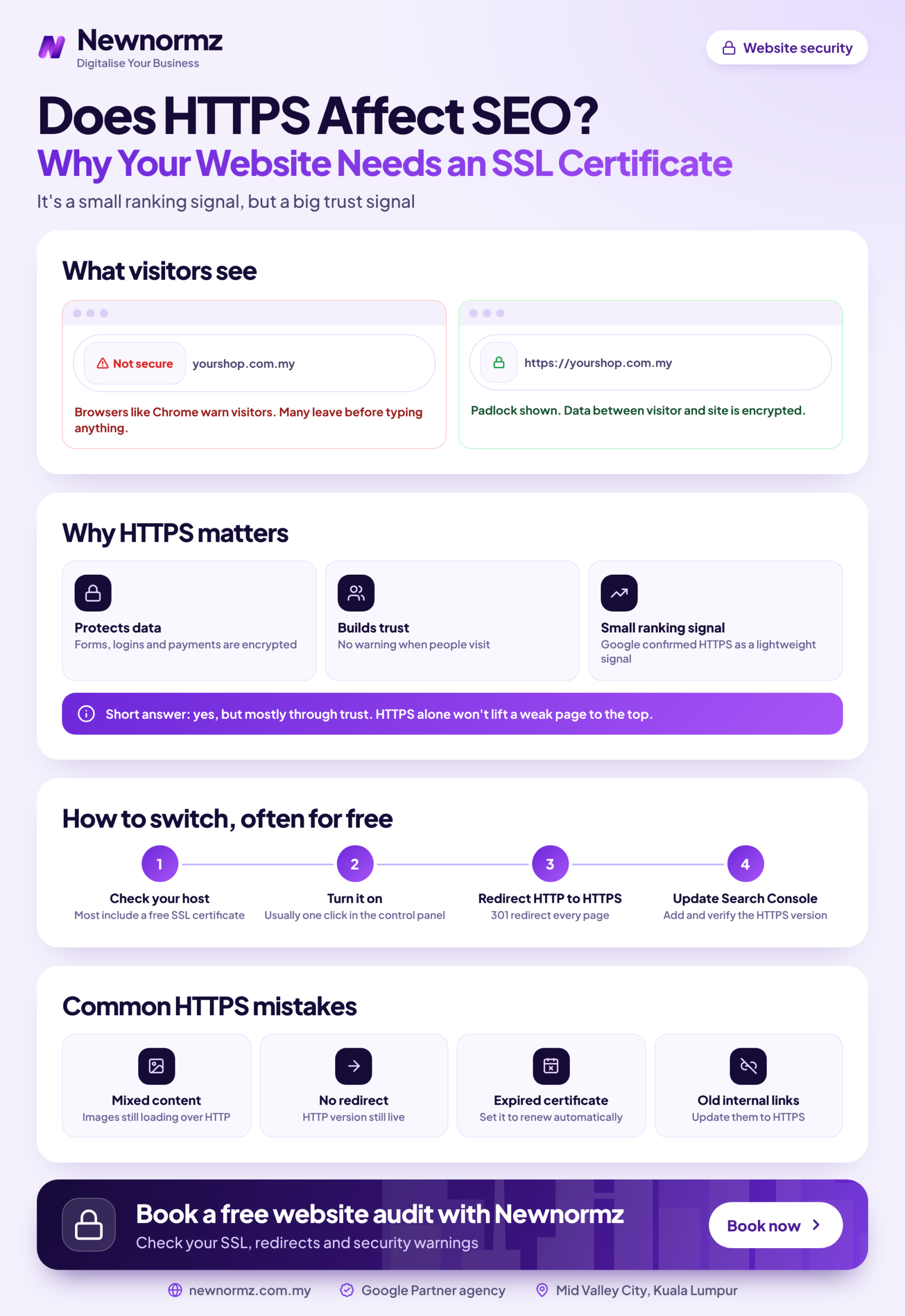
So is HTTPS a ranking factor? Yes, it’s confirmed. Is it a big one? No. It matters more in Malaysia than the ranking weight suggests, though, because Google handles roughly 93 to 96% of Malaysian searches (Statcounter). How Google and its Chrome browser treat an HTTP site is, in practice, how your whole market treats it. That’s why most of the SSL SEO benefits worth having sit outside the algorithm, as the next sections show.
Why HTTPS Won’t Rescue Thin Content or Weak Backlinks
This is where most answers to “does HTTPS affect SEO” go wrong. A padlock won’t beat a competitor whose pages answer the search better and who has earned more links from relevant sites. If a rival with thin content is outranking you, SSL is not the reason, and adding it won’t change the order. Google itself says publicly that no one can guarantee a specific ranking position, and no single technical fix can either.
If your site is already on HTTPS and still stuck on page 3, look at the other technical SEO issues holding it back before blaming the certificate.
HTTPS is the entry ticket, not the race. It keeps you in contention. It won’t win the race for you.
The Bigger Cost of No SSL: Chrome Warnings and Lost WhatsApp Enquiries
Since Chrome 68 in July 2018, Chrome has labelled every page loaded over HTTP as “Not secure”. On a phone set to Bahasa Malaysia, the same label reads “Tidak selamat”. Most Malaysian visitors browse on mobile, so the Not Secure warning Chrome displays sits right beside your URL on the screen where they decide whether to tap your WhatsApp button or fill in your form.
Chrome makes it worse at the worst moment. When a visitor starts typing into a form on an HTTP page, the warning turns red. Picture someone in Subang Jaya entering their phone number into a quotation form for a renovation job, then watching the address bar warn them in red. A good share of them stop typing.
Visitors also can’t tell “no certificate” apart from “something is wrong with this site”. To them, both look risky. If you’re seeing strange redirects or spam pages as well as the warning, check the signs your website has been hacked before assuming SSL is the only problem.
Think of it from both sides: a secure website Google can crawl over HTTPS earns a small ranking credit, while an HTTP site earns a warning label in front of every visitor. The table shows where that gap costs you.
| Factor | HTTP site | Secure HTTPS site |
|---|---|---|
| Chrome address bar | “Not secure” / “Tidak selamat” on every page | No warning |
| Form and WhatsApp click trust | Warning turns red when visitors type into forms | No browser objection at the point of enquiry |
| GA4 referral data | Visits from HTTPS sites often appear as “Direct” | Referring sites are reported properly |
| HTTP/2 support | Not available (browsers only use HTTP/2 over TLS) | Available, usually faster page loads |
| Google Ads landing pages | Paid clicks land on a page flagged as unsafe | Paid clicks land on a page that looks trustworthy |
The GA4 Blind Spot: Why Your Referral Traffic Shows as “Direct”
Browsers usually drop the referrer when someone moves from an HTTPS page to an HTTP page. So when a visitor clicks your link on a supplier directory, a news site or a partner’s website (nearly all of which are HTTPS now) and lands on your HTTP site, GA4 can’t see where they came from. It files the visit under Direct.
The business cost is quiet but real. Your directory listings, PR mentions and partnerships look as if they send nothing, so you may cut the ones that are working. Once you move to HTTPS, that referral data starts coming through again. It’s one reason to get your GA4 setup for SEO reporting right at the same time as the switch.
Free SSL Certificate or Paid? A Decision Rule for Malaysian Businesses
On SSL certificate SEO, the rule is simple: Google does not rank sites by certificate type. A free Domain Validated (DV) certificate from Let’s Encrypt uses the same TLS encryption as a paid one, and Google treats both the same for SEO. On most Malaysian shared hosting, cPanel AutoSSL issues and renews one automatically, often without you clicking anything.
Paid Organisation Validated (OV) and Extended Validation (EV) certificates check who owns the business. That has a use, but it isn’t a ranking use. Chrome removed the green EV company name from the address bar in 2019, so most visitors can’t even tell which type you bought.
For a plain-language breakdown of DV, OV and EV, see our SSL certificate Malaysia guide to certificate types.
Does PDPA Require SSL?
The Personal Data Protection Act 2010 doesn’t mention SSL by name. Its Security Principle does require you to take practical steps to protect personal data you collect, and that includes names, phone numbers and IC details submitted through your website forms. If those forms send data over unencrypted HTTP, that requirement becomes hard to defend. This isn’t legal advice, so check your obligations with a lawyer, but an SSL certificate is the cheapest protection you can put in place.
How to Move From HTTP to HTTPS Without Losing Rankings
Most traffic drops blamed on “the HTTPS switch” are really redirect and housekeeping mistakes. Follow this sequence and HTTP to HTTPS migration SEO risk stays low.
Crawl and export every current URL
Run a crawler such as Screaming Frog (free up to 500 URLs), then add the top pages from Search Console’s Performance report and GA4’s landing pages. This list becomes your redirect map and your checklist for later.
Install the certificate and test it
Turn on AutoSSL or Let’s Encrypt in your hosting panel. Make sure it covers both the www and non-www versions, then check the setup with Qualys SSL Labs’ free SSL Server Test.
Add 301 redirects from HTTP to HTTPS, page by page
When you 301 redirect HTTP to HTTPS, each http:// URL should point to its exact https:// match in a single hop. Never send everything to the homepage, because Google treats mass homepage redirects like missing pages and the rankings for those inner pages are lost.
Update internal links, canonicals, hreflang and the XML sitemap
In WordPress, change both URLs under Settings > General to https first. Then confirm that canonical tags, hreflang tags and your XML sitemap all point to HTTPS. Internal links that still go through redirects waste crawl budget.
Fix mixed content
Find every image, script and font still loading over http:// and switch it to https://. The section below shows how.
Set up a Domain property in Google Search Console
A Domain property (verified through DNS) covers HTTP, HTTPS, www and non-www together. Submit the new HTTPS sitemap there. Don’t use the Change of Address tool: Google’s documentation says it isn’t for protocol-only moves.
Update every link you control outside the site
Update the GA4 web stream URL, Google Ads final URLs, your Google Business Profile website link, and the links in your Facebook, Instagram and LinkedIn bios. Do the same for any directory listings you can edit.
Add HSTS only once everything is stable
HSTS tells browsers to load only HTTPS from then on. Start with a short max-age such as one day and increase it over a few weeks. Only consider the preload list once you’re certain every subdomain works over HTTPS, because it’s very hard to reverse.
From our audits
Step 7 is the one DIY migrations skip most often, especially Google Ads final URLs and the Google Business Profile link. Nobody notices because the redirect quietly catches them. But every paid click now goes through an extra hop before the page loads, and your most visible local listing points to a URL that no longer exists in its own right.
Mixed Content: The Padlock Killer Most DIY Migrations Miss
✗ Assuming the certificate fixes everything
Themes, page builders and older blog posts often hard-code images, scripts and fonts to http://. The page loads over HTTPS but pulls insecure files in, so Chrome blocks some of them or withholds the clean padlock. Sliders break, fonts change, and the site looks half-finished on exactly the pages you migrated to build trust.
✓ The fix
Open each main template in Chrome, press F12 and check the Console tab. Each mixed content error is listed there with the name of the offending file. Back up the database, then run a search-replace from http://yourdomain.com.my to https://yourdomain.com.my using WP-CLI or a plugin such as Better Search Replace. Elementor users should also run its built-in Replace URL tool. Anything loaded from another domain needs its https:// version, or should be removed.
What a Botched Migration Looks Like (and How It Gets Fixed)
Any change that breaks URLs carries the same risk an HTTPS move does if the redirects go wrong. One of our clients learnt this from a routine site upgrade, not an SSL change.
Client example
My Lovely Baby: 100% of lost traffic recovered
Problem: A site upgrade broke the shop’s URLs and organic traffic dropped overnight.
What we did: A full migration audit to map the broken URLs, followed by a structured recovery.
Result: 100% of the lost traffic recovered, and 85% of target keywords on page 1 within 9 months, including “baby shop”, “baby stroller” and “baby car seat”.
If your traffic has already fallen after a site change, start with this framework for recovering from a sudden ranking drop.
How Long Before Google Settles After the Switch
Expect some movement. While Google recrawls and swaps HTTP URLs for HTTPS ones, rankings and impressions can wobble for a while. Google’s site-move guidance says most pages on a medium-sized site move within a few weeks, and larger sites take longer. A small fluctuation that settles is normal. A steady decline after a month means something in the steps above is broken.
Check two reports in Search Console each week. In the Pages report, your old HTTP URLs should move into “Page with redirect” while the HTTPS versions show as indexed. The Crawl Stats report (under Settings) should show Googlebot fetching the HTTPS URLs without a spike in errors.
At Newnormz, this work falls under the Architecture pillar of our RANKED Framework, and we plan technical fixes for weeks 2 to 6 of an engagement. Getting those foundations right is often what makes the rest possible. For Sunway TCM Centre, a technical rebuild with crawl and indexing fixes came before 80% of their target keywords reached page 1 within 4 months. If you’d rather have an SEO agency in Malaysia run the move and the monitoring, that’s the kind of work we scope for clients.
Your 10-Minute HTTPS Health Check
This isn’t a full technical audit, just a quick way to confirm your secure website setup is actually working for Google and your visitors.
HTTPS quick check
- ✓The padlock shows on every template: homepage, service page, blog post, contact page and (if you have one) product and checkout pages.
- ✓Typing http:// in front of any page takes you to its HTTPS version in a single redirect hop.
- ✓The www and non-www versions both end up at one HTTPS version.
- ✓Chrome DevTools shows no mixed content warnings on your key pages.
- ✓Your XML sitemap lists only HTTPS URLs.
- ✓Search Console has a Domain property or an HTTPS property, and that’s where you read your data.
If several of these fail and your theme or host can’t support a clean HTTPS setup, it’s usually cheaper to fix the platform than to keep patching around it.
HTTPS SSL SEO Malaysia: Frequently Asked Questions
Does HTTPS improve Google rankings?
Only slightly. Google confirmed HTTPS as a lightweight ranking signal in 2014, and it works mostly as a tiebreaker between otherwise equal pages. The bigger gains come from removing the “Not secure” warning and getting accurate analytics.
Is a free SSL certificate good enough for SEO?
Yes. A free Let’s Encrypt or cPanel AutoSSL certificate gets exactly the same SEO treatment as a paid one. Just make sure it renews automatically, because an expired certificate blocks visitors with a full-page warning.
Will switching from HTTP to HTTPS make my rankings drop?
Not if every HTTP URL 301-redirects to its matching HTTPS page. A brief fluctuation while Google recrawls is normal. Lasting drops usually come from redirects to the homepage, redirect chains, or pages blocked from crawling.
Do EV or OV certificates rank better than a basic DV certificate?
No. Google doesn’t rank by certificate type, and Chrome stopped showing the EV company name in the address bar in 2019. Buy OV or EV only when a bank, payment gateway or corporate client requires it.
Why does Chrome say my website is “Not secure”?
Because the page is loading over HTTP instead of HTTPS. Chrome has labelled all HTTP pages this way since 2018. If you already have a certificate, check for a missing redirect, an expired certificate or insecure files loading on the page.
How long does Google take to reindex a site after moving to HTTPS?
For most small and medium sites, a few weeks. Google’s site-move guidance says most pages on a medium-sized site move within a few weeks, while large sites take longer. Track progress in Search Console’s Pages report.
Technical SEO and migration audit
Not sure your HTTPS setup is costing you nothing? We’ll check every redirect, certificate and mixed content issue.
Newnormz runs SEO for 200+ Malaysian businesses on month-to-month terms, with a written page 1 guarantee and a 5.0 rating from 214+ Google reviews.
Month to month, no lock-in. No obligation to sign up.

Bryan Tan is an SEO Specialist and CEO at Newnormz, helping hundreds of businesses achieve first-page rankings on Google. With a passion for driving organic growth, Bryan blends innovative strategies with hands-on experience to optimize websites for maximum visibility. Always at the forefront of the latest SEO insights and trends, he consistently adapts to the evolving digital landscape.