Google does not penalise most duplicate content. Google has said publicly that it only takes action when duplication is deliberate and manipulative, such as scraping other sites or mass-producing copied pages to game rankings. The real damage is quieter. When the same content sits on several URLs, Google picks one version to show, and it may not be the one you want. Your links and ranking signals get split across copies, and Googlebot spends time crawling pages that add nothing new. The fix is usually technical and cheap: find the duplicates in Google Search Console or a crawler, then consolidate them with 301 redirects, canonical tags, or rewritten content, depending on why the duplicate exists.
A Simple Way to Think About It
One Flyer, Two Phone Numbers
📞 The same flyer, two numbers
You print one flyer with two different phone numbers on it. Half your callers end up on a line nobody checks.
✅ One flyer, one number
Every call rings the same phone, and someone always picks up.
The rest of this guide shows you how to find the second phone numbers on your website and point them all back to the one that matters.
What Duplicate Content Actually Means
Duplicate content is the same or nearly the same text available at more than one URL. It can happen inside your own site (the most common case) or across different sites, for example when your blog post gets republished somewhere else.
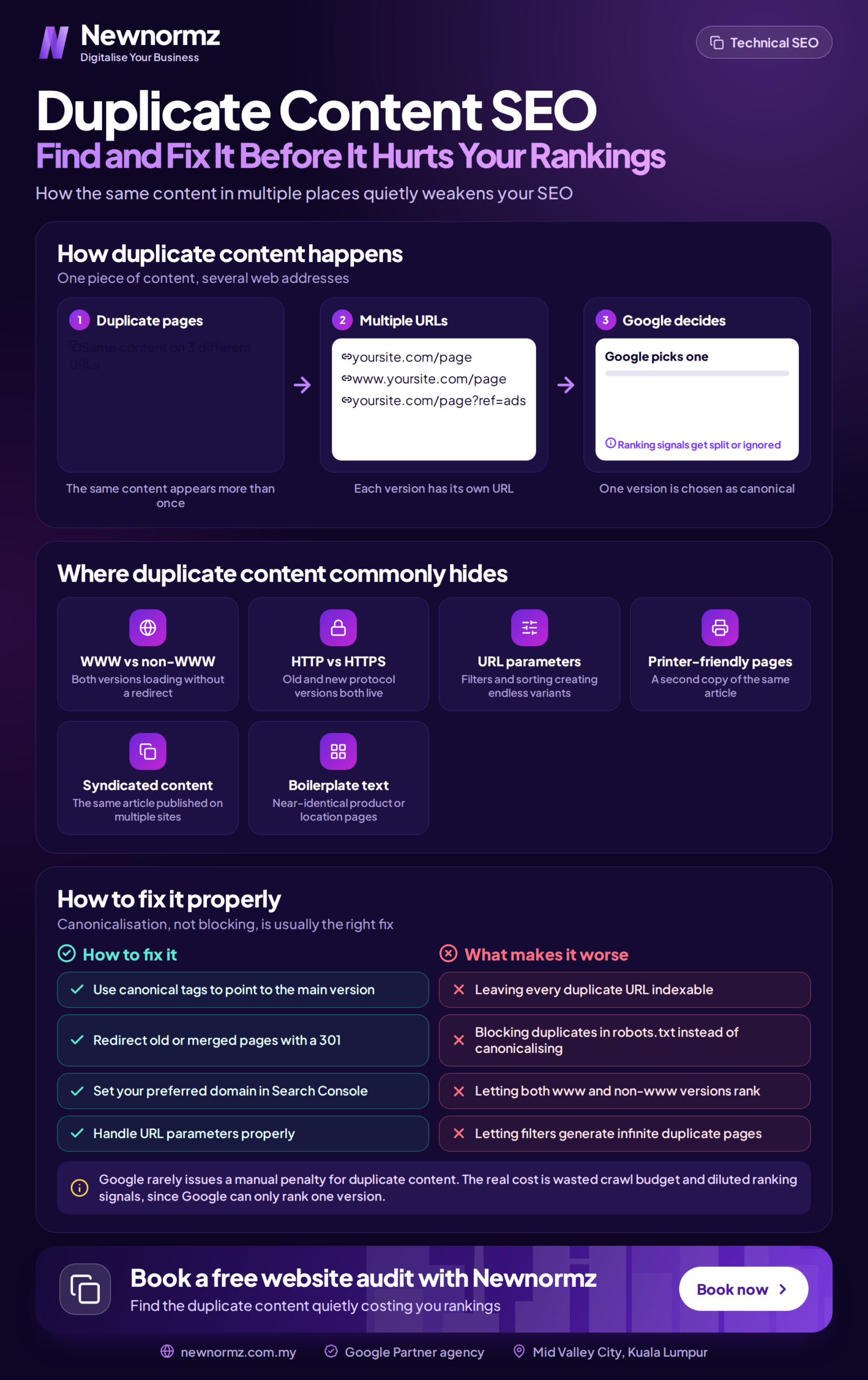
The important word is URL. To you, yoursite.com.my/shoes and yoursite.com.my/shoes?colour=red are one page. To Google, they are two addresses, and if both show the same content, Google has to decide which one belongs in search results.
Most duplicate content is accidental. It comes from how your CMS, theme, or ecommerce plugin generates URLs, not from anyone copying anything on purpose. That is good news, because accidental duplication has straightforward fixes.
The Penalty Question: What Google Actually Does
A lot of SEO content uses “penalty” loosely, so here is the honest version.
Manual action. This is a true penalty, where a Google reviewer flags your site and it shows up in the Manual Actions report in Search Console. For duplicate content, this is reserved for sites that scrape or copy content wholesale with little or no added value. A normal business website with some accidental duplicates will not get one.
Filtering. This is what happens to almost everyone else. Google groups the duplicates, picks one as the “canonical” version, and hides the rest from results. No punishment, but the version it picks may be a parameter URL, an old HTTP page, or a tag archive instead of your carefully built service page.
Signal dilution. If other sites link to three different versions of the same page, those links are split three ways instead of backing one strong URL. Google tries to consolidate this itself, but it does not always get it right.
Wasted crawling. On small sites this rarely matters. On ecommerce sites with thousands of filter combinations, Googlebot can spend a lot of its visits on near-identical pages while your new products wait to be discovered.
So the goal is not avoiding a penalty. It is making sure Google shows the right page, with all your signals behind it.
Where Duplicate Content Usually Comes From
When we audit Malaysian business sites, the same handful of causes come up again and again.
Several versions of your whole domain
If your homepage loads at http://, https://, www, and non-www addresses without redirecting, you have up to four copies of your entire site. This is common on older sites that moved to HTTPS without cleaning up properly.
URL parameters from filters, sorting, and tracking
Online stores are the worst hit. Filter by size, sort by price, add a UTM tag from a Facebook campaign, and each combination creates a new URL showing mostly the same products.
Supplier product descriptions
Many Malaysian retailers paste descriptions straight from the manufacturer. The same text then appears on your site, on dozens of competitor sites, and on Shopee and Lazada listings. Google has no reason to rank your copy above everyone else’s.
Location pages with the city name swapped
Service businesses often build pages for Kuala Lumpur, Petaling Jaya, Shah Alam, and Johor Bahru where the only difference is the town name. Google sees these as near-duplicates, and at scale they can look like doorway pages. If you want location pages to work, each one needs genuinely local substance, which is the core of good local SEO.
Tag, category, and archive pages
WordPress creates tag pages, category pages, author archives, and date archives by default. Each can show the same post excerpts in slightly different groupings.
Republished or syndicated articles
Publishing your article on Medium, LinkedIn, or a partner portal is fine, but without a link or canonical pointing back to you, the bigger site can end up outranking your original.
A note on multilingual sites
An English page and its Bahasa Malaysia or Chinese translation are not duplicate content. They are different languages serving different searchers. Where you do need care is the same English content served on separate Malaysia and Singapore URLs. That is what hreflang tags are for: they tell Google which version belongs to which audience.
How to Find Duplicate Content on Your Site
You do not need expensive software for this. Start with the free tools and only go further if your site is large.
1. Google Search Console: Page Indexing report
This is the most useful source because it shows what Google itself decided. Go to Indexing, then Pages, and look under “Why pages aren’t indexed” for these statuses:
- Duplicate without user-selected canonical: Google found duplicates and you have not told it which one is the main version.
- Duplicate, Google chose different canonical than user: you set a canonical, but Google disagreed. Usually a sign your signals conflict, such as internal links pointing to the wrong version.
- Alternate page with proper canonical tag: this one is fine. It means your canonical tags are working.
For any single page, paste the URL into the URL Inspection tool to see which canonical Google selected.
2. A site crawler
Screaming Frog SEO Spider crawls up to 500 URLs free, which covers most SME websites. It flags duplicate titles, meta descriptions, and near-duplicate page content. Siteliner is a simpler browser-based option for a quick internal duplication check.
3. A full site audit tool
Semrush Site Audit and similar platforms report duplicate content alongside other technical problems. Worth it for larger sites or when you want everything in one report.
4. A quick manual check
Copy a distinctive sentence from one of your pages, wrap it in quotation marks, and search it on Google. If other sites show up with the same text, you have external duplication. This is the fastest way to check whether supplier descriptions or scraped copies are competing with you.
Matching the Fix to the Cause
The mistake most people make is using one fix for everything. Each tool does a different job, and the wrong one can make things worse.
| Cause | Best Fix | Why |
|---|---|---|
| HTTP/HTTPS or www/non-www versions | Site-wide 301 redirect | Nobody needs the old versions. Redirects send users and link signals to one address. |
| Filter, sort, and tracking parameters | Canonical tag to the clean URL | Shoppers still need the filtered view, so the page stays, but Google credits the main page. |
| Two or more pages targeting the same topic | Merge into one page, 301 the rest | One strong page beats three weak ones competing with each other. |
| Supplier product descriptions | Rewrite, starting with best sellers | No technical tag makes shared text unique. Only original writing does. |
| Thin location pages | Add real local detail, or cut to the locations you truly serve | A page only earns its place if it tells that area’s customers something the other pages don’t. |
| Low-value tag and archive pages | Noindex, or disable them entirely | They can stay usable for visitors without competing in search. |
| Syndicated articles | Cross-domain canonical, or a clear link back to the original | Tells Google your site is the source. |
Three mistakes that undo the fix
Blocking duplicates in robots.txt. It sounds logical, but if Google cannot crawl a page, it cannot see the canonical tag on it either. The duplicate can still get indexed from links, and you lose control over it.
Mixing noindex and canonical on the same page. One says “consolidate into that page”, the other says “drop this page”. Pick one.
Canonicalising but still linking to the duplicate. If your menu, sitemap, and internal links all point to the parameter version, Google may ignore your canonical. Make every internal signal point to the version you want ranked.
A note for older guides: many still tell you to use the URL Parameters tool in Search Console. Google retired it in 2022. Canonical tags and clean internal linking do that job now.
What to Expect After Fixing It
Nothing changes until Google recrawls the affected pages, and that timing depends on your site’s size and how often Google visits. Important pages can be picked up within days. Deep product or archive URLs can take weeks. You can speed things up by submitting an updated sitemap and requesting indexing for key pages in the URL Inspection tool.
Be realistic about the result, too. Fixing duplicates removes something that was holding your pages back. It does not add authority or content your site did not already have. If rankings are still weak after cleanup, the next constraint is usually content quality or links, which is where an ongoing SEO service takes over from a one-off fix.
Frequently Asked Questions
Will Google penalise my site for duplicate content?
Almost certainly not, unless you are copying other sites’ content in bulk to manipulate rankings. What you will see instead is Google choosing which version to show and filtering the rest, which can mean the wrong page ranks or none rank well.
How much duplicate content is too much?
There is no percentage threshold. Repeated footers, disclaimers, and short boilerplate are normal and Google handles them fine. The problem is whole pages, or the main body of pages, repeated across URLs.
Another site copied my content. What should I do?
Usually Google identifies the original and ranks it. If the copy is outranking you, ask the site owner to remove it or add a link back to you. If that fails, you can file a copyright removal request with Google.
I have 2,000 products with supplier descriptions. Do I rewrite all of them?
Not at once. Start with the products that bring in the most revenue or already get search impressions, then work down. Even a few original sentences on who the product suits and how it is used locally sets your page apart.
Should I noindex all my tag and category pages?
No. Category pages on ecommerce sites are often some of your best ranking pages. Review them one by one: keep and improve the ones with real search demand, and noindex or remove thin tag pages that just repeat post excerpts.
Is Google ranking the wrong version of your pages?
Find out where duplicate content is splitting your rankings, and how to fix it.
Newnormz has run SEO campaigns across F&B, healthcare, ecommerce, and local services in Malaysia, backed by a performance guarantee of 70 percent of targeted keywords on Google’s first page.
30 minutes, no obligation, and a clear list of the duplicate URLs on your site and the fix for each one.

Bryan Tan is an SEO Specialist and CEO at Newnormz, helping hundreds of businesses achieve first-page rankings on Google. With a passion for driving organic growth, Bryan blends innovative strategies with hands-on experience to optimize websites for maximum visibility. Always at the forefront of the latest SEO insights and trends, he consistently adapts to the evolving digital landscape.