
An XML sitemap is a file, usually sitting at yoursite.com/sitemap.xml, that lists the pages on your website you want Google to find, crawl and index. It will not push your rankings up on its own, but it removes one of the most common reasons a good page never shows up in search: Google simply never found it. A single sitemap file can hold up to 50,000 URLs and must stay under 50MB uncompressed, and on most modern platforms the file is generated automatically by whatever SEO plugin you already run. Your actual job is smaller than it sounds: keep the file clean, reference it in robots.txt, and submit it in Google Search Console.
What an XML Sitemap Actually Does
Google can crawl the web without any help from you, following links from page to page the way a visitor would. A sitemap short-circuits that process. It hands Google a direct list of URLs instead of asking it to stumble across them, which matters most on sites where the internal linking is weak, the content is deep, or the site is simply new. Google’s own documentation describes a sitemap as a way to tell search engines about the pages you consider important, and that framing is the right one to keep in mind: it is a hint, not an instruction.
This matters more in Malaysia than the raw mechanics suggest. Google holds roughly 93 percent of the search market here (Statcounter, May 2026), so when we talk about “getting indexed,” we are almost always talking about getting indexed by Google specifically. A clean sitemap is one of the first things our SEO agency in Malaysia team checks during a technical audit, precisely because it is cheap to fix and directly affects whether your best pages ever get a chance to rank at all.
A Simple Way to Think About It
The New Hire in the Warehouse
📦 No Sitemap
A new hire is dropped into a huge warehouse with no directory and told to find the stock room on their own, aisle by aisle, hoping they stumble across it before the shift ends.
🗺️ With a Sitemap
The same new hire is handed a one-page map at the front door that points straight to the aisles that matter, so they skip the wandering entirely.
The map does not stock the shelves for you. It just makes sure nothing important stays hidden, which is exactly what the sections below will show you how to set up.
Do You Actually Need One?
Google can crawl a small, well-linked website without any sitemap at all. A sitemap earns its keep when one or more of these apply to your site:
- Your site is large, with pages that are hard to reach through normal navigation links.
- Your site is new and does not yet have many external links pointing to it.
- You have pages that are poorly linked internally, such as older blog archives or deep product categories.
- Your content changes often and you want Google to notice the updates faster.
This is especially relevant if you run a single-location business relying on local SEO to bring in enquiries. A new service page buried three clicks deep on a site with almost no backlinks can sit undiscovered for weeks without a sitemap pointing straight at it. For most Malaysian business websites, having a clean, current sitemap is simply a sensible default, not an optional extra.
What to Include and What to Leave Out
| Include | Exclude |
|---|---|
| Canonical, indexable pages | Redirected URLs (301 or 302) |
| Live, genuinely valuable content | Error pages (404, 5xx) |
| Pages you actually want ranked | Pages blocked by robots.txt or noindex |
| Recently updated pages | Duplicate or thin pages |
A sitemap that only lists pages you genuinely want indexed sends a clean, trustworthy signal. A sitemap padded with redirects and error pages does the opposite: it burns crawl budget and quietly tells Google your file is not to be trusted.
How to Create and Submit a Sitemap
1. Generate it automatically
Almost nobody writes a sitemap by hand anymore. On WordPress, SEO plugins like Rank Math or Yoast create and update one for you automatically, usually at /sitemap_index.xml, refreshing it whenever you publish or remove a page.
2. Check that it is clean
Open the file and scan it. It should list only live, canonical, indexable pages. If you spot redirects, 404s, or pages you have blocked from indexing, that is a sign your plugin’s settings need adjusting, not something to ignore.
3. Reference it in robots.txt
Add a line pointing to your sitemap inside robots.txt. This gives crawlers an easy, secondary way to find it, alongside submitting it directly to Google.
4. Submit it in Google Search Console
In Search Console’s Sitemaps report, submit your sitemap URL. This confirms Google can read the file and lets you track how many pages it has discovered versus indexed over time. It is also worth submitting the same file to Bing Webmaster Tools, which reads sitemaps the same way and gives you visibility into a second search engine’s index coverage.
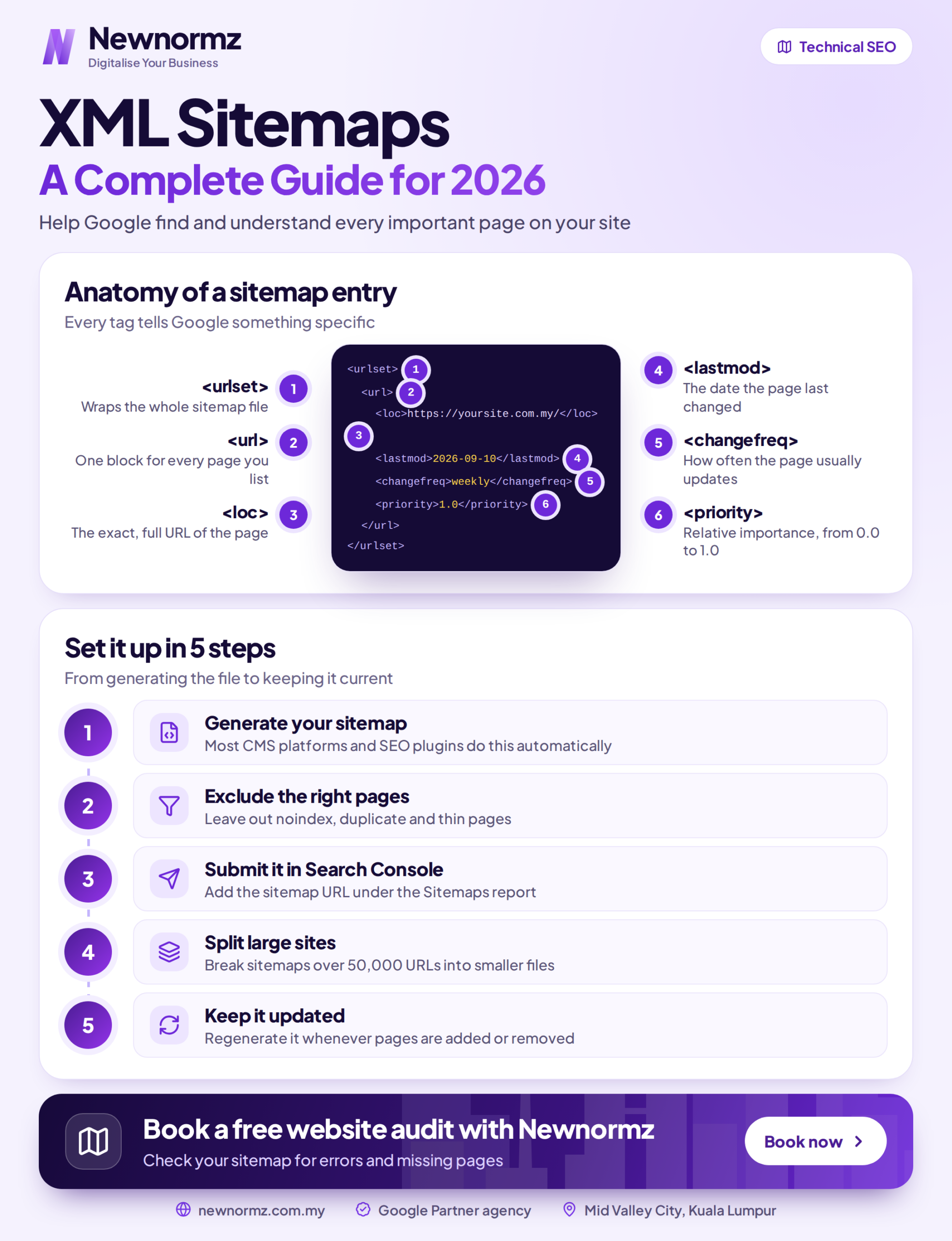
Example: A Simple sitemap.xml File
Here is what a minimal sitemap looks like for a two-page site. Each URL sits inside its own <url> entry, with the location, the date it was last modified, how often it changes, and a priority relative to your other pages:
<?xml version="1.0" encoding="UTF-8"?>
<urlset xmlns="http://www.sitemaps.org/schemas/sitemap/0.9">
  <url>
    <loc>https://example.com.my/</loc>
    <lastmod>2026-07-01</lastmod>
    <changefreq>weekly</changefreq>
    <priority>1.0</priority>
  </url>
  <url>
    <loc>https://example.com.my/about/</loc>
    <lastmod>2026-06-15</lastmod>
    <changefreq>monthly</changefreq>
    <priority>0.8</priority>
  </url>
</urlset>
You will almost never write this by hand. Your plugin generates and maintains it. Your job is to submit that URL in Search Console and periodically confirm it still lists only clean, indexable pages.
Common Mistakes to Avoid
| Mistake | Why it matters |
|---|---|
| Listing non-indexable pages | Noindex, blocked, or redirected URLs confuse crawlers about what actually matters on the site. |
| Including error pages | Dead 404 or 5xx URLs waste crawl budget and weaken trust in the file overall. |
| Exceeding the limits silently | Past 50,000 URLs or 50MB, the file needs splitting into multiple sitemaps under one index file. |
| Assuming a sitemap forces indexing | It aids discovery only. Google still decides what actually gets indexed and ranked. |
The Sitemap Checklist
- It lists only canonical, indexable pages.
- It excludes redirects, error pages, and blocked or thin pages.
- It stays within 50,000 URLs and 50MB per file (or uses an index if larger).
- It is referenced in robots.txt.
- It is submitted in Google Search Console.
- It updates automatically whenever you add or remove pages.
Frequently Asked Questions
What is an XML sitemap used for?
It lists the important pages on your website so search engines can find, crawl and index them more efficiently. It works like a roadmap that points to which URLs matter, which helps most on large, new, or poorly linked sites.
Does an XML sitemap improve rankings?
Not directly. It helps Google discover and index your pages, which is a prerequisite for ranking, but the ranking itself still depends on content quality, relevance, links, and technical health.
How many URLs can a sitemap contain?
Up to 50,000 URLs, and the file must stay under 50MB uncompressed. Bigger sites split URLs across several sitemaps and list them in a sitemap index file, which then gets submitted to Google.
Where do I find my sitemap?
Usually at yoursite.com/sitemap.xml or a similar path your platform generates. On WordPress with Rank Math or Yoast, it is created automatically, and you can locate and submit it through the Sitemaps report in Google Search Console.
Should every page on my site be in the sitemap?
No. Include only canonical, indexable pages you actually want ranked, and leave out redirects, error pages, thin content, and anything blocked by robots.txt or noindex. A focused sitemap of your best pages beats a bloated one every time.
Not sure Google can even find your pages?
Get a free audit that checks your sitemap, indexing and crawl health.
Newnormz has run SEO campaigns across F&B, healthcare, ecommerce, and local services in Malaysia, backed by a performance guarantee of 70 percent of targeted keywords on Google’s first page.
30 minutes, no obligation, and you will know exactly which pages Google is missing.

Bryan Tan is an SEO Specialist and CEO at Newnormz, helping hundreds of businesses achieve first-page rankings on Google. With a passion for driving organic growth, Bryan blends innovative strategies with hands-on experience to optimize websites for maximum visibility. Always at the forefront of the latest SEO insights and trends, he consistently adapts to the evolving digital landscape.