WordPress SEO means setting up your site so Google can crawl it, index it, and rank it, then giving every page the on-page signals it needs to win the click. For a Malaysian site that means four things, done in this order: set your permalinks to Post name, install one SEO plugin (Rank Math or Yoast, never both), submit your sitemap in Google Search Console, and write keyword-first titles and meta descriptions while your hosting keeps load times under three seconds. None of it needs a developer. It needs about an hour of careful settings changes, done properly, before you publish anything.
A Simple Way to Think About It
Your Website Is a New Shop, Not Just a Web Page
🚪 The Shop With No Sign
A new shop opens in a back lane with no signboard and no listing anywhere online. People walk past it every single day and never know it’s there.
📍 The Shop On The Map
A shop with a bright signboard on the main road, registered on every map app in the area. Someone searching nearby finds it in seconds and walks straight in.
Everything below is how you move your WordPress site from the first shop to the second, starting with the settings Google reads before it reads a single word of your content.
Why WordPress SEO Deserves an Hour of Your Time
This guide is for Malaysian business owners, marketers, and freelancers who can log into wp-admin and want organic traffic without hiring a technical team. No coding required, just the right settings applied in the right order.
WordPress powers roughly 43.5% of all websites on the internet, so most of your competitors in Malaysia are running the exact same platform you are. The theme you pick and the number of plugins installed don’t decide who wins. The sites that rank are the ones that got the basics right before they started publishing, not the ones with the prettiest homepage.
Step 1: Fix the Three Foundations Before You Publish Anything
Three settings decide whether Google can even understand your site, and all three take about ten minutes to fix.
First, permalinks. Go to Settings, then Permalinks, and choose Post name. This turns an address like yoursite.com/?p=123 into yoursite.com/wordpress-seo-guide/, which is easier for a visitor to read and easier for Google to match against a search query.
Second, check that you aren’t accidentally blocking search engines. Under Settings, then Reading, make sure “Discourage search engines from indexing this site” is unchecked. This one checkbox has quietly killed more Malaysian site launches than any algorithm update, because it tells Google not to index a single page.
Third, pick one canonical version of your domain (www or non-www) on HTTPS, and stick to it. Running both versions live splits your authority between two addresses Google treats as separate sites.
Step 2: Install One SEO Plugin, Set It Up Once
You need exactly one SEO plugin, and there are really only two serious choices: Rank Math or Yoast SEO.
Yoast SEO has over 13 million active installations, and Rank Math has passed 4 million, so both are proven at scale. Rank Math ships more features for free, including schema markup and redirects. Yoast has a gentler learning curve. Pick one and never run both: two plugins writing competing title tags and sitemaps will corrupt your output and confuse Google about which version is correct.
Once installed, the plugin controls four things that used to require custom code: title templates, meta descriptions, your XML sitemap, and schema markup. Run the setup wizard, connect Google Search Console, and tell it to index your posts and pages. Leave thin, unoptimised pages like tag archives out of the index.
| WordPress SEO Task | Where It Lives | Recommended Setting |
|---|---|---|
| Permalink structure | Settings > Permalinks | Post name |
| Search engine visibility | Settings > Reading | Indexing enabled (box unchecked) |
| SEO plugin | Plugins | Rank Math or Yoast, one only |
| XML sitemap | SEO plugin settings | Enabled at /sitemap_index.xml |
| Title and meta description length | Per post, SEO plugin | Under 60 characters, 140 to 160 characters |
Step 3: On-Page SEO That Turns Rankings Into Clicks
Ranking is only half the job. The other half is earning the click, and that’s decided by what shows up in the search result itself.
For every page, set one focus keyword and work it naturally into the SEO title, the meta description, the URL slug, the first paragraph, and at least one H2 heading. The title tag is the blue link a searcher actually clicks, so it’s the most valuable piece of real estate on the page.
This isn’t a small detail. The top three organic results capture 68.7% of all clicks, and the number one result alone averages a 27.6% click-through rate. A precise, benefit-led title tag is what turns a ranking into a visitor. Add internal links from every new post to related pages, such as your SEO service pages, and give every image real alt text instead of leaving it blank.
Step 4: Speed, Indexing and Technical Health
Speed is a ranking factor, not just a nice-to-have. 53% of mobile visitors abandon a site that takes longer than three seconds to load, and the damage compounds from there: the probability of a bounce increases by 32% as load time goes from one second to three. On WordPress, the fastest wins are a caching plugin, an image optimiser, and hosting physically close to your audience, which for a Malaysian site usually means a Singapore or regional data centre rather than a cheap US shared server.
Don’t wait for Google to stumble onto your new pages. Submit your sitemap in Search Console and use URL Inspection to request indexing for anything important you’ve just published. This matters even more if you’re chasing local SEO results, where Google needs to match your page to a nearby search fast.
A Worked Example: Setting Up a Page for “Aircond Service Petaling Jaya”
Here’s what this looks like in practice for a page targeting aircond service Petaling Jaya, using Rank Math as the plugin.
| Step | What You Do |
|---|---|
| Set the permalink | Settings > Permalinks > Post name, so the page lives at yoursite.com.my/aircond-service-petaling-jaya/ |
| Set a title template | %title% %sep% %sitename% renders as “Aircond Service Petaling Jaya | CoolAir Malaysia” |
| Write the SEO title | “Aircond Service Petaling Jaya | Same-Day Booking” (55 characters) |
| Write the meta description | “Fast, licensed aircond service in Petaling Jaya. Same-day booking, transparent pricing, all major brands. Get a free quote today.” (around 140 characters) |
| Submit the sitemap | Search Console > Sitemaps > enter sitemap_index.xml > Submit |
Once submitted, Google has a live map of every page on the site and typically crawls new content within days rather than weeks.
Common Mistakes to Avoid
| Mistake | Why It Costs You |
|---|---|
| Leaving “Discourage search engines” ticked | Blocks indexing entirely, the most common launch-day disaster |
| Running two SEO plugins | Duplicate title tags and conflicting sitemaps confuse Google |
| Changing permalinks after publishing | Every old URL becomes a broken link unless you set up redirects |
| Ignoring page speed | A slow theme or unoptimised images can cost you more than half your mobile visitors |
| Writing titles for keywords, not humans | Keyword stuffing kills the click-through rate that actually drives traffic |
| Never submitting a sitemap | You leave Google to guess which pages matter and how often to recrawl them |
The WordPress SEO Checklist
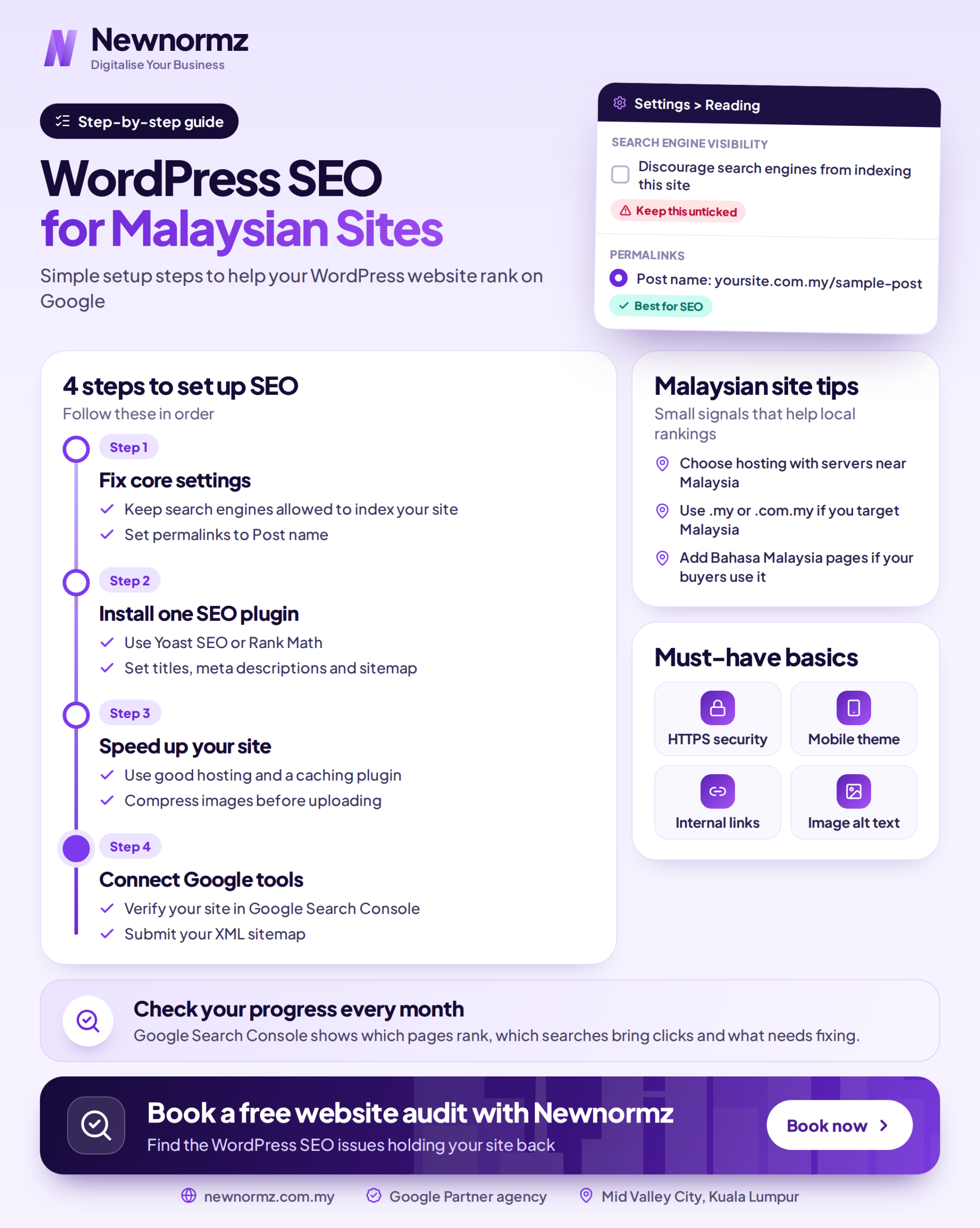
- Permalinks set to Post name, saved before you publish anything.
- Search engine visibility enabled in Settings, then Reading.
- One SEO plugin installed, with its setup wizard completed.
- Title templates configured, keyword-first, brand appended, under 60 characters.
- XML sitemap submitted at /sitemap_index.xml in Google Search Console.
- Every page has a unique SEO title, a 140 to 160 character meta description, and a focus keyword.
- Images optimised, with alt text, compression, and a caching plugin active.
- Internal links added from every new post to relevant service and blog pages.
Frequently Asked Questions
Do I need an SEO plugin for WordPress SEO?
Yes, practically speaking. WordPress handles basics like permalinks natively, but a plugin such as Rank Math or Yoast manages title tags, meta descriptions, XML sitemaps, and schema markup from one dashboard. Doing that manually with code is possible but slow and unnecessary for almost any Malaysian business site.
Which is better, Rank Math or Yoast?
Both are solid and either will rank your site well. Rank Math offers more free features, including built-in schema and redirects. Yoast has a gentler learning curve and a huge support base with over 13 million installs. Choose one, learn it properly, and never run both.
How long does WordPress SEO take to work in Malaysia?
Expect three to six months for meaningful movement on competitive Malaysian keywords. Technical fixes like speed and indexing can show results within weeks, but ranking gains depend on content quality, backlinks, and competition. No agency, including Newnormz, can guarantee a specific position, since Google itself has said that isn’t possible.
What permalink structure is best for SEO?
Post name is the clear winner. It produces short, readable URLs containing your keyword, such as yoursite.com.my/wordpress-seo/. Avoid date-based or numeric structures, which add clutter and offer no keyword signal. Set this before publishing content, since changing permalinks later breaks existing links unless you carefully configure redirects for every page.
How do I submit my WordPress sitemap to Google?
Verify your site in Google Search Console, open the Sitemaps report, and enter sitemap_index.xml as the path. Your SEO plugin generates this file automatically. Once submitted, Google uses it to discover and crawl new pages faster, often within days rather than weeks.
Does page speed really affect WordPress rankings?
Yes. Speed is a confirmed Google ranking signal and a major factor in whether a visitor stays on your page at all. More than half of mobile users leave a site that takes over three seconds to load. On WordPress, caching, image optimisation, and quality regional hosting are the highest-impact fixes for Malaysian sites chasing better rankings.
Can I do WordPress SEO without paying for tools?
Yes. The free versions of Rank Math or Yoast, plus Google Search Console and Google Analytics, cover the essentials for most sites. Paid tools help with keyword research at scale, but you can rank a small Malaysian business site on free tools and consistent, disciplined on-page work.
Not sure your WordPress site is set up right?
Get a Free WordPress SEO Health Check
Newnormz has run SEO campaigns across F&B, healthcare, ecommerce, and local services in Malaysia, backed by a performance guarantee of 70 percent of targeted keywords on Google’s first page.
30 minutes, no obligation, just a clear list of what’s holding your rankings back.

Bryan Tan is an SEO Specialist and CEO at Newnormz, helping hundreds of businesses achieve first-page rankings on Google. With a passion for driving organic growth, Bryan blends innovative strategies with hands-on experience to optimize websites for maximum visibility. Always at the forefront of the latest SEO insights and trends, he consistently adapts to the evolving digital landscape.