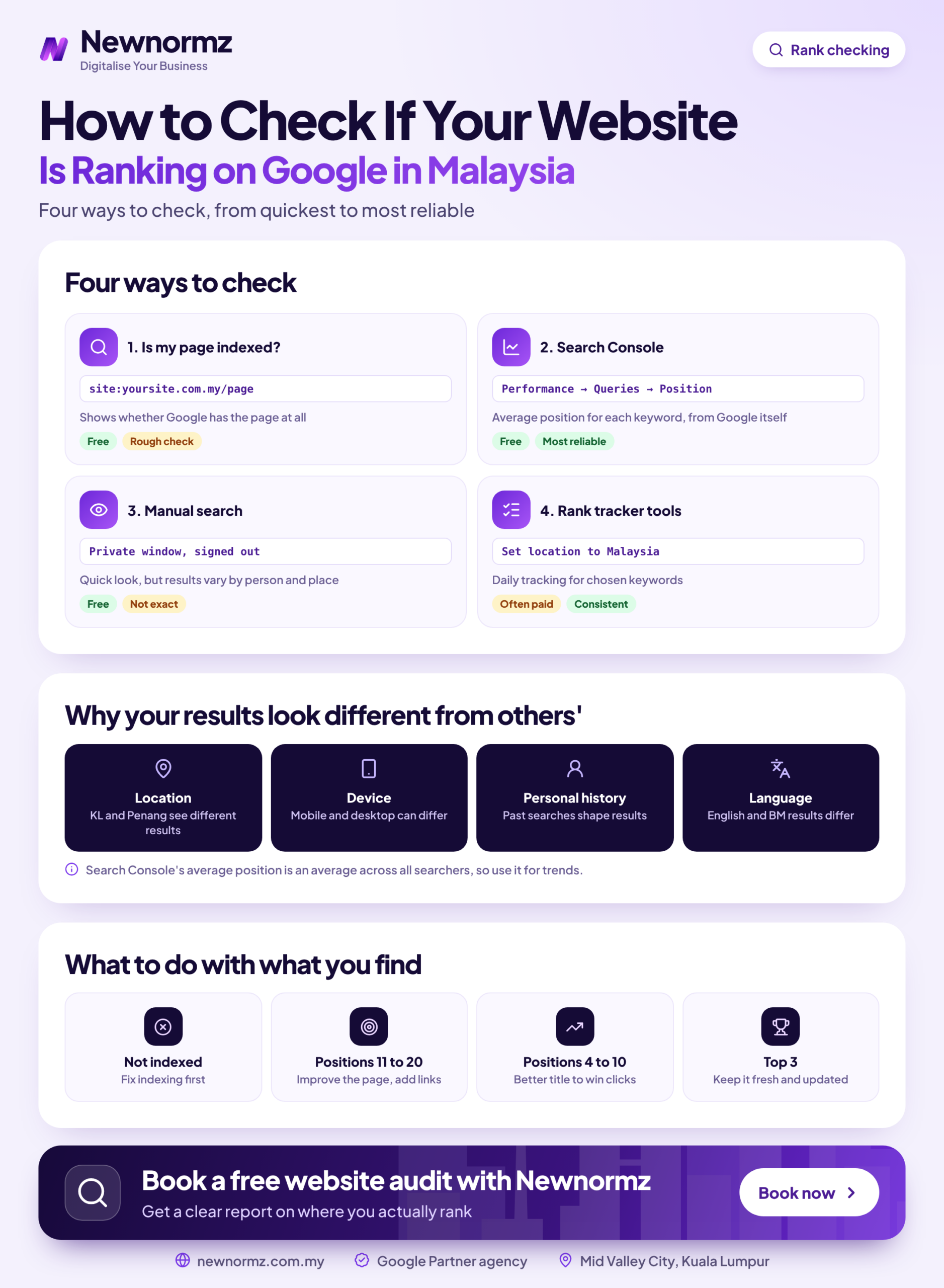
One Google search from your own phone tells you very little, because your website has no single Google ranking in Malaysia. Position shifts with location, device and search language. To check Google rankings Malaysia customers really see, take a baseline from Search Console, spot-check the live results in a private window, and record both in a simple sheet.
This guide is for Malaysian business owners and marketing managers who want a baseline and a tracking sheet in about 30 minutes, using free tools only.
Before You Check: What You Need and Why One Search Proves Nothing
Check website ranking on Google from Mid Valley and a colleague in Penang may see a different order. Switch from desktop to mobile, or from “klinik gigi” to “dental clinic”, and the results can change again. None of these results is the “true” one. Each is one reading from one situation.
That is why this routine relies on several readings. It focuses on Google because Statcounter puts Google’s share of Malaysian search at roughly 93 to 96%, so other search engines can wait.
What to have ready
- ✓Access to Google Search Console for your website
- ✓A list of 10 to 20 keywords that can bring in revenue
- ✓A blank Google Sheets file
- ✓A mobile phone for the live checks
If your site launched recently, Search Console may show little or nothing yet. In that case, the guide to ranking a brand new website is the better place to start.
Check Google Rankings in Malaysia in 7 Steps
These steps show you how to see your website position on Google from two angles: what Google recorded over 28 days, and what a searcher sees right now. To fit the first sitting into 30 minutes, pull Search Console data for your whole list but live-check only your five most important keywords.
Phase 1: Get Your Baseline From Search Console
Choose 10 to 20 keywords that bring enquiries
Include the Bahasa Malaysia and Chinese versions your customers really type, and ask your sales team or check your WhatsApp enquiries for the wording. A defined set beats one vanity term. Sunway TCM Centre reached page 1 for 80% of its target keywords within 4 months, across terms such as “TCM Malaysia”, “Acupuncture KL” and “Best TCM in Klang Valley”.
Confirm each target page is indexed
Search Google for site:yourdomain.com/your-page for a quick look. Then paste the full address into the URL Inspection tool at the top of Search Console, which gives a firmer answer. A page that isn’t indexed can’t rank, so fix this before reading any position data.
Check keyword ranking in Search Console
Open the Performance report and turn on Average position. Set the date range to 28 days, add a Country filter for Malaysia, and read the Queries tab. Without the country filter, overseas searches get mixed into your number.
Phase 2: Spot-Check the Live Results Properly
Split the same data by mobile and desktop
Click a query, then open the Devices tab to compare its position on each device. If you rank 4 on desktop and 11 on mobile, a desktop-only report would hide a real problem. Note the gap, then do your live checks on the device that matters most to your customers.
Search logged out in a private window
Run the search, then add &gl=my to the end of the results page address to ask for Malaysian results. Private browsing removes your signed-in history, but it does not remove your location. An incognito Google ranking check from Mid Valley still shows a view shaped by being in or near Mid Valley.
Record your position and what sits above it
Count the organic results down to your listing. Then note any ads, local pack or Google AI Overviews above you, because position 3 can still sit below the fold on mobile. A ranking that nobody scrolls down to won’t bring in many enquiries.
Phase 3: Record It So You Can Track the Trend
Log everything, then repeat monthly
This is how to track SEO rankings without paying for software. Add one row per keyword on each check, keep the old rows, and track keyword rankings monthly on roughly the same date. The trend is what you are after, and it only appears from the second or third round.
Copy these column headings into your sheet. The rows below are illustrative.
| Keyword | Language | Page | Average position | Live position | Above you | Date |
|---|---|---|---|---|---|---|
| klinik gigi pj | BM | /dental-clinic-pj/ | 3.2 | 3 | Local pack | 1 Nov |
| dental clinic pj | English | /dental-clinic-pj/ | 24.6 | 25 | Ads, local pack | 1 Nov |
How to Check It Worked: Reading the Numbers Without Fooling Yourself
Your Search Console and live numbers will rarely match, and they don’t need to. One is an average across many real searches, and the other is a single snapshot. The routine is working if both tell a broadly similar story for each keyword, and if you can explain any big gap, usually through device, language or location.
What the Average Position Google Search Console Reports Really Hides
Average position in Google Search Console is weighted by impressions, so the searches shown most often pull the number hardest. The data also lags by about two days, so today’s change won’t appear today.
Here is an illustrative example. A page shows an average position of 8.4 across 1,000 impressions, which looks like the bottom of page 1. Split it by query and you find a BM keyword at position 3 with 755 impressions, and an English keyword at position 25 with 245. The page isn’t really ranking 8th for anything: it is strong in one language and on page 3 in the other.
Malaysia note
Check English, Bahasa Malaysia and Chinese queries separately, because each is its own set of results with its own competitors. It is also why Newnormz strategists work across all three languages. Add a language column to your sheet, and never let one blended number stand in for all of them.
Why Weekly Swings Shouldn’t Drive Your Decisions
The timeline Newnormz gives clients is technical fixes in weeks 2 to 6, first ranking movement at day 60 to 90, and traffic and lead growth in months 4 to 8. Against that timescale, moving from 9 to 11 for a week means very little. Judge the trend across several months, and pair it with the metrics to track beyond rankings, because a ranking only matters if it brings enquiries.
The exception is a sudden fall across many keywords at once, especially straight after a site change. Your last recorded baseline then shows what you lost and which pages were affected.
Client example
My Lovely Baby: 100% of lost traffic recovered
Problem: A site upgrade broke URLs and traffic dropped overnight.
What we did: Ran a migration audit and recovery.
Result: 100% of lost traffic recovered, with 85% of target keywords on page 1 within 9 months.
If your sheet shows a drop like this, follow this framework for recovering from a ranking drop before changing anything else on the site.
Google Rank Checker Malaysia Options: When Free Is Enough and When to Pay
Most keyword position checker tools fall into one of three groups. A free Google rank checker website can also give you a quick snapshot, but you often can’t tell what location it searched from, so don’t use it as your baseline.
| Option | Cost type | Location accuracy | Effort | Best use |
|---|---|---|---|---|
| Google Search Console | Free | Country level, with no city view | Low | Your baseline, based on real impressions |
| Manual private-window checks | Free, but uses staff time | Tied to where you are searching from | High | Seeing what sits above you on priority keywords |
| Ahrefs or Semrush | Paid subscription | Lets you check Google ranking by location that you set | Low after setup | Large keyword sets, several languages or branches |
Free has a hidden cost, which is staff time. As an illustration, assume RM50 per staff hour (an assumption, so use your own figure) and 3 minutes to check one keyword live, every week:
- 20 keywords x 3 minutes = 1 hour a week, or about RM200 a month.
- 60 keywords x 3 minutes = 3 hours a week, or about RM650 a month.
Checking monthly instead of weekly cuts those figures sharply, and for most small sites it is enough. Compare the higher figure with a tracker’s current subscription price, and read our shortlist of SEO ranking tools worth using before you commit.
Your Rankings Look Wrong? Common Problems and Fixes
✗ Googling yourself repeatedly from the office
Your office location and browsing habits can both shape what you see, so you may be judging your whole market from a single desk. It can lead you to celebrate a ranking your customers never see.
✓ The fix
Treat the Search Console baseline as your main number, and use live checks only to see what surrounds your listing.
✗ Asking “why is my website not showing on Google?” and blaming competition
If the site doesn’t appear for anything, including its own brand name, the cause is often indexing and not competition. More content won’t help until this is fixed.
✓ The fix
Run the URL Inspection tool, then look for noindex tags left over from the staging site. This list of technical issues that block rankings covers the other usual causes.
✗ Tracking only English keywords
Reports are often written in English, so the keyword list ends up in English too. You then miss Bahasa Malaysia search and Chinese queries, which may be where your buyers are or where a competitor is going unchallenged.
✓ The fix
Add the BM and Chinese terms your customers use, and give each its own row in the sheet.
✗ Confusing your Maps position with your organic position
Appearing in the local pack doesn’t mean your website ranks in the organic results below it. The two can move independently, and blending them makes the sheet impossible to read.
✓ The fix
Track them in separate columns, and read up on how Google Maps rankings work if local searches drive your enquiries.
Diagnosing these problems is manageable for 10 keywords, but it takes real time across three languages and several branches. If you would rather hand it over, that is the point to bring in an SEO agency in Malaysia.
Got a ranking report you don’t quite trust? Ask us for a second opinion on it.
Check Google Rankings Malaysia Questions Business Owners Ask
How do I check my website’s Google ranking for free in Malaysia?
Use the Performance report in Google Search Console with the Country filter set to Malaysia, then read average position in the Queries tab. Spot-check your priority keywords in a private window with &gl=my added to the results address, and log both numbers in Google Sheets.
Why does my website rank differently on my phone and my colleague’s phone?
Your results differ because Google takes factors such as location, language settings and search history into account. For local-intent searches, even a short distance can change what appears, so neither phone is showing the “real” ranking.
Does incognito mode show my true Google ranking?
No, incognito mode only gives you a cleaner view. It stops your signed-in history from shaping the results, but Google can still use your location, so treat the result as one snapshot.
How often should I check my Google rankings?
Once a month is enough for most businesses. Rankings shift from week to week, and first movement on a new campaign typically takes 60 to 90 days on the timeline Newnormz gives clients. Check sooner after a site migration or a sudden drop in enquiries.
How can I tell if an agency’s ranking report is honest?
Compare it with your own Search Console data for the same keywords, country and date range. Be wary of any promise of a specific position, because Google has stated publicly that no one can guarantee one. A useful report also separates languages and devices and shows enquiries alongside rankings.
Free SEO audit
Find out where your website really stands on Google in Malaysia
- ✓A review of how your priority keywords perform across English, BM and Chinese
- ✓A check for the indexing and technical issues holding your pages back
- ✓A straight read from the team behind 200+ month-to-month SEO accounts, rated 5.0 from 214+ Google reviews

Bryan Tan is an SEO Specialist and CEO at Newnormz, helping hundreds of businesses achieve first-page rankings on Google. With a passion for driving organic growth, Bryan blends innovative strategies with hands-on experience to optimize websites for maximum visibility. Always at the forefront of the latest SEO insights and trends, he consistently adapts to the evolving digital landscape.