Key takeaways
- ✓This Google Business Profile Malaysia setup guide takes you from no listing to a live, verified and complete profile.
- ✓Allow 60 to 90 minutes of work, plus waiting time for verification. The profile itself is free.
- ✓Malaysian listings usually go wrong on local details: mixed address formats, missing public holiday hours, WhatsApp enquiries and customers searching in three languages.
- ✓Good setup makes you eligible and competitive for Google Maps results, but it cannot guarantee a position. Nobody can.
What to Prepare Before You Start Your Listing
Learning how to create Google Business Profile listings is the easy part. Most delays come from missing details, or from a listing set up under the wrong person’s login, so gather everything below before you open the dashboard.
Have these ready
- ✓A Google account on a company email, not a staff member’s personal Gmail
- ✓Your exact business name as customers see it on your signage
- ✓One standard address format, written down so you can copy it
- ✓A phone number that customers can actually get through on
- ✓Website or landing page URL, plus your regular opening hours
- ✓5 to 10 real photos of your premises, team or work
- ✓Proof of business for verification, such as your SSM registration and signage
Shopfront or Service Area Business: Decide This First
Your answer changes what you enter in Step 4. Service area business Google Maps listings show the region they cover instead of a street address, and Google’s help pages allow up to 20 service areas, within about two hours’ drive of your base.
Google Business Profile Malaysia Setup: 8 Steps From Zero to Live Listing
The usual search is “add business to Google Maps Malaysia”, and these eight steps do exactly that, while also making your business appear on Google Search. That matters because Google holds roughly 93 to 96% of Malaysian search, according to Statcounter.
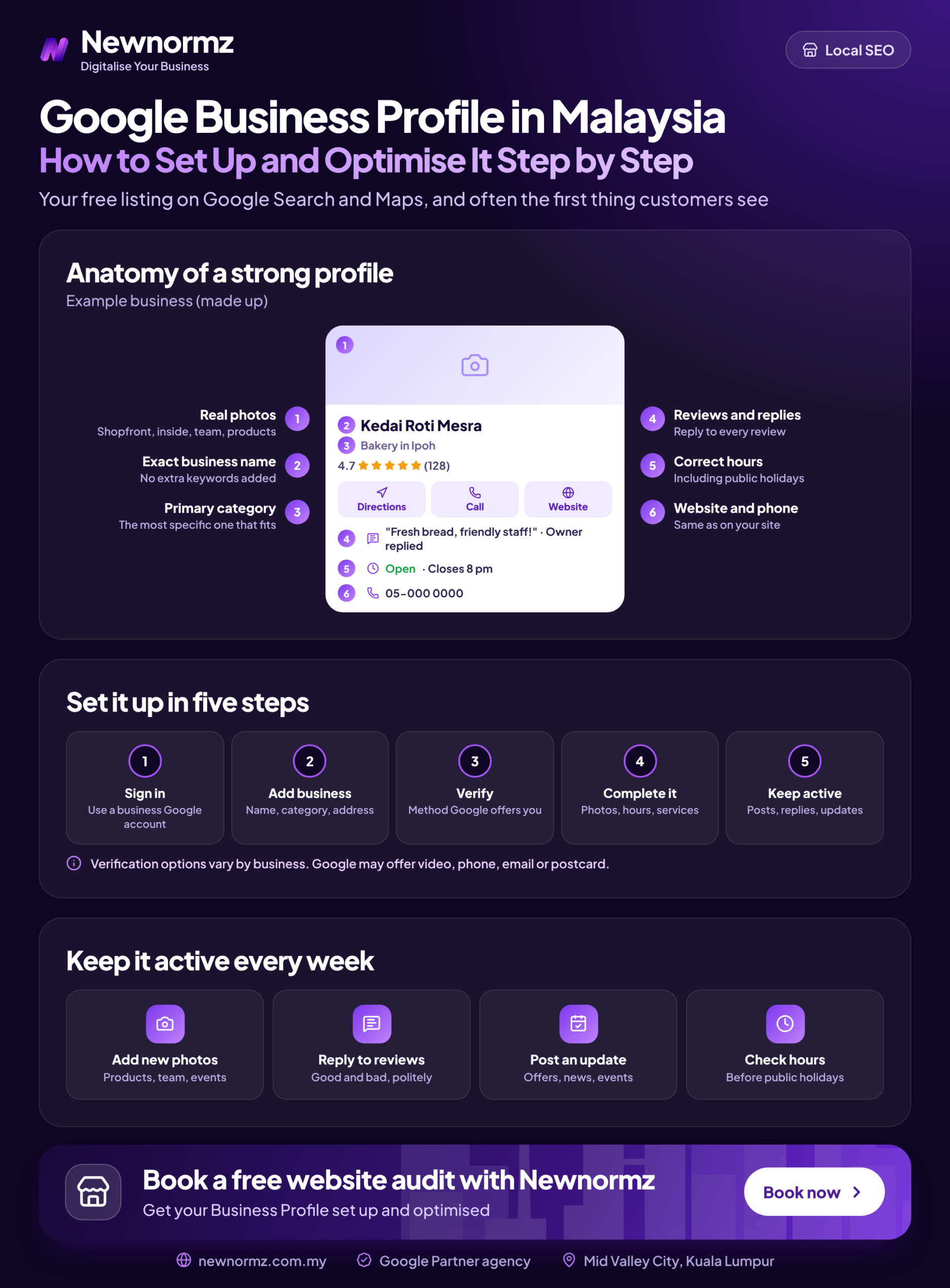
Phase 1: Create and Verify the Profile (Steps 1 to 4)
Any guide titled Google My Business setup Malaysia describes this same process, because Google My Business is simply the old name.
Check Google Maps for an existing listing
Search your business name and address. If a listing exists, claim it or request access rather than creating a second one, because duplicates cause trouble later.
Create the profile with your real name
Go to business.google.com while signed in to the company account. Enter the name you trade under, with no keywords or suburb added.
Choose your primary category
Of all the Google Business Profile categories you set, the primary one is the most consequential choice here. Look up three or four competitors on Google Maps, note the label shown near their name, and pick the closest match to your main service. Add extra categories only for work you really do.
Enter the address and move the pin
Paste your standard address, then drag the pin to the actual entrance. Check this closely for shoplots in newer townships, where the map can lag behind construction, and for mall units, where the default pin may sit at the wrong side of the building.
Next comes Google Business Profile verification. Google chooses which methods to offer you, which may include video, phone or text, email or postcard, so you can’t always pick your preferred one.
If you get video, record one continuous clip showing your signage, the premises and proof of management, such as keys to the door, your point-of-sale system or business documents.
Phase 2: Complete What Customers See (Steps 5 to 8)
Guides on how to optimize Google Business Profile listings often jump straight to tricks. Finishing these four steps properly comes first, and each one affects whether a customer contacts you.
Set regular and special hours
Your Google Business Profile hours should cover more than the normal week. Add special hours for Hari Raya, Chinese New Year, Deepavali and your state’s public holidays, since Thaipusam, for example, is a holiday in some states and not others. Hari Raya dates are confirmed late, so recheck them that week.
Write the description, then add services and attributes
A Google Business Profile description has a 750-character limit and cannot include links or promotions. Say what you do, where you do it and who it suits, in plain language.
List each service separately, then work through which GBP attributes to select for your type of business.
Upload real photos
Cover the exterior, interior, team and finished work. Skip stock images. A clear shot of your shopfront from the road helps someone find you on a busy row of shoplots.
Add every contact path
Enter your phone number, website and booking link, plus WhatsApp if your dashboard offers it. Google’s old chat feature was retired in 2024, so ignore older guides that recommend it. If you use your website here, make sure its name, address and phone match the profile, ideally in LocalBusiness schema too.
Selling specific items or packages? Once the core details are finished, look at adding products to your profile.
Malaysia note
NAP consistency (name, address, phone) starts with one address format, copied everywhere. Choose “Jalan” or “Jln”, “Lot” or “No.”, include the unit and level for a Menara or mall, and keep the same postcode. Then check that your Waze listing matches, because Waze is maintained separately and many Malaysian drivers navigate with it.
Our guide on why business listings still matter explains where else that address should appear.
Language Choice for GBP Malaysia: English, BM or Chinese
Your profile has one main description, so write it for your dominant customer language and work in the terms your other customers use.
| Customer base | Description language | Service names | Review replies |
|---|---|---|---|
| Mostly English speakers | English | English, with common BM or Chinese terms where useful | Language of the review |
| Mostly BM speakers | Bahasa Malaysia | BM first, English where customers use it | Language of the review |
| Mostly Chinese speakers | Chinese or English, based on how customers enquire | Both Chinese and English terms | Language of the review |
| Evenly mixed | English, with key local terms worked in | Mixed, one clear term per service | Language of the review |
Here is a worked example. A Puchong renovation contractor with mixed customers lists “House Renovation” in English, then writes in the description: “We handle house renovation (pengubahsuaian rumah, 房屋装修) for homes across Puchong and nearby areas.” That one sentence covers all three groups and still reads naturally. Don’t go further and stuff in every variation.
Healthcare businesses have one more check. Review the advertising rules that apply to you, such as MDC advertising rules, before making any treatment claim in the description.
How to Check It Worked
Once verified, run these checks yourself instead of assuming everything is correct.
Search your exact name
Use a phone on mobile data rather than office Wi-Fi, so you see roughly what a customer sees away from your premises.
Open the listing in Google Maps
Tap call and directions. Check that the phone rings and the route ends at your door.
Test the website link
Confirm it loads on mobile and goes to the right page.
View Performance insights after a few weeks
Track search terms and calls, not views. Views look encouraging but don’t tell you whether anyone wanted to buy.
Not showing on Google Maps at all? Check first that verification finished and that the profile hasn’t been suspended, then search the exact name again. New or edited details can also take time to appear.
To judge whether the listing pays off, try this illustrative example, which is not a client result. If the listing brings 8 extra calls a month, 2 become jobs and each job is worth RM400, that is RM800 a month from a free profile. Replace these figures with your own, and ask new WhatsApp enquiries how they found you, because those conversations won’t all show up in your dashboard.
Google Maps ranking Malaysia-wide comes down to three things. Google’s own documentation names relevance, distance and prominence as the local ranking factors, and distance is outside anyone’s control. Google has also stated publicly that no one can guarantee a specific ranking position, so treat any promise of a top map spot with suspicion.
Common Setup Problems and How to Fix Them
✗ Adding a suburb or keywords to the business name
A name like “Best Aircond Service KL” is tempting, but it breaches Google’s guidelines and risks suspension.
✓ The fix
Use your real business name, exactly as it appears on your signage and documents.
✗ The listing belongs to an ex-staff member or old agency
This often surfaces only when you need to change something, and you can’t edit a listing you don’t control.
✓ The fix
Request access from the listing itself, then move ownership to a company account. Keep at least two people from the business as managers so one resignation can’t lock you out again.
✗ Verification is rejected or stuck
Common causes are missing signage, an address that doesn’t match what’s on the video, or a clip that was cut together.
✓ The fix
Check your signage and address format, make sure the video is one continuous recording, then resubmit.
✗ Paying for or incentivising reviews
Google’s review policy applies to Google reviews Malaysia-wide, so an RM10 voucher for 5 stars breaks it and puts those reviews at risk of removal.
✓ The fix
Ask every real customer by WhatsApp with a direct review link, keeping PDPA in mind for any bulk messaging. Our guide to getting more genuine Google reviews has more ways to ask.
Setup is the one-time part, so if you would rather have the ongoing posts, reviews, citations and tracking handled for you, talk to the team.
What to Do After the First Week: The 20-Minute Monthly Routine
A finished profile still needs light upkeep, because details change and the public can suggest edits to your listing. Put 20 minutes in your calendar once a month.
Your monthly GBP routine
- ✓Add new photos of recent work or premises
- ✓Reply to every review, good or bad
- ✓Check for suggested edits from the public
- ✓Update hours for the next public holiday
- ✓Review your top search terms in Performance insights
With time left over, work through these listing optimisations worth prioritising.
Be realistic about the limits. In a dense area such as Mid Valley or Bangsar, a complete profile alone may not reach the local pack, because reviews, citations and the website all matter.
For a single shop in a less crowded area, the routine above may be all you need, and it costs only your time. Paid local SEO services are a much bigger commitment. Our Growth package, for comparison, is RM4,500/month excluding SST, including local SEO, GBP and 60 local citations, so it only makes sense if the extra jobs would clearly cover that fee.
If your profile is solid but your website is what’s holding you back, that is a separate job. At that point, compare doing the work in-house with hiring an SEO agency in Malaysia, using the numbers from your own Performance insights.
Frequently Asked Questions
Is Google Business Profile free in Malaysia?
Yes, creating and managing a Google Business Profile is free. Anyone charging you is charging for their labour, not for the listing itself. Google Ads is a separate, paid product and isn’t required.
How long does Google Business Profile verification take?
It varies and can take several days, depending on the method Google offers you. Some reviews finish sooner and others run longer, so don’t plan a launch around a fixed date.
Can I set up a Google Business Profile without a shop or office address?
Yes, if you travel to your customers, you can set up a service area business. You still give Google an address during setup, but you hide it from the public and show the areas you cover. This suits aircond servicing, cleaning and renovation businesses.
Can I use a virtual office or coworking address for my Google Business Profile?
No, not if it is a virtual office or an unstaffed coworking desk, because it doesn’t meet Google’s guidelines. Listing one risks failed verification or suspension. If you serve customers at their locations, the service area setup is the safer route.
Can I add WhatsApp to my Google Business Profile?
You can if your dashboard offers the option, as availability varies between profiles. If you don’t see it, list a phone number that also runs WhatsApp, so customers can call or message the same number.
Want a second pair of eyes on your setup? Newnormz manages local SEO and Google Business Profiles for businesses across the Klang Valley, Penang and Johor Bahru, with a 5.0 rating from 214+ Google reviews and strategists working in English, Bahasa Malaysia and Chinese.
Free local SEO audit
Find out what your Google Business Profile setup is still missing
- ✓A review of your profile details and category choice
- ✓A NAP and citation consistency check
- ✓A list of gaps in your review and enquiry tracking

Bryan Tan is an SEO Specialist and CEO at Newnormz, helping hundreds of businesses achieve first-page rankings on Google. With a passion for driving organic growth, Bryan blends innovative strategies with hands-on experience to optimize websites for maximum visibility. Always at the forefront of the latest SEO insights and trends, he consistently adapts to the evolving digital landscape.