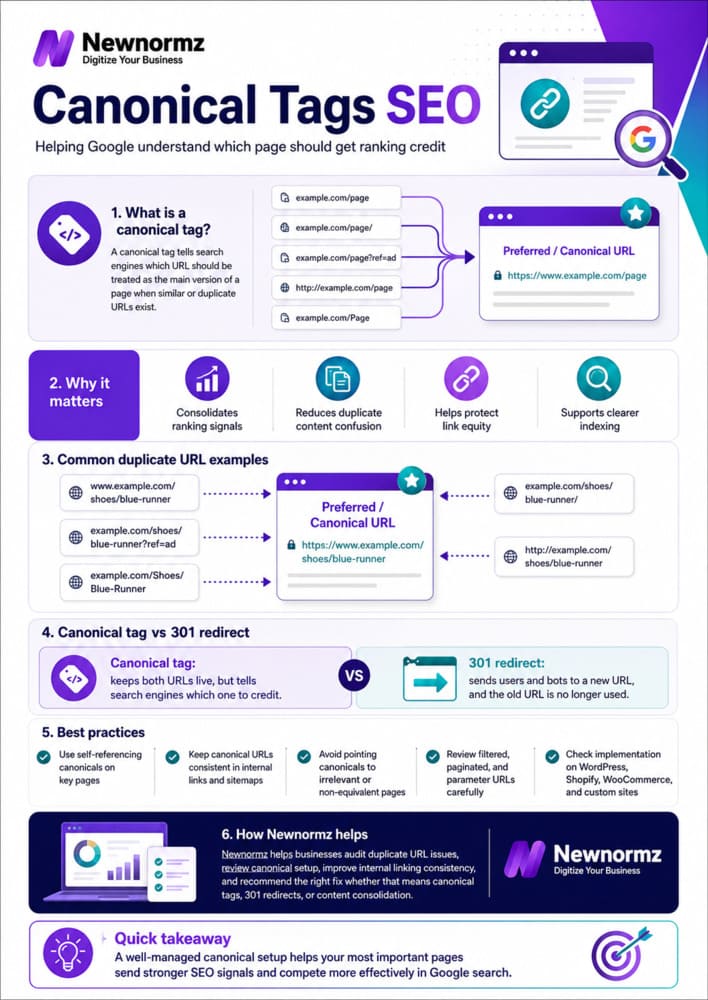
A canonical tag is a line of code that tells Google which version of a page is the “real” one when several URLs show the same or near-identical content. Without it, a site with example.com, www.example.com, example.com/product?color=red, and example.com/product?color=blue all showing the same product page is quietly asking Google to choose between four competitors instead of ranking one strong page. Fixing this is usually a few hours of technical work, and it is one of the highest-leverage, lowest-cost SEO fixes available on most Malaysian websites.
A Simple Way to Think About It
Splitting the Vote
🗳️ Four Candidates, Same Platform
Four almost identical candidates run for the same seat and split the vote between them. None gets enough to win, even though together they had more support than anyone else on the ballot.
🏆 One Candidate, Full Support
The other three step aside and throw their support behind one candidate. Every vote counts toward the same person, and that person wins.
Your website’s duplicate URLs work the same way. Below, we break down exactly where the splitting happens and how a canonical tag gets everyone voting for the same page.
Where Duplicate URLs Actually Come From
Most site owners never deliberately create duplicate content. It happens as a side effect of how websites are built. On a typical Malaysian ecommerce or business site, the same page is often reachable through several different URLs without anyone noticing:
- www vs non-www: example.com and www.example.com serving identical content
- HTTP vs HTTPS: old links or redirects that leave both versions live
- Trailing slashes: example.com/services and example.com/services/ treated as two separate URLs
- Filter and sort parameters: a WooCommerce or Shopify store generating example.com/shop?color=red&size=m for every filter combination
- Pagination and session IDs: ?page=2, ?sessionid=xxxx, or tracking parameters appended by ad platforms
- Printer-friendly or AMP versions: a second, lighter copy of the same page
Each of these is a technically separate URL as far as Google is concerned, even though a human visitor sees the same page. If none of them carries a canonical tag pointing to one preferred version, Google has to guess which one to treat as the “main” page, and it often splits ranking signals across all of them instead of consolidating behind one.
How a Canonical Tag Actually Works
The tag itself is simple. It sits in the <head> of a page’s HTML and looks like this:
<link rel="canonical" href="https://www.example.com/services/seo/" />
Every page on your site, including the preferred version itself, should carry this tag pointing to the one URL you want indexed and ranked. When Google crawls example.com/services/seo, example.com/services/seo/, and https://example.com/services/seo, and all three carry a canonical tag pointing to https://www.example.com/services/seo/, Google consolidates whatever ranking signal each version picked up (links, crawl history, engagement) into that single URL.
One honest caveat worth knowing: Google’s own documentation is clear that a canonical tag is a strong hint, not a binding instruction. Google can and sometimes does choose a different canonical URL than the one you specify, usually when other signals (like where most external links point) disagree with your tag. Getting the rest of your site’s signals consistent with the canonical you choose, such as internal links and sitemap entries, makes Google far more likely to respect it.
What It Costs You When Canonicals Are Missing or Wrong
A missing canonical tag rarely triggers an obvious penalty. It’s a quieter problem: your ranking potential gets divided instead of concentrated. If your product page picks up backlinks and internal links spread across four URL variants instead of one, none of those variants builds enough authority to rank on page one, even though the combined authority might have been enough. Google can also decide to index the “wrong” variant on its own, sometimes a parameter-heavy URL that looks messy in search results and converts worse than your clean version would have.
There’s a crawl budget cost too. Every duplicate URL Google crawls is time and resources not spent crawling your genuinely new or updated pages. On larger sites, especially ecommerce catalogues with heavy filtering, this can meaningfully slow down how fast new content gets discovered and indexed.
Canonical Mistakes We See Most Often on Malaysian Sites
| Mistake | Why It Hurts |
|---|---|
| No self-referencing canonical on the main page itself | Leaves Google to guess whether this page or a variant is the preferred one |
| Every filtered product URL canonicalized to the homepage | Tells Google the filtered pages aren’t worth indexing at all, even when some deserve to rank |
| Canonical tag points to a URL that redirects or 404s | Google ignores broken canonical chains and picks its own preferred URL instead |
| Canonical set to the desktop URL but the mobile version has different content | Suppresses mobile-specific content from ranking on a mobile-first index |
| Plugin-generated duplicate canonicals conflicting with each other | Common on WordPress sites running an SEO plugin plus theme-level tags fighting for the same slot |
How to Audit and Fix Canonical Tags on Your Own Site
1. Pull a full URL list
Use a crawler (Screaming Frog is the standard tool) to crawl your entire site and export every indexable URL along with its current canonical tag, if any.
2. Group near-duplicate URLs
Sort by page title or content similarity to spot pages that are really the same content under different URLs: parameter variants, www/non-www pairs, trailing slash pairs.
3. Decide your preferred version
Pick one URL format for the whole site (HTTPS, with or without www, with or without trailing slash) and stay consistent. This becomes the canonical target everywhere.
4. Set self-referencing canonicals sitewide
Every indexable page should have a canonical tag pointing to itself, in your chosen URL format. Most WordPress SEO plugins, including the tools our SEO service configures for clients, handle this automatically once set up correctly.
5. Check Google Search Console’s Page Indexing report
The “Duplicate, Google chose different canonical than user” status tells you exactly where Google disagreed with your tag, so you can fix the underlying signal (usually internal links or redirects) rather than the tag alone.
Frequently Asked Questions
Is a canonical tag the same as a 301 redirect?
No. A 301 redirect sends both users and Google to a different URL, and the old one stops existing as a live page. A canonical tag keeps both URLs live and accessible, but tells search engines which one to index and rank. Use redirects when a URL should genuinely disappear, and canonicals when you need multiple accessible versions of the same content (like filter combinations on a store).
Can I canonicalize a page to a completely different page?
Only if the content is genuinely near-duplicate. Canonicalizing two unrelated pages together confuses Google and can cause it to ignore the tag entirely. The canonical target should be a page a user could land on and get essentially the same content they were expecting.
Do canonical tags affect how fast a site ranks?
Indirectly, yes. Consolidating signals onto one URL instead of splitting them across several gives that page a better chance of accumulating enough authority to rank. It’s not an instant fix, but it removes a self-inflicted obstacle that was working against every other SEO effort on the page.
Will Google always respect my canonical tag?
Not always. Google treats it as a strong signal, not a command, and can choose a different URL if other signals point elsewhere. The fix is consistency: make sure your internal links, sitemap, and redirects all agree with the canonical you’ve set, so there’s no conflicting signal for Google to weigh against it.
Not sure if duplicate URLs are costing you rankings?
Get a Free Technical SEO Audit for Your Website
Newnormz has run SEO campaigns across F&B, healthcare, ecommerce, and local services in Malaysia, backed by a performance guarantee of 70 percent of targeted keywords on Google’s first page.
30 minutes, no obligation, and you’ll walk away knowing exactly which URLs are splitting your rankings.

Bryan Tan is an SEO Specialist and CEO at Newnormz, helping hundreds of businesses achieve first-page rankings on Google. With a passion for driving organic growth, Bryan blends innovative strategies with hands-on experience to optimize websites for maximum visibility. Always at the forefront of the latest SEO insights and trends, he consistently adapts to the evolving digital landscape.